TDL
A* 기반 주행 실습(easy map)
A* 기반 주행 실습(hard map)
객체 검출 시 비상정지 기능 추가하기(robotflow + yolo)
import rclpy
from rclpy.node import Node
from rclpy.qos import QoSProfile, ReliabilityPolicy, DurabilityPolicy, HistoryPolicy
from nav_msgs.msg import OccupancyGrid
import numpy as np


class MapReader(Node):
    def __init__(self):
        super().__init__('step1_map_reader')

        # 맵 속성들 (콜백에서 채워짐)
        self.map_data = None
        self.map_resolution = 0.05
        self.map_width = 0
        self.map_height = 0
        self.map_origin = [0.0, 0.0]

        # map_server는 TRANSIENT_LOCAL로 맵을 발행하므로 구독자도 동일 QoS 필요
        map_qos = QoSProfile(
            reliability=ReliabilityPolicy.RELIABLE,
            durability=DurabilityPolicy.TRANSIENT_LOCAL,
            history=HistoryPolicy.KEEP_LAST,
            depth=1
        )

        self.subscription = self.create_subscription(
            OccupancyGrid,
            '/map',
            self.map_callback,
            map_qos
        )

        self.get_logger().info("Map Reader Started. Waiting for /map ...")

    def map_callback(self, msg):
        self.map_resolution = msg.info.resolution
        self.map_width = msg.info.width
        self.map_height = msg.info.height
        self.map_origin = [msg.info.origin.position.x, msg.info.origin.position.y]

        # 1D -> 2D: shape = (height, width) 즉 [y][x]로 접근
        self.map_data = np.array(msg.data).reshape((self.map_height, self.map_width))

        # 맵 셀 값 통계 (벽/빈공간/미확인)
        unique, counts = np.unique(self.map_data, return_counts=True)
        stats = dict(zip(unique.tolist(), counts.tolist()))

        self.get_logger().info(
            f"Map Received: {self.map_width} x {self.map_height} "
            f"@ {self.map_resolution} m/cell"
        )
        self.get_logger().info(
            f"Origin (world): ({self.map_origin[0]:.2f}, {self.map_origin[1]:.2f})"
        )
        self.get_logger().info(f"Cell stats: {stats}")


def main(args=None):
    rclpy.init(args=args)
    node = MapReader()
    try:
        rclpy.spin(node)
    except KeyboardInterrupt:
        pass
    finally:
        node.destroy_node()
        rclpy.shutdown()


if __name__ == '__main__':
    main()
1
export TURTLEBOT3_MODEL=waffle_pi
cd ~/turtlebot3_ws
source install/setup.bash
ros2 launch my_bot tb3_localization.launch.py
2
source ~/turtlebot3_ws/install/setup.bash
ros2 run my_astar step1_map_reader
[INFO] [1776990271.447258558] [step1_map_reader]: Map Reader Started. Waiting for /map ...
[INFO] [1776990272.324598076] [step1_map_reader]: Map Received: 111 x 103 @ 0.05000000074505806 m/cell
[INFO] [1776990272.325036873] [step1_map_reader]: Origin (world): (-2.96, -2.59)
[INFO] [1776990272.325358542] [step1_map_reader]: Cell stats: {0: 10709, 100: 724}
turtlebot3_ws/src/my_astar/my_astar/step2_pose_goal.py
Notion 공유 코드 + QoS 수정 + 로그 개선
import rclpy
from rclpy.node import Node
from rclpy.qos import QoSProfile, ReliabilityPolicy, DurabilityPolicy, HistoryPolicy
from geometry_msgs.msg import PoseStamped, PoseWithCovarianceStamped
from math import atan2, degrees


class PoseGoalListener(Node):
    def __init__(self):
        super().__init__('step2_pose_goal')

        self.current_pose = [0.0, 0.0]  # 현재 위치 [x, y]
        self.current_yaw = 0.0          # 현재 방향 (radians)
        self.goal_pose = None           # 목적지 [x, y] (아직 없음)

        # AMCL은 /amcl_pose를 TRANSIENT_LOCAL로 발행
        amcl_qos = QoSProfile(
            reliability=ReliabilityPolicy.RELIABLE,
            durability=DurabilityPolicy.TRANSIENT_LOCAL,
            history=HistoryPolicy.KEEP_LAST,
            depth=1
        )

        self.sub_pose = self.create_subscription(
            PoseWithCovarianceStamped,
            '/amcl_pose',
            self.pose_callback,
            amcl_qos
        )

        # /goal_pose는 RViz가 기본 QoS(VOLATILE)로 발행
        self.sub_goal = self.create_subscription(
            PoseStamped,
            '/goal_pose',
            self.goal_callback,
            10
        )

        self.get_logger().info("Pose/Goal Listener Started.")
        self.get_logger().info("  - Set initial pose in RViz: [2D Pose Estimate]")
        self.get_logger().info("  - Set goal in RViz: [2D Goal Pose]")

    def pose_callback(self, msg):
        self.current_pose = [
            msg.pose.pose.position.x,
            msg.pose.pose.position.y
        ]

        # 쿼터니언 -> yaw 변환
        # 쿼터니언: x, y, z, w 4개 값으로 3D 회전 표현
        # 2D 평면에선 x=y=0, z와 w만 의미 있음 (z축 중심 회전)
        q = msg.pose.pose.orientation
        self.current_yaw = atan2(
            2.0 * (q.w * q.z + q.x * q.y),
            1.0 - 2.0 * (q.y * q.y + q.z * q.z)
        )

        self.get_logger().info(
            f"Current: ({self.current_pose[0]:.2f}, {self.current_pose[1]:.2f}) "
            f"Yaw: {self.current_yaw:.2f} rad ({degrees(self.current_yaw):.1f}°)"
        )

    def goal_callback(self, msg):
        self.goal_pose = [msg.pose.position.x, msg.pose.position.y]

        self.get_logger().info(
            f"New Goal: ({self.goal_pose[0]:.2f}, {self.goal_pose[1]:.2f})"
        )

        # 현재 위치가 잡혀 있으면 거리도 같이 출력
        if self.current_pose != [0.0, 0.0]:
            dx = self.goal_pose[0] - self.current_pose[0]
            dy = self.goal_pose[1] - self.current_pose[1]
            distance = (dx**2 + dy**2) ** 0.5
            self.get_logger().info(f"  Distance to goal: {distance:.2f} m")


def main(args=None):
    rclpy.init(args=args)
    node = PoseGoalListener()
    try:
        rclpy.spin(node)
    except KeyboardInterrupt:
        pass
    finally:
        node.destroy_node()
        rclpy.shutdown()


if __name__ == '__main__':
    main()
turtlebot3_ws/src/my_astar/setup.py 수정
'console_scripts': [
    'step1_map_reader = my_astar.step1_map_reader:main',
    'step2_pose_goal = my_astar.step2_pose_goal:main',
],
빌드
cd ~/turtlebot3_ws
colcon build --symlink-install --packages-select my_astar
source install/setup.bash
ros2 pkg executables my_astar
turtlebot3_ws/src/my_astar/my_astar/astar_core.py
"""
A* 경로 계획 알고리즘 + 좌표 변환 유틸리티.
ROS2에 의존하지 않는 순수 Python 모듈.
"""

import heapq
import math


# ==========================================
# 좌표 변환 유틸리티
# ==========================================

def world_to_grid(world_x, world_y, origin_x, origin_y, resolution):
    """
    월드 좌표(m) -> 격자 좌표(cell).
    반환: (grid_y, grid_x) - map_data[y][x] 접근 순서에 맞춤
    """
    grid_x = int((world_x - origin_x) / resolution)
    grid_y = int((world_y - origin_y) / resolution)
    return (grid_y, grid_x)


def grid_to_world(grid_y, grid_x, origin_x, origin_y, resolution):
    """
    격자 좌표(cell) -> 월드 좌표(m).
    셀 중심을 월드 좌표로 반환.
    """
    world_x = grid_x * resolution + origin_x + resolution / 2.0
    world_y = grid_y * resolution + origin_y + resolution / 2.0
    return (world_x, world_y)


# ==========================================
# A* 노드 클래스
# ==========================================

class AStarNode:
    def __init__(self, parent=None, position=None):
        self.parent = parent
        self.position = position  # (grid_y, grid_x)
        self.g = 0
        self.h = 0
        self.f = 0

    def __eq__(self, other):
        return self.position == other.position

    def __lt__(self, other):
        return self.f < other.f

    def __hash__(self):
        return hash(self.position)


# ==========================================
# A* 경로 계획 메인 함수
# ==========================================

def astar_search(map_data, start, end, inflation_radius=2):
    """
    격자 지도에서 A*로 최단 경로 탐색.

    Parameters
    ----------
    map_data : 2D numpy array (height, width)
        0 = 빈 공간, 100 = 벽, -1 = 미확인 (벽으로 취급)
    start : tuple (grid_y, grid_x)
    end   : tuple (grid_y, grid_x)
    inflation_radius : int
        벽 주변 몇 셀까지 "접근 금지"로 취급할지 (로봇 반지름 고려)

    Returns
    -------
    list of (grid_y, grid_x) or None
        경로 (시작 -> 끝). 경로 없으면 None.
    """
    height, width = map_data.shape

    # 시작/끝 범위 체크
    if not _is_valid(start, map_data, inflation_radius):
        return None
    if not _is_valid(end, map_data, inflation_radius):
        return None

    start_node = AStarNode(None, start)
    end_node = AStarNode(None, end)

    open_list = []
    heapq.heappush(open_list, start_node)
    visited = set()

    # 8방향 이동 (대각선 포함)
    moves = [
        (0, 1), (0, -1), (1, 0), (-1, 0),           # 상하좌우: 비용 1
        (1, 1), (1, -1), (-1, 1), (-1, -1)          # 대각선: 비용 √2
    ]

    # 탐색 한계 (안전장치: 맵 전체를 탐색 후에도 못 찾으면 포기)
    max_iter = height * width
    iter_count = 0

    while open_list and iter_count < max_iter:
        iter_count += 1
        current_node = heapq.heappop(open_list)

        if current_node.position in visited:
            continue
        visited.add(current_node.position)

        # 목표 도착
        if current_node.position == end_node.position:
            path = []
            cur = current_node
            while cur is not None:
                path.append(cur.position)
                cur = cur.parent
            return path[::-1]

        # 이웃 탐색
        for move in moves:
            ny = current_node.position[0] + move[0]
            nx = current_node.position[1] + move[1]
            neighbor_pos = (ny, nx)

            if neighbor_pos in visited:
                continue

            if not _is_valid(neighbor_pos, map_data, inflation_radius):
                continue

            # 이동 비용 (대각선이면 √2, 아니면 1)
            step_cost = math.sqrt(2) if (move[0] != 0 and move[1] != 0) else 1.0

            new_node = AStarNode(current_node, neighbor_pos)
            new_node.g = current_node.g + step_cost

            # 휴리스틱: 유클리드 거리 (대각선 이동 허용했으니 맨해튼보다 정확)
            new_node.h = math.sqrt(
                (ny - end_node.position[0]) ** 2 +
                (nx - end_node.position[1]) ** 2
            )
            new_node.f = new_node.g + new_node.h

            heapq.heappush(open_list, new_node)

    return None  # 경로 없음


def _is_valid(position, map_data, inflation_radius):
    """좌표가 맵 안이고, 주변 inflation_radius 내에 벽이 없는지 검사."""
    y, x = position
    height, width = map_data.shape

    if y < 0 or y >= height or x < 0 or x >= width:
        return False

    # 해당 셀과 주변이 벽이 아닌지 (로봇 크기 고려)
    for dy in range(-inflation_radius, inflation_radius + 1):
        for dx in range(-inflation_radius, inflation_radius + 1):
            ny, nx = y + dy, x + dx
            if 0 <= ny < height and 0 <= nx < width:
                if map_data[ny][nx] != 0:  # 0이 아니면 벽 또는 미확인
                    return False

    return True


# ==========================================
# 경로 후처리: 격자 경로 -> 월드 좌표 웨이포인트
# ==========================================

def grid_path_to_world(grid_path, origin_x, origin_y, resolution):
    """격자 경로를 월드 좌표 리스트로 변환."""
    if grid_path is None:
        return None
    return [
        grid_to_world(gy, gx, origin_x, origin_y, resolution)
        for (gy, gx) in grid_path
    ]


def simplify_path(world_path, step=5):
    """
    웨이포인트 솎아내기. A*는 셀 단위로 촘촘하게 찍혀서
    Pure Pursuit이 따라가기 벅찰 수 있음.
    step=5면 5셀마다 하나씩만 남김 + 끝점 항상 유지.
    """
    if world_path is None or len(world_path) < 2:
        return world_path

    simplified = world_path[::step]
    # 마지막 점은 반드시 포함
    if simplified[-1] != world_path[-1]:
        simplified.append(world_path[-1])
    return simplified


# ==========================================
# 단독 테스트
# ==========================================

if __name__ == '__main__':
    import numpy as np

    # 수업 예시 맵과 동일한 구조 (0: 빈공간, 100: 벽)
    # OccupancyGrid의 실제 값(0, 100)에 맞춰서 테스트
    test_map = np.array([
        [0, 0, 0, 0, 100, 0],
        [100, 100, 100, 0, 100, 0],
        [0, 0, 0, 0, 0, 0],
        [0, 100, 100, 100, 100, 0],
        [0, 0, 0, 0, 0, 0]
    ])

    print("테스트 맵:")
    for row in test_map:
        print('  ' + ' '.join('#' if v != 0 else '.' for v in row))

    start = (0, 0)
    end = (4, 5)
    print(f"\n경로 탐색: {start} -> {end}")

    # inflation 0: 원본 맵 그대로 (수업 예제와 동일)
    path = astar_search(test_map, start, end, inflation_radius=0)

    if path is None:
        print("경로 없음")
    else:
        print(f"격자 경로 ({len(path)}개):")
        for p in path:
            print(f"  {p}")

        # 좌표 변환 테스트 (가상의 맵 파라미터)
        world_path = grid_path_to_world(path, origin_x=-1.0, origin_y=-1.0, resolution=0.5)
        print(f"\n월드 경로 (변환 예시, origin=(-1,-1), res=0.5):")
        for wp in world_path:
            print(f"  ({wp[0]:.2f}, {wp[1]:.2f})")
A* 로직 검증
cd ~/turtlebot3_ws/src/my_astar/my_astar
python3 astar_core.py
steezer@DESKTOP-TF8J569:~/turtlebot3_ws/src/my_astar/my_astar$ python3 astar_core.py
테스트 맵:
. . . . # .
# # # . # .
. . . . . .
. # # # # .
. . . . . .
경로 탐색: (0, 0) -> (4, 5)
격자 경로 (7개):
(0, 0)
(0, 1)
(0, 2)
(1, 3)
(2, 4)
(3, 5)
(4, 5)
월드 경로 (변환 예시, origin=(-1,-1), res=0.5):
(-0.75, -0.75)
(-0.25, -0.75)
(0.25, -0.75)
(0.75, -0.25)
(1.25, 0.25)
(1.75, 0.75)
(1.75, 1.25)
최종 노드
turtlebot3_ws/src/my_astar/my_astar/astar_follower.py
turtlebot3_ws/src/my_astar/setup.py
'console_scripts': [
    'step1_map_reader = my_astar.step1_map_reader:main',
    'step2_pose_goal = my_astar.step2_pose_goal:main',
    'astar_follower = my_astar.astar_follower:main',
],
빌드
cd ~/turtlebot3_ws
colcon build --symlink-install --packages-select my_astar
source install/setup.bash
ros2 pkg executables my_astar
1
export TURTLEBOT3_MODEL=waffle_pi
cd ~/turtlebot3_ws
source install/setup.bash
ros2 launch my_bot tb3_localization.launch.py
Rviz 2D Pose Estimate
2
source ~/turtlebot3_ws/install/setup.bash
ros2 run my_astar astar_follower
Rviz / Displays Add -> By topic(/planned_path) -> Path -> OK
3
source ~/turtlebot3_ws/install/setup.bash

ros2 topic pub --once /goal_pose geometry_msgs/msg/PoseStamped "{
  header: {frame_id: 'map'},
  pose: {
    position: {x: 1.5, y: 0.5, z: 0.0},
    orientation: {x: 0.0, y: 0.0, z: 0.0, w: 1.0}
  }
}"
steezer@DESKTOP-TF8J569:~$ ros2 run my_astar astar_follower
[INFO] [1776991997.658997026] [astar_follower]: A* Follower Started.
[INFO] [1776991997.659385412] [astar_follower]: Waiting for: /map, /amcl_pose, /goal_pose
[INFO] [1776991997.660332254] [astar_follower]: Map loaded: 111x103 origin=(-2.96, -2.59)
[INFO] [1776992081.526113831] [astar_follower]: Goal received: (1.50, 0.50)
[INFO] [1776992081.526591542] [astar_follower]: A* search: start_grid=(38, 85), end_grid=(61, 89)
[INFO] [1776992081.560511470] [astar_follower]: A* found path: 24 cells
[INFO] [1776992081.560989996] [astar_follower]: Simplified waypoints: 6 (step=5)
[INFO] [1776992089.742431945] [astar_follower]: Goal reached!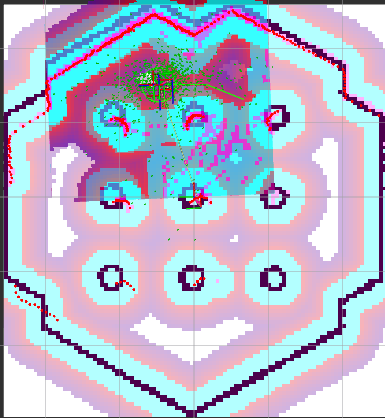
Notion 정답 코드
import rclpy
from rclpy.node import Node
from geometry_msgs.msg import Twist, PoseStamped, PoseWithCovarianceStamped
from nav_msgs.msg import OccupancyGrid, Path
from math import pow, atan2, sqrt, sin, cos, pi
import heapq
import numpy as np

class NodeAStar:
    def __init__(self, parent=None, position=None):
        self.parent = parent
        self.position = position
        self.g = 0
        self.h = 0
        self.f = 0
    def __eq__(self, other): return self.position == other.position
    def __lt__(self, other): return self.f < other.f

class IntegratedNavigation(Node):
    def __init__(self):
        super().__init__('integrated_navigation')

        # 여기가 바로 당신들이 수정할 파라미터
        self.lookahead_dist = 0.5  # 전방 주시 거리 : 멀리 보냐, 가까이 보냐에 따른 차이 발생함
        self.linear_vel = 0.2      # 이동 속도 : 느리냐, 빠르냐에 따른 차이 발생함
        self.stop_tolerance = 0.15 # 도착 인정 거리 : 가까우면 멈추냐, 멀어도 멈추냐에 따른 차이 발생함

        # 장애물에 부딪히지 않기 위한 안전거리 (x칸)
        self.safety_margin = 4

        self.map_data = None
        self.map_resolution = 0.05
        self.map_origin = [0.0, 0.0]
        self.map_width = 0
        self.map_height = 0

        self.current_pose = None
        self.current_yaw = 0.0
        self.global_path = []
        self.path_index = 0

        self.pub_cmd = self.create_publisher(Twist, '/cmd_vel', 10)
        self.pub_path = self.create_publisher(Path, '/planned_path', 10)

        self.sub_map = self.create_subscription(OccupancyGrid, '/map', self.map_callback, 10)
        self.sub_pose = self.create_subscription(PoseWithCovarianceStamped, '/amcl_pose', self.pose_callback, 10)
        self.sub_goal = self.create_subscription(PoseStamped, '/goal_pose', self.goal_callback, 10)

        # 이 주기를 바꾸는 것도 주행 퍼포먼스에 영향을 줄 수 있음
        self.timer = self.create_timer(0.1, self.control_loop)
        self.get_logger().info("Let's Run!")

    def map_callback(self, msg):
        self.map_resolution = msg.info.resolution
        self.map_width = msg.info.width
        self.map_height = msg.info.height
        self.map_origin = [msg.info.origin.position.x, msg.info.origin.position.y]
        self.map_data = np.array(msg.data).reshape((self.map_height, self.map_width))

    def pose_callback(self, msg):
        self.current_pose = [msg.pose.pose.position.x, msg.pose.pose.position.y]
        q = msg.pose.pose.orientation
        self.current_yaw = atan2(2.0*(q.w*q.z + q.x*q.y), 1.0-2.0*(q.y*q.y + q.z*q.z))

    def goal_callback(self, msg):
        if self.map_data is None or self.current_pose is None: return

        goal_pose = [msg.pose.position.x, msg.pose.position.y]
        start_grid = self.world_to_grid(self.current_pose)
        goal_grid = self.world_to_grid(goal_pose)

        self.get_logger().info("Calculating Path...")
        path_grid = self.run_astar(start_grid, goal_grid)

        if path_grid:
            self.global_path = [self.grid_to_world(p) for p in path_grid]
            self.path_index = 0
            self.publish_path_viz()
            self.get_logger().info("Path Found! Go!")
        else:
            self.get_logger().warn("No Path Found.")


    def check_safety(self, y, x) :
        margin = self.safety_margin

        for r in range(y - margin, y + margin + 1):
            for c in range(x - margin, x + margin + 1):
                if 0 <= r < self.map_height and 0 <= c < self.map_width:
                    if self.map_data[r][c] != 0: # 0이 아닌 게 장애물
                        return False
        return True

    def run_astar(self, start, end):
        if not (0 <= start[0] < self.map_height and 0 <= start[1] < self.map_width): return None
        if not (0 <= end[0] < self.map_height and 0 <= end[1] < self.map_width): return None

        start_node = NodeAStar(None, start)
        end_node = NodeAStar(None, end)
        open_list = []
        heapq.heappush(open_list, start_node)
        visited = set()
        moves = [(0,1), (0,-1), (1,0), (-1,0), (1,1), (1,-1), (-1,1), (-1,-1)]

        while open_list:
            current_node = heapq.heappop(open_list)
            if current_node.position in visited: continue
            visited.add(current_node.position)

            if current_node.position == end_node.position:
                path = []
                current = current_node
                while current:
                    path.append(current.position)
                    current = current.parent
                return path[::-1]

            for move in moves:
                ny, nx = current_node.position[0] + move[0], current_node.position[1] + move[1]
                if not (0 <= ny < self.map_height and 0 <= nx < self.map_width): continue
                if self.map_data[ny][nx] != 0: continue

                if not self.check_safety(ny, nx) : continue

                new_node = NodeAStar(current_node, (ny, nx))
                new_node.g = current_node.g + 1
                new_node.h = sqrt((ny - end[0])**2 + (nx - end[1])**2)
                new_node.f = new_node.g + new_node.h
                heapq.heappush(open_list, new_node)
        return None

    # 경로는 에이스타가 구해줬다는 가정 하에, 나는 이동만 하면 돼!
    def control_loop(self):
        if not self.global_path: return

        final_goal = self.global_path[-1] # 목적지

        # 목적지까지 가기 위해 계산해 본 거리
        dist_to_final = sqrt((final_goal[0]-self.current_pose[0])**2 + (final_goal[1]-self.current_pose[1])**2)

        if dist_to_final < self.stop_tolerance:
            self.global_path = []
            self.stop_robot()
            return

        # 도착 지점의 좌표
        target_x, target_y = final_goal

        # 경로가 점 10개짜리 경로라고 쳐봐....
        # 그러면 10번의 인덱싱을 할 수 있는거야!
        for i in range(self.path_index, len(self.global_path)):
            px, py = self.global_path[i]
            dist = sqrt((px - self.current_pose[0])**2 + (py - self.current_pose[1])**2)
            # 내가 주시하는 거리보다 조금 먼 정도의 목적지를 설정
            if dist >= self.lookahead_dist:
                target_x, target_y = px, py # 적절한 타겟으로 갱신!
                self.path_index = i
                break

        # 새로 갱신한 현실적인 목적지까지의 거리 기반으로 계산
        dx = target_x - self.current_pose[0]
        dy = target_y - self.current_pose[1]
        alpha = atan2(dy, dx) - self.current_yaw

        if alpha > pi: alpha -= 2*pi
        elif alpha < -pi: alpha += 2*pi

        angular_velocity = self.linear_vel * (2.0 * sin(alpha)) / self.lookahead_dist

        cmd = Twist()
        cmd.linear.x = self.linear_vel
        cmd.angular.z = angular_velocity

        if cmd.angular.z > 1.0: cmd.angular.z = 1.0
        if cmd.angular.z < -1.0: cmd.angular.z = -1.0

        self.pub_cmd.publish(cmd)
    def world_to_grid(self, world):
        return (int((world[1]-self.map_origin[1])/self.map_resolution), int((world[0]-self.map_origin[0])/self.map_resolution))

    def grid_to_world(self, grid):
        return [(grid[1]*self.map_resolution)+self.map_origin[0], (grid[0]*self.map_resolution)+self.map_origin[1]]

    def publish_path_viz(self):
        msg = Path()
        msg.header.frame_id = 'map'
        for p in self.global_path:
            ps = PoseStamped()
            ps.pose.position.x, ps.pose.position.y = p[0], p[1]
            msg.poses.append(ps)
        self.pub_path.publish(msg)

    def stop_robot(self):
        self.pub_cmd.publish(Twist())

def main(args=None):
    rclpy.init(args=args)
    node = IntegratedNavigation()
    try:
        rclpy.spin(node)
    except KeyboardInterrupt:
        pass
    finally:
        node.stop_robot()
        node.destroy_node()
        rclpy.shutdown()

if __name__ == '__main__':
    main()
실습 과제 : 주행 완료 확인 후 마지막 추가 사항
특정 객체 검출 시 ‘비상정지’ 기능 추가하기. 완료된 경우에는…
- 깃허브 저장소 생성 및 코드 업로드 (주행 노드가 포함된 패키지)
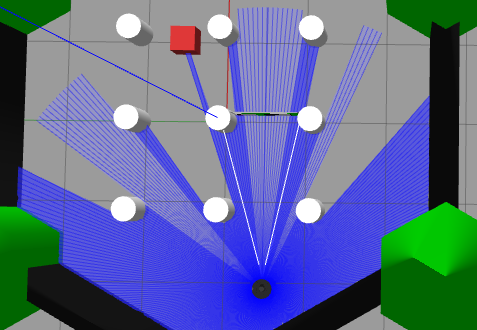
TurtleBot3 Waffle Pi + Gazebo 시뮬레이션 환경에서 YOLOv8 객체 검출을 활용한 비상정지 주행 노드 패키지
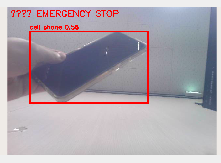
로봇이 일정 속도로 주행하다가, PC 웹캠 영상에서 특정 객체(스마트폰)가 검출되면 즉시 정지하고, 객체가 사라지면 자동으로 주행을 재개한다.
[PC Webcam]
     v
[Windows Flask Server]  --  http://<WIN_HOST>:8080/stream
     v
[webcam_bridge]         ->  /camera/webcam/image_raw
     v
[yolo_detector]         ->  /emergency_stop
                             /camera/webcam/detection
     v
[emergency_stop]        <-  /cmd_vel_raw
                        ->  /cmd_vel
     ^
[goal_driver]           ->  /cmd_vel_raw
     v
[Gazebo / TurtleBot3]
- OS : Ubuntu 22.04 (WSL2)
- ROS2 : Humble
- Gazebo : Classic 11.10
- Python : 3.10
- 추가 의존: ultralytics, opencv-python, cv_bridge
- pip install ultralytics opencv-python sudo apt install ros-humble-cv-bridge ros-humble-gazebo-ros-pkgs
노드역할입력 토픽출력 토픽
| webcam_bridge | HTTP 스트림 -> ROS2 이미지 발행 | (HTTP) | /camera/webcam/image_raw |
| yolo_detector | YOLOv8 추론, 목표 클래스 검출 | /camera/webcam/image_raw | /emergency_stop, /camera/webcam/detection |
| emergency_stop | 속도 명령 필터, 신호 시 정지 | /cmd_vel_raw, /emergency_stop | /cmd_vel |
| goal_driver | 상수 속도 명령 발행 | - | /cmd_vel_raw |
emergency_stop_nav/
v emergency_stop_nav/
|   ^ __init__.py
|   ^ goal_driver.py            <- 주행 명령 발행
|   ^ webcam_bridge.py          <- HTTP 스트림 구독 -> 이미지 발행
|   ^ yolo_detector.py          <- YOLO 추론, 비상정지 신호 발행
|   ^ emergency_stop.py         <- 속도 명령 필터
v launch/
|   ^ gazebo_world.launch.py    <- Gazebo + TurtleBot3 스폰
|   ^ bringup.launch.py         <- 전체 시스템 단일 실행
v worlds/
|   ^ custom_world.world        <- 장애물 포함 커스텀 월드
v config/
|   ^ yolov8n.pt                <- YOLO 가중치 (git 제외, 별도 다운로드)
v scripts/
|   ^ webcam_server.py          <- Windows 측 MJPEG 스트림 서버
^ package.xml
^ setup.py
^ README.md
cd ~/turtlebot3_ws
colcon build --packages-select emergency_stop_nav --symlink-install
source install/setup.bash
cd ~/turtlebot3_ws/src/emergency_stop_nav/config
python3 -c "from ultralytics import YOLO; YOLO('yolov8n.pt')"
config 폴더에 yolov8n.pt(약 6MB) 생성. 생성 후 재빌드 필요:
cd ~/turtlebot3_ws
colcon build --packages-select emergency_stop_nav --symlink-install
Windows PowerShell:
pip install flask opencv-python
cd <scripts 폴더>
python webcam_server.py
접속 확인 (Windows 브라우저):
http://localhost:8080
export TURTLEBOT3_MODEL=waffle_pi
export LIBGL_ALWAYS_SOFTWARE=1
export GAZEBO_MODEL_DATABASE_URI=""
ros2 launch emergency_stop_nav bringup.launch.py
20초 이내에 Gazebo가 뜨고, 그 뒤 웹캠 -> YOLO -> 필터 -> 주행 노드가 순차적으로 올라와 로봇이 자동 주행을 시작한다.
인자기본값설명
| linear_speed | 0.15 | 전진 속도 [m/s] |
| angular_speed | 0.0 | 회전 속도 [rad/s] |
| stream_url | http://172.30.64.1:8080/stream | 웹캠 HTTP 주소 |
ros2 launch emergency_stop_nav bringup.launch.py linear_speed:=0.3
ros2 launch emergency_stop_nav bringup.launch.py linear_speed:=0.1 angular_speed:=0.5
ros2 launch emergency_stop_nav bringup.launch.py stream_url:=http://192.168.0.10:8080/stream
ros2 run emergency_stop_nav goal_driver
ros2 run emergency_stop_nav webcam_bridge
ros2 run emergency_stop_nav yolo_detector
ros2 run emergency_stop_nav emergency_stop
- 로봇이 정의된 속도(linear=0.15 m/s)로 직진
- 웹캠 앞에 스마트폰이 들어오면 YOLO가 검출
- /emergency_stop 토픽에 true 발행
- 필터가 /cmd_vel을 0으로 덮어씀 -> 로봇 즉시 정지
- 스마트폰이 시야에서 사라지면 1초 후 자동 재개
- WSL2 + Gazebo Classic 환경 한정
- LIBGL_ALWAYS_SOFTWARE=1 설정 필요 (하드웨어 렌더링 시 gzclient 불안정)
- usbipd 대신 Windows 측 HTTP 스트림 서버 사용 (WSL에 웹캠 직접 attach 불가 환경 대응)
- 웹캠 스트림 약 8 FPS (WSL <-> Windows HTTP 전송 한계)
- YOLOv8n CPU 추론, 실시간성 제한
- Nav2 연동으로 목표 좌표 기반 주행
- 커스텀 클래스 학습으로 특정 객체 검출 정확도 향상
- 라이다 기반 충돌 회피와 비상정지 병합
- 실제 TurtleBot3 하드웨어 이식
'로보테크AI' 카테고리의 다른 글
| 융합_로보테크 AI 자율주행 로봇 개발자 과정-26/04/29 (0) | 2026.04.29 |
|---|---|
| 융합_로보테크 AI 자율주행 로봇 개발자 과정-26/04/28 (0) | 2026.04.28 |
| 융합_로보테크 AI 자율주행 로봇 개발자 과정-26/04/23 (0) | 2026.04.23 |
| 융합_로보테크 AI 자율주행 로봇 개발자 과정-26/04/22 (0) | 2026.04.22 |
| 융합_로보테크 AI 자율주행 로봇 개발자 과정-26/04/21[멘토링] (0) | 2026.04.21 |