IPv4 주소가 192.168.0.187로 바뀜
ㄴ이유는 모름
내일까지 웹 완성(우영)
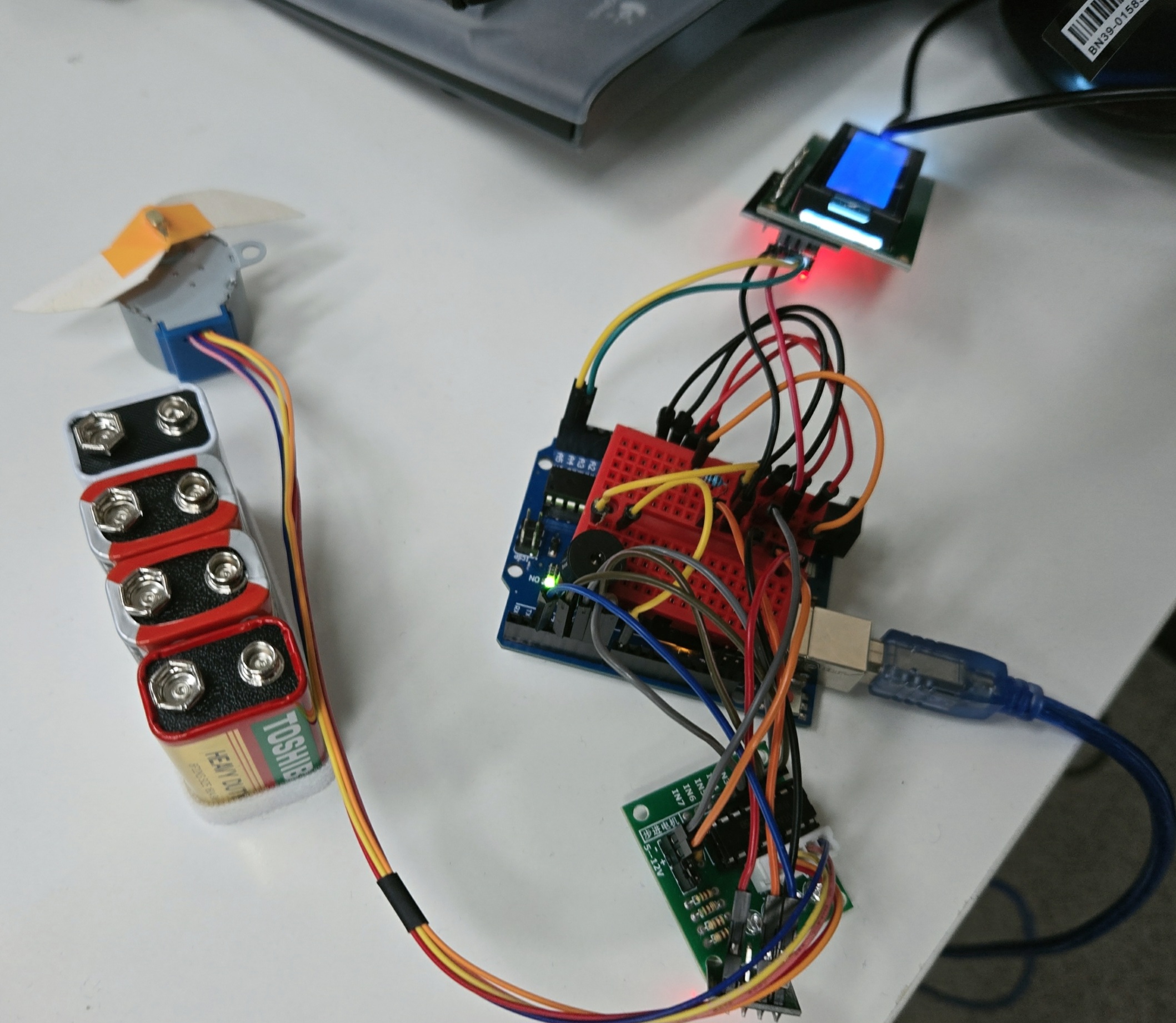
공기청정기(모터 + 디스플레이)로 간단하게 청소하는 느낌 구현 + MQTT
ESP 펌웨어 업데이트
#include <ESP8266WiFi.h>
#include <PubSubClient.h>

// ================ 환경에 맞게 수정 ================
const char* WIFI_SSID     = "3F_302";
const char* WIFI_PASSWORD = "0424719222!!";
const char* MQTT_BROKER   = "192.168.0.55";
// ================================================

const uint16_t MQTT_PORT      = 1883;
const char*    MQTT_CLIENT_ID = "esp01_actuator_node1";
const char*    MQTT_TOPIC     = "sensor/pm/zoneA";

WiFiClient   espClient;
PubSubClient mqttClient(espClient);

void setupWiFi() {
  WiFi.mode(WIFI_STA);
  WiFi.begin(WIFI_SSID, WIFI_PASSWORD);
  uint32_t start = millis();
  while (WiFi.status() != WL_CONNECTED && millis() - start < 20000) {
    delay(500);
  }
}

int extractPm10(const char* json) {
  const char* key = strstr(json, "\"pm10\":");
  if (key == nullptr) return -1;
  return atoi(key + 7);
}

void onMqttMessage(char* topic, byte* payload, unsigned int length) {
  char buffer[160];
  if (length >= sizeof(buffer)) length = sizeof(buffer) - 1;
  memcpy(buffer, payload, length);
  buffer[length] = '\0';

  int pm10 = extractPm10(buffer);
  if (pm10 < 0) return;

  Serial.print("PM10:");
  Serial.print(pm10);
  Serial.print("\n");
}

void connectMqtt() {
  uint8_t attempts = 0;
  while (!mqttClient.connected() && attempts < 5) {
    if (mqttClient.connect(MQTT_CLIENT_ID)) {
      mqttClient.subscribe(MQTT_TOPIC, 0);
      return;
    }
    attempts++;
    delay(2000);
  }
}

void setup() {
  Serial.begin(9600);
  delay(100);
  setupWiFi();
  mqttClient.setServer(MQTT_BROKER, MQTT_PORT);
  mqttClient.setCallback(onMqttMessage);
  connectMqtt();
}

void loop() {
  if (WiFi.status() != WL_CONNECTED) {
    setupWiFi();
    return;
  }
  if (!mqttClient.connected()) {
    connectMqtt();
  }
  mqttClient.loop();
}
모터 + 부저 + LCD 코드
#include <SoftwareSerial.h>
#include <Wire.h>
#include <LiquidCrystal_I2C.h>
#include <Stepper.h>

// ============ 핀 설정 ============
const uint8_t PIN_ESP_RX = 2;       // ESP-01 TX → UNO D2
const uint8_t PIN_ESP_TX = 3;       // 미사용 (단방향)
const uint8_t PIN_BUZZER = 8;
const uint8_t PIN_STEP_IN1 = 4;
const uint8_t PIN_STEP_IN2 = 5;
const uint8_t PIN_STEP_IN3 = 6;
const uint8_t PIN_STEP_IN4 = 7;

// ============ 임계값 ============
const int PM10_ON_THRESHOLD  = 50;
const int PM10_OFF_THRESHOLD = 40;

// ============ 등급 기준 ============
const int PM10_GOOD_MAX = 30;
const int PM10_NORMAL_MAX = 80;

// ============ 모터 설정 ============
const int STEPS_PER_REV = 2048;     // 28BYJ-48 한 바퀴 (full-step 기준)
const int STEP_RPM = 15;            // 28BYJ-48 사실상 최대 속도

// ============ I2C LCD ============
const uint8_t LCD_I2C_ADDR = 0x27;  // 동작 안 하면 0x3F로 변경
LiquidCrystal_I2C lcd(LCD_I2C_ADDR, 16, 2);

// ============ 객체 ============
SoftwareSerial espSerial(PIN_ESP_RX, PIN_ESP_TX);
Stepper stepMotor(STEPS_PER_REV, PIN_STEP_IN1, PIN_STEP_IN3, PIN_STEP_IN2, PIN_STEP_IN4);

// ============ 상태 변수 ============
int  currentPm10 = -1;
bool motorRunning = false;
unsigned long lastDisplayUpdate = 0;
const unsigned long DISPLAY_REFRESH_MS = 500;


// ============ 등급 분류 ============
const char* gradeLabel(int pm10) {
  if (pm10 < 0) return "WAIT";
  if (pm10 <= PM10_GOOD_MAX) return "GOOD";
  if (pm10 <= PM10_NORMAL_MAX) return "NORMAL";
  return "BAD";
}


// ============ LCD 갱신 ============
void updateLcd(int pm10) {
  lcd.clear();
  lcd.setCursor(0, 0);
  if (pm10 < 0) {
    lcd.print("PM10: ---");
  } else {
    lcd.print("PM10: ");
    lcd.print(pm10);
  }
  lcd.setCursor(0, 1);
  lcd.print("Status: ");
  lcd.print(gradeLabel(pm10));
}


// ============ 부저 제어 ============
void buzzerOn() {
  tone(PIN_BUZZER, 800);
}

void buzzerOff() {
  noTone(PIN_BUZZER);
}


// ============ 모터 정지 ============
void stopMotor() {
  digitalWrite(PIN_STEP_IN1, LOW);
  digitalWrite(PIN_STEP_IN2, LOW);
  digitalWrite(PIN_STEP_IN3, LOW);
  digitalWrite(PIN_STEP_IN4, LOW);
}


// ============ ESP-01에서 PM10 수신 ============
int readPm10FromEsp() {
  static char lineBuffer[16];
  static uint8_t idx = 0;

  while (espSerial.available()) {
    char c = espSerial.read();
    if (c == '\n' || c == '\r') {
      if (idx == 0) continue;
      lineBuffer[idx] = '\0';
      idx = 0;
      if (strncmp(lineBuffer, "PM10:", 5) == 0) {
        return atoi(lineBuffer + 5);
      }
    } else if (idx < sizeof(lineBuffer) - 1) {
      lineBuffer[idx++] = c;
    }
  }
  return -1;
}


// ============ 셋업 ============
void setup() {
  pinMode(PIN_BUZZER, OUTPUT);
  digitalWrite(PIN_BUZZER, LOW);

  pinMode(PIN_STEP_IN1, OUTPUT);
  pinMode(PIN_STEP_IN2, OUTPUT);
  pinMode(PIN_STEP_IN3, OUTPUT);
  pinMode(PIN_STEP_IN4, OUTPUT);
  stopMotor();

  stepMotor.setSpeed(STEP_RPM);

  Serial.begin(9600);     // 디버그용
  espSerial.begin(9600);  // ESP-01과 통신

  Wire.begin();
  lcd.init();
  lcd.backlight();
  lcd.print("Booting...");
  delay(1000);
  updateLcd(-1);
}


// ============ 메인 루프 ============
void loop() {
  int newValue = readPm10FromEsp();

  if (newValue >= 0) {
    currentPm10 = newValue;

    if (currentPm10 > PM10_ON_THRESHOLD) {
      motorRunning = true;
      buzzerOn();
    } else if (currentPm10 < PM10_OFF_THRESHOLD) {
      motorRunning = false;
      stopMotor();
      buzzerOff();
    }

    Serial.print("[RX] PM10=");
    Serial.print(currentPm10);
    Serial.print(" motor=");
    Serial.println(motorRunning ? "ON" : "OFF");
  }

  if (motorRunning) {
    stepMotor.step(64);   // 작은 step씩 반복 → 부드러운 연속 회전
  }

  if (millis() - lastDisplayUpdate >= DISPLAY_REFRESH_MS) {
    updateLcd(currentPm10);
    lastDisplayUpdate = millis();
  }
}
'로보테크AI' 카테고리의 다른 글
| 융합_로보테크 AI 자율주행 로봇 개발자 과정-26/05/08 (0) | 2026.05.08 |
|---|---|
| 융합_로보테크 AI 자율주행 로봇 개발자 과정-26/05/07 (0) | 2026.05.07 |
| 융합_로보테크 AI 자율주행 로봇 개발자 과정-26/05/04 (0) | 2026.05.04 |
| 융합_로보테크 AI 자율주행 로봇 개발자 과정-26/04/29 (0) | 2026.04.29 |
| 융합_로보테크 AI 자율주행 로봇 개발자 과정-26/04/28 (0) | 2026.04.28 |