프로젝트 구조 변경
guiprj/
│
├── app.py # 프로그램 진입점
├── config.py # DB 설정 파일
├── samsung.sql # 테이블 생성 및 초기 데이터
│
├── db/
│ ├── connection.py # DB 연결 관리
│ └── item_repository.py # items 테이블 CRUD 로직
│
├── models/
│ └── item.py # Item 모델 클래스
│
├── views/
│ ├── login_dialog.py # 로그인 창
│ ├── main_window.py # 메인 GUI
│ ├── insert_dialog.py # 데이터 추가 창
│ ├── update_dialog.py # 데이터 수정 창
└── └── delete_dialog.py # 데이터 삭제 창
PyQt 디자인 변경
SQL에 데이터 추가
검색, 수정, 정렬 기능 수정
app.py
import sys
from PyQt5.QtWidgets import QApplication
from views.login_dialog import LoginDialog
from views.main_window import MainWindow

if __name__ == "__main__":
    app = QApplication(sys.argv)

    login = LoginDialog()
    if login.exec_() == LoginDialog.Accepted:
        window = MainWindow()
        window.show()
        sys.exit(app.exec_())
    else:
        sys.exit(0)
config.py
DB_CONFIG = {
    "host": "localhost",
    "user": "root",
    "password": "0000",
    "database": "samsung",
    "charset": "utf8"
}
samsung.sql
DROP TABLE IF EXISTS items;

CREATE TABLE items (
    id INT PRIMARY KEY AUTO_INCREMENT,
    code VARCHAR(10) UNIQUE,
    name VARCHAR(50),
    price INT,
    stock INT
);

INSERT INTO items (code, name, price, stock) VALUES
('1001','Galaxy_S', 945000,15),
('1002','Galaxy_S2', 880000,18),
('1003','Galaxy_S3', 990000,22),
('1004','Galaxy_S4', 957000,19),
('1005','Galaxy_S5', 866000,14),
('1006','Galaxy_S6', 858000,13),
('1007','Galaxy_S6_Edge', 979000,10),
('1008','Galaxy_S7', 836000,16),
('1009','Galaxy_S7_Edge', 935000,12),
('1010','Galaxy_S8', 935000,20),
('1011','Galaxy_S8_Plus', 990000,18),
('1012','Galaxy_S9', 957000,15),
('1013','Galaxy_S9_Plus', 1056000,11),
('1014','Galaxy_S10e', 899800,14),
('1015','Galaxy_S10', 1056000,17),
('1016','Galaxy_S10_Plus', 1155000,12),
('1017','Galaxy_S20', 1248500,13),
('1018','Galaxy_S20_Plus', 1353000,11),
('1019','Galaxy_S20_Ultra', 1595000,9),
('1020','Galaxy_S21', 999900,25),
('1021','Galaxy_S21_Plus', 1199000,16),
('1022','Galaxy_S21_Ultra', 1452000,14),
('1023','Galaxy_S22', 999900,22),
('1024','Galaxy_S22_Plus', 1199000,18),
('1025','Galaxy_S22_Ultra', 1452000,13),
('1026','Galaxy_S23', 1155000,30),
('1027','Galaxy_S23_Plus', 1353000,21),
('1028','Galaxy_S23_Ultra', 1599400,12),
('1029','Galaxy_S24', 1155000,28),
('1030','Galaxy_S24_Plus', 1353000,19),
('1031','Galaxy_S24_Ultra', 1698400,10),
('1032','Galaxy_S25', 1199000,20),
('1033','Galaxy_S25_Plus', 1399000,18),
('1034','Galaxy_S25_Ultra', 1699000,12),
('1035','Galaxy_S26', 1250000,25),
('1036','Galaxy_S26_Plus', 1450000,19),
('1037','Galaxy_S26_Ultra', 1750000,14),
('1101','Galaxy_Note', 946000,7),
('1102','Galaxy_Note2', 1089000,8),
('1103','Galaxy_Note3', 1067000,9),
('1104','Galaxy_Note4', 957000,6),
('1105','Galaxy_Note5', 899800,5),
('1106','Galaxy_Note7_FE', 699600,4),
('1107','Galaxy_Note8', 1094500,7),
('1108','Galaxy_Note9', 1094500,6),
('1109','Galaxy_Note10', 1248500,5),
('1110','Galaxy_Note10_Plus', 1397000,4),
('1111','Galaxy_Note20', 1199000,6),
('1112','Galaxy_Note20_Ultra', 1452000,3),
('1201','Galaxy_Fold', 2398000,5),
('1202','Galaxy_Z_Fold2', 2398000,6),
('1203','Galaxy_Z_Fold3', 1998700,7),
('1204','Galaxy_Z_Fold4', 1998700,6),
('1205','Galaxy_Z_Fold5', 2097700,5),
('1206','Galaxy_Z_Fold6', 2229700,4),
('1207','Galaxy_Z_Fold7', 2290000,6),
('1301','Galaxy_Z_Flip', 1650000,10),
('1302','Galaxy_Z_Flip3', 1254000,14),
('1303','Galaxy_Z_Flip4', 1353000,11),
('1304','Galaxy_Z_Flip5', 1399200,9),
('1305','Galaxy_Z_Flip6', 1485000,7),
('1306','Galaxy_Z_Flip7', 1499000,10),
('1401','Galaxy_A5_2016', 548900,12),
('1402','Galaxy_A7_2017', 598400,14),
('1403','Galaxy_A8_2018', 599500,16),
('1404','Galaxy_A31', 374000,20),
('1405','Galaxy_A32', 374000,18),
('1406','Galaxy_A42_5G', 449900,15),
('1407','Galaxy_A52', 499400,17),
('1408','Galaxy_A53', 599500,19),
('1409','Galaxy_A54', 599500,22),
('1410','Galaxy_A55', 649000,21),
('1411','Galaxy_A73', 699600,10),
('1412','Galaxy_A56', 699000,23),
('1501','Galaxy_M20', 220000,15),
('1502','Galaxy_M12', 198000,17),
('1503','Galaxy_M32', 299000,16),
('1504','Galaxy_M52', 399000,12),
('1601','Galaxy_J5', 298000,12),
('1602','Galaxy_J7', 348000,14);

CREATE TABLE IF NOT EXISTS users (
    id INT PRIMARY KEY AUTO_INCREMENT,
    username VARCHAR(50),
    password VARCHAR(50)
);

INSERT INTO users (username, password)
VALUES ('admin', '1234');
connection.py
import pymysql
from config import DB_CONFIG

def get_connection():
    return pymysql.connect(**DB_CONFIG)
item_repository.py
from db.connection import get_connection

class ItemRepository:

    def fetch_all(self):
        sql = "SELECT id, code, name, price, stock FROM items ORDER BY id"
        with get_connection() as conn:
            with conn.cursor() as cur:
                cur.execute(sql)
                return cur.fetchall()

    def insert(self, code, name, price, stock):
        sql = "INSERT INTO items (code, name, price, stock) VALUES (%s, %s, %s, %s)"
        try:
            with get_connection() as conn:
                with conn.cursor() as cur:
                    cur.execute(sql, (code, name, price, stock))
                conn.commit()
            return True
        except:
            return False

    def update(self, item_id, code, name, price, stock):
        sql = """
        UPDATE items
        SET code=%s, name=%s, price=%s, stock=%s
        WHERE id=%s
        """
        try:
            with get_connection() as conn:
                with conn.cursor() as cur:
                    cur.execute(sql, (code, name, price, stock, item_id))
                conn.commit()
            return True
        except:
            return False

    def delete(self, item_id):
        sql = "DELETE FROM items WHERE id=%s"
        with get_connection() as conn:
            with conn.cursor() as cur:
                cur.execute(sql, (item_id,))
            conn.commit()

    def exists_code(self, code):
        sql = "SELECT COUNT(*) FROM items WHERE code=%s"
        with get_connection() as conn:
            with conn.cursor() as cur:
                cur.execute(sql, (code,))
                count, = cur.fetchone()
                return count > 0
item.py
class Item:
    def __init__(self, id, code, name, price, stock):
        self.id = id
        self.code = code
        self.name = name
        self.price = price
        self.stock = stock
login_dialog.py
from PyQt5.QtWidgets import *
from PyQt5.QtCore import Qt
from db.connection import get_connection

class LoginDialog(QDialog):
    def __init__(self):
        super().__init__()

        self.setWindowFlag(Qt.WindowContextHelpButtonHint, False)

        self.setWindowTitle("로그인")

        self.username = QLineEdit()
        self.password = QLineEdit()
        self.password.setEchoMode(QLineEdit.Password)

        form = QFormLayout()
        form.addRow("아이디", self.username)
        form.addRow("비밀번호", self.password)

        btn = QPushButton("로그인")
        btn.clicked.connect(self.try_login)

        layout = QVBoxLayout()
        layout.addLayout(form)
        layout.addWidget(btn)
        self.setLayout(layout)

    def try_login(self):
        uid = self.username.text().strip()
        pw = self.password.text().strip()

        sql = "SELECT COUNT(*) FROM users WHERE username=%s AND password=%s"

        with get_connection() as conn:
            with conn.cursor() as cur:
                cur.execute(sql, (uid, pw))
                count, = cur.fetchone()

        if count == 1:
            self.accept()
        else:
            QMessageBox.warning(self, "실패", "아이디 또는 비밀번호 오류")
main_window.py
from PyQt5.QtWidgets import *
from PyQt5.QtCore import Qt
from PyQt5.QtWidgets import QHeaderView
from db.item_repository import ItemRepository
from views.insert_dialog import InsertDialog
from views.update_dialog import UpdateDialog
from views.delete_dialog import DeleteDialog


class MainWindow(QMainWindow):
    def __init__(self):
        super().__init__()
        self.setWindowTitle("Samsung")
        self.resize(950, 550)

        self.repo = ItemRepository()

        self.setWindowFlag(Qt.WindowContextHelpButtonHint, False)

        central = QWidget()
        self.setCentralWidget(central)
        main_layout = QVBoxLayout(central)
        main_layout.setContentsMargins(20, 20, 20, 20)
        main_layout.setSpacing(15)

        # 상단 통합 바
        top_layout = QHBoxLayout()

        label = QLabel("검색")
        label.setFixedWidth(40)

        self.search_input = QLineEdit()
        self.search_input.setPlaceholderText("상품명 또는 코드 검색...")
        self.search_input.setFixedWidth(300)
        self.search_input.setFixedHeight(28)
        self.search_input.textChanged.connect(self.load_items)

        self.btn_insert = QPushButton("추가")
        self.btn_update = QPushButton("수정")
        self.btn_delete = QPushButton("삭제")

        self.btn_insert.setFixedWidth(80)
        self.btn_update.setFixedWidth(80)
        self.btn_delete.setFixedWidth(80)

        self.btn_insert.clicked.connect(self.open_insert)
        self.btn_update.clicked.connect(self.open_update)
        self.btn_delete.clicked.connect(self.open_delete)

        top_layout.addWidget(label)
        top_layout.addWidget(self.search_input)
        top_layout.addStretch()
        top_layout.addWidget(self.btn_insert)
        top_layout.addWidget(self.btn_update)
        top_layout.addWidget(self.btn_delete)

        # 테이블
        self.table = QTableWidget()
        self.table.setColumnCount(5)
        self.table.setHorizontalHeaderLabels(["ID", "코드", "상품명", "가격", "재고"])

        self.table.setAlternatingRowColors(True)
        self.table.setSelectionBehavior(QTableWidget.SelectRows)
        self.table.setSelectionMode(QTableWidget.SingleSelection)
        self.table.setEditTriggers(QTableWidget.NoEditTriggers)
        self.table.verticalHeader().setVisible(False)
        self.table.setSortingEnabled(True)

        header = self.table.horizontalHeader()

        header.setSectionResizeMode(0, QHeaderView.Fixed)
        self.table.setColumnWidth(0, 50)

        header.setSectionResizeMode(1, QHeaderView.ResizeToContents)
        header.setSectionResizeMode(2, QHeaderView.Stretch)
        header.setSectionResizeMode(3, QHeaderView.ResizeToContents)
        header.setSectionResizeMode(4, QHeaderView.ResizeToContents)

        # 스타일
        self.setStyleSheet("""
            QMainWindow {
                background-color: #e9e9e9;
            }

            QPushButton {
                background-color: #d0d0d0;
                color: black;
                padding: 5px 12px;
                border: 1px solid #a0a0a0;
                border-radius: 0px;
            }

            QPushButton:hover {
                background-color: #c2c2c2;
            }

            QPushButton:pressed {
                background-color: #b0b0b0;
            }

            QTableWidget {
                background-color: white;
                gridline-color: #c8c8c8;
                font-size: 12px;
            }

            QHeaderView::section {
                background-color: #dcdcdc;
                border: 1px solid #b5b5b5;
                font-weight: bold;
                padding: 4px;
            }

            QLineEdit {
                padding: 5px;
                border: 1px solid #b5b5b5;
                background: white;
            }
        """)

        # 레이아웃 적용
        main_layout.addLayout(top_layout)
        main_layout.addWidget(self.table)

        self.load_items()

    # 데이터 로드
    def load_items(self):
        keyword = self.search_input.text().strip().lower()
        rows = self.repo.fetch_all()

        if keyword:
            rows = [
                row for row in rows
                if keyword in row[1].lower() or keyword in row[2].lower()
            ]

        # 정렬 완전 비활성화
        self.table.setSortingEnabled(False)

        self.table.clearContents()
        self.table.setRowCount(len(rows))

        for r, row in enumerate(rows):
            for c, value in enumerate(row):

                item = QTableWidgetItem()

                # ID 컬럼 숫자 정렬 처리
                if c == 0:
                    numeric_value = int(value)
                    item.setData(Qt.EditRole, numeric_value)

                # 가격 숫자 정렬 처리
                elif c == 3:
                    numeric_value = int(value)
                    item.setData(Qt.EditRole, numeric_value)
                    item.setText(f"{numeric_value:,}")

                else:
                    item.setText(str(value))

                if c in (3, 4):
                    item.setTextAlignment(Qt.AlignRight | Qt.AlignVCenter)

                self.table.setItem(r, c, item)

        # 정렬 활성화
        self.table.setSortingEnabled(True)

    # 다이얼로그
    def open_insert(self):
        dialog = InsertDialog()
        if dialog.exec_() == QDialog.Accepted:
            self.load_items()

    def open_update(self):
        row = self.table.currentRow()
        if row < 0:
            return

        item_id = self.table.item(row, 0).text()
        dialog = UpdateDialog(item_id)
        if dialog.exec_() == QDialog.Accepted:
            self.load_items()

    def open_delete(self):
        row = self.table.currentRow()
        if row < 0:
            return

        item_id = self.table.item(row, 0).text()
        dialog = DeleteDialog(item_id)
        if dialog.exec_() == QDialog.Accepted:
            self.load_items()
insert_dialog.py
from PyQt5.QtWidgets import *
from PyQt5.QtCore import Qt
from db.item_repository import ItemRepository


class InsertDialog(QDialog):
    def __init__(self):
        super().__init__()

        self.setWindowFlag(Qt.WindowContextHelpButtonHint, False)

        self.setWindowTitle("상품 추가")
        self.repo = ItemRepository()

        self.input_code = QLineEdit()
        self.input_name = QLineEdit()
        self.input_price = QLineEdit()
        self.input_stock = QLineEdit()

        form = QFormLayout()
        form.addRow("코드", self.input_code)
        form.addRow("상품명", self.input_name)
        form.addRow("가격", self.input_price)
        form.addRow("재고", self.input_stock)

        self.btn_ok = QPushButton("추가")
        self.btn_cancel = QPushButton("취소")

        self.btn_ok.clicked.connect(self.insert_item)
        self.btn_cancel.clicked.connect(self.reject)

        btn_layout = QHBoxLayout()
        btn_layout.addWidget(self.btn_ok)
        btn_layout.addWidget(self.btn_cancel)

        layout = QVBoxLayout()
        layout.addLayout(form)
        layout.addLayout(btn_layout)

        self.setLayout(layout)

    def insert_item(self):
        code = self.input_code.text().strip()
        name = self.input_name.text().strip()
        price = self.input_price.text().strip()
        stock = self.input_stock.text().strip()

        if not code or not name:
            QMessageBox.warning(self, "오류", "코드와 상품명은 필수입니다.")
            return

        if not price.isdigit() or not stock.isdigit():
            QMessageBox.warning(self, "오류", "가격과 재고는 숫자만 입력하세요.")
            return

        if self.repo.exists_code(code):
            QMessageBox.warning(self, "오류", "이미 존재하는 코드입니다.")
            return

        ok = self.repo.insert(code, name, int(price), int(stock))

        if ok:
            QMessageBox.information(self, "완료", "추가되었습니다.")
            self.accept()
        else:
            QMessageBox.critical(self, "실패", "추가 중 오류 발생")
update_dialog.py
from PyQt5.QtWidgets import *
from db.item_repository import ItemRepository


class UpdateDialog(QDialog):
    def __init__(self, item_id):
        super().__init__()
        self.setWindowTitle("상품 수정")
        self.repo = ItemRepository()
        self.item_id = item_id

        self.input_code = QLineEdit()
        self.input_name = QLineEdit()
        self.input_price = QLineEdit()
        self.input_stock = QLineEdit()

        form = QFormLayout()
        form.addRow("코드", self.input_code)
        form.addRow("상품명", self.input_name)
        form.addRow("가격", self.input_price)
        form.addRow("재고", self.input_stock)

        self.btn_ok = QPushButton("수정")
        self.btn_cancel = QPushButton("취소")

        self.btn_ok.clicked.connect(self.update_item)
        self.btn_cancel.clicked.connect(self.reject)

        btn_layout = QHBoxLayout()
        btn_layout.addWidget(self.btn_ok)
        btn_layout.addWidget(self.btn_cancel)

        layout = QVBoxLayout()
        layout.addLayout(form)
        layout.addLayout(btn_layout)

        self.setLayout(layout)

        self.load_data()

    def load_data(self):
        rows = self.repo.fetch_all()
        for row in rows:
            if str(row[0]) == str(self.item_id):
                self.input_code.setText(row[1])
                self.input_name.setText(row[2])
                self.input_price.setText(str(row[3]))
                self.input_stock.setText(str(row[4]))
                break

    def update_item(self):
        code = self.input_code.text().strip()
        name = self.input_name.text().strip()
        price = self.input_price.text().strip()
        stock = self.input_stock.text().strip()

        if not code or not name:
            QMessageBox.warning(self, "오류", "코드와 상품명은 필수입니다.")
            return

        if not price.isdigit() or not stock.isdigit():
            QMessageBox.warning(self, "오류", "가격과 재고는 숫자만 입력하세요.")
            return

        ok = self.repo.update(
            self.item_id,
            code,
            name,
            int(price),
            int(stock)
        )

        if ok:
            QMessageBox.information(self, "완료", "수정되었습니다.")
            self.accept()
        else:
            QMessageBox.critical(self, "실패", "수정 중 오류 발생")
delete_dialog.py
from PyQt5.QtWidgets import *
from PyQt5.QtCore import Qt
from db.item_repository import ItemRepository


class DeleteDialog(QDialog):
    def __init__(self, item_id):
        super().__init__()

        self.setWindowTitle("상품 삭제")
        self.setWindowFlag(Qt.WindowContextHelpButtonHint, False)

        self.repo = ItemRepository()
        self.item_id = item_id

        # 안내 문구
        label = QLabel("정말 삭제하시겠습니까?")
        label.setAlignment(Qt.AlignCenter)

        # 버튼
        self.btn_ok = QPushButton("삭제")
        self.btn_cancel = QPushButton("취소")

        self.btn_ok.setFixedWidth(80)
        self.btn_cancel.setFixedWidth(80)

        self.btn_ok.clicked.connect(self.delete_item)
        self.btn_cancel.clicked.connect(self.reject)

        # 버튼 레이아웃
        btn_layout = QHBoxLayout()
        btn_layout.addStretch()
        btn_layout.addWidget(self.btn_ok)
        btn_layout.addWidget(self.btn_cancel)

        # 메인 레이아웃
        layout = QVBoxLayout()
        layout.setContentsMargins(20, 20, 20, 20)
        layout.setSpacing(15)
        layout.addWidget(label)
        layout.addLayout(btn_layout)

        self.setLayout(layout)

    def delete_item(self):
        self.repo.delete(self.item_id)
        QMessageBox.information(self, "완료", "삭제되었습니다.")
        self.accept()
.gitignore
.venv/
__pycache__/
*.pyc
.idea/

.idea/**/workspace.xml
.idea/**/tasks.xml
.idea/**/usage.statistics.xml
.idea/**/dictionaries
.idea/**/shelf

.idea/**/aws.xml

.idea/**/contentModel.xml

.idea/**/dataSources/
.idea/**/dataSources.ids
.idea/**/dataSources.local.xml
.idea/**/sqlDataSources.xml
.idea/**/dynamic.xml
.idea/**/uiDesigner.xml
.idea/**/dbnavigator.xml

.idea/**/gradle.xml
.idea/**/libraries

cmake-build-*/

.idea/**/mongoSettings.xml

*.iws

out/

.idea_modules/

atlassian-ide-plugin.xml

.idea/replstate.xml

.idea/sonarlint/

com_crashlytics_export_strings.xml
crashlytics.properties
crashlytics-build.properties
fabric.properties

.idea/httpRequests

.idea/caches/build_file_checksums.ser

.idea/**/sonarlint/

.idea/**/sonarIssues.xml

.idea/**/markdown-navigator.xml
.idea/**/markdown-navigator-enh.xml
.idea/**/markdown-navigator/

.idea/$CACHE_FILE$

.idea/codestream.xml

.idea/**/azureSettings.xml
*.py[cod]
*$py.class

*.so

.Python
build/
develop-eggs/
dist/
downloads/
eggs/
.eggs/
lib/
lib64/
parts/
sdist/
var/
wheels/
share/python-wheels/
*.egg-info/
.installed.cfg
*.egg
MANIFEST

*.manifest
*.spec

pip-log.txt
pip-delete-this-directory.txt

htmlcov/
.tox/
.nox/
.coverage
.coverage.*
.cache
nosetests.xml
coverage.xml
*.cover
*.py,cover
.hypothesis/
.pytest_cache/
cover/

*.mo
*.pot

*.log
local_settings.py
db.sqlite3
db.sqlite3-journal

instance/
.webassets-cache

.scrapy

docs/_build/

.pybuilder/
target/

.ipynb_checkpoints

profile_default/
ipython_config.py

.pdm.toml

__pypackages__/

celerybeat-schedule
celerybeat.pid

*.sage.py

.env
.venv
env/
venv/
ENV/
env.bak/
venv.bak/

.spyderproject
.spyproject

.ropeproject

/site

.mypy_cache/
.dmypy.json
dmypy.json

.pyre/

.pytype/

cython_debug/

poetry.toml

.ruff_cache/

pyrightconfig.json
아두이노
아두이노(Arduino)는 마이크로컨트롤러 기반의 오픈소스 하드웨어 플랫폼
작은 컴퓨터 역할을 하는 보드에 다양한 센서와 부품을 연결하여 프로그램을 실행할 수 있는 도구
오픈소스 하드웨어: 회로도와 소프트웨어가 모두 공개되어 있어 누구나 자유롭게 학습, 응용, 개발 가능
확장성: 센서(온도, 습도, 조도, 거리 등)와 액추에이터(LED, 모터, 부저 등)를 자유롭게 연결할 수 있어, 단순한 LED 깜빡임부터 사물인터넷(IoT) 프로젝트까지 구현이 가능
쉬운 프로그래밍: 아두이노 IDE를 통해 간단한 C/C++ 기반 코드로 제어 가능
교육 및 메이커 활용: 전자·코딩 교육, 창의융합 수업, 프로토타입 제작에 널리 쓰
https://www.arduino.cc/en/software/#ide
https://www.arduino.cc/en/software/#ide
www.arduino.cc
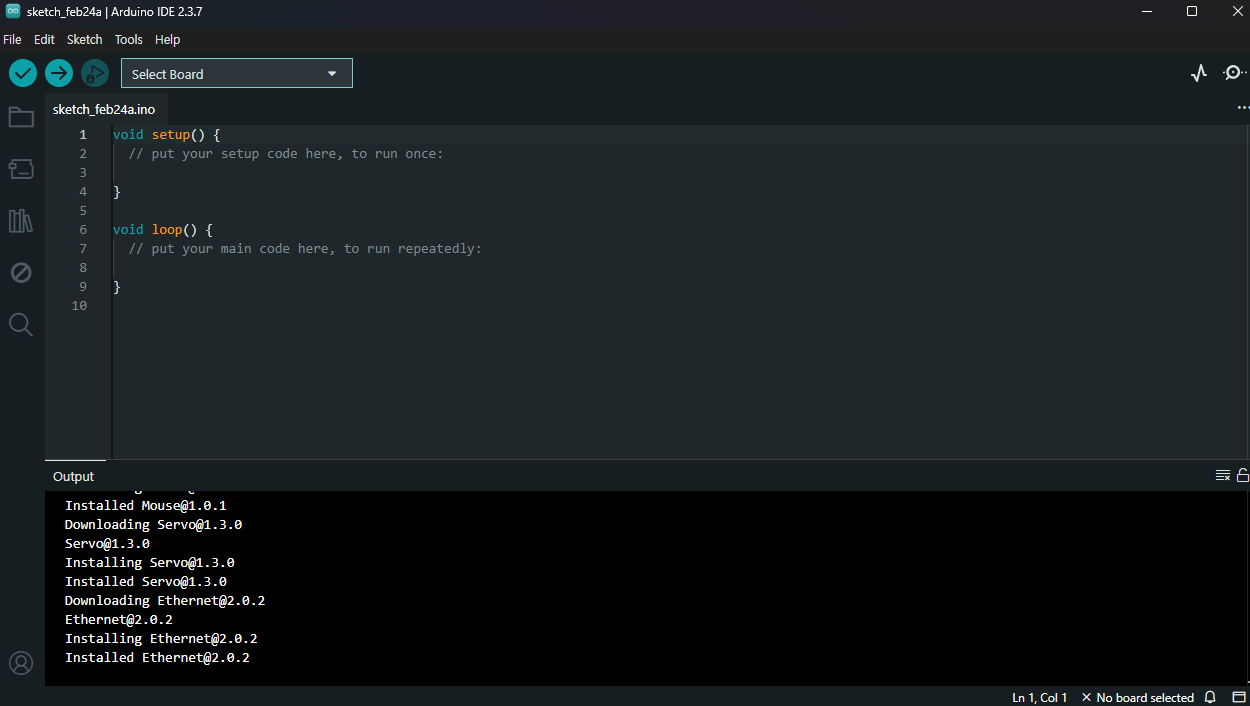
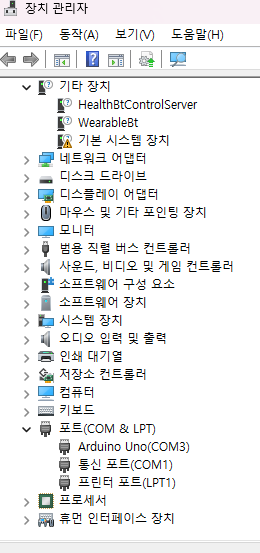
// 내장 LED를 1초마다 깜빡이기

#define LED 13

void setup() {
  pinMode(LED, OUTPUT); // LED_BUILTIN = D13
}

void loop() {
  digitalWrite(LED, HIGH); // LED 켜기
  delay(1000);                     // 1초 대기
  digitalWrite(LED, LOW);  // LED 끄기
  delay(1000);                     // 1초 대기
}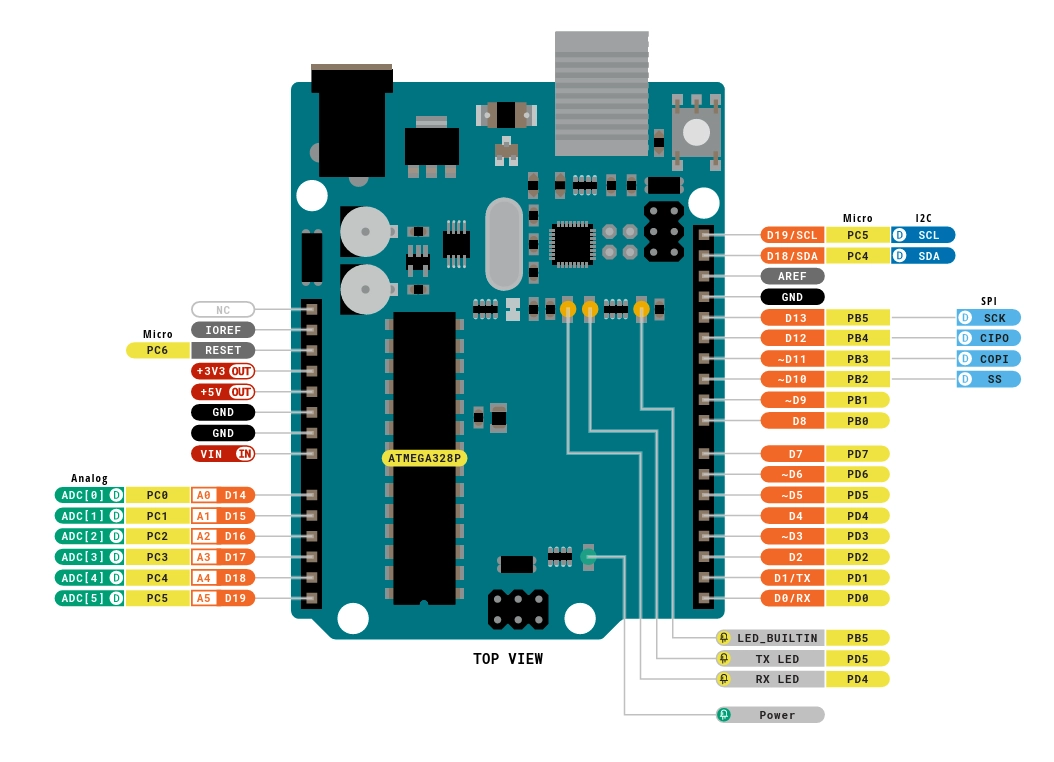
ATMEGA328P: 마이크로 컨트롤러/사용자의 코드를 처리하는 칩
전자회로 기초
전압
전기를 밀어주는 힘
물에 비유하면, 전압은 물탱크의 수압과 같음
수압이 높을수록 물이 더 세게 흐르듯, 전압이 높을수록 전류가 잘 흐름
(아두이노는 주로 5V 또는 3.3V 전압을 사용)
전류
전자의 흐름을 의미
물에 비유하면, 전류는 물이 실제로 흐르는 양
저항
전류의 흐름을 방해하는 정도
물에 비유하면, 저항은 흐르는 물을 가로막는 바위 같은 역할
전류를 안전한 수준으로 줄여주기 위해 주로 사용
옴의 법칙
V=IR
전압, 전류, 저항의 관계를 나타내는 공식
LED 1개 깜빡거리게 하기
void setup(){
  pinMode(3, OUTPUT);
}

void loop(){
  digitalWrite(3, HIGH);
  delay(1000);
  digitalWrite(3, LOW);
  delay(1000);
}
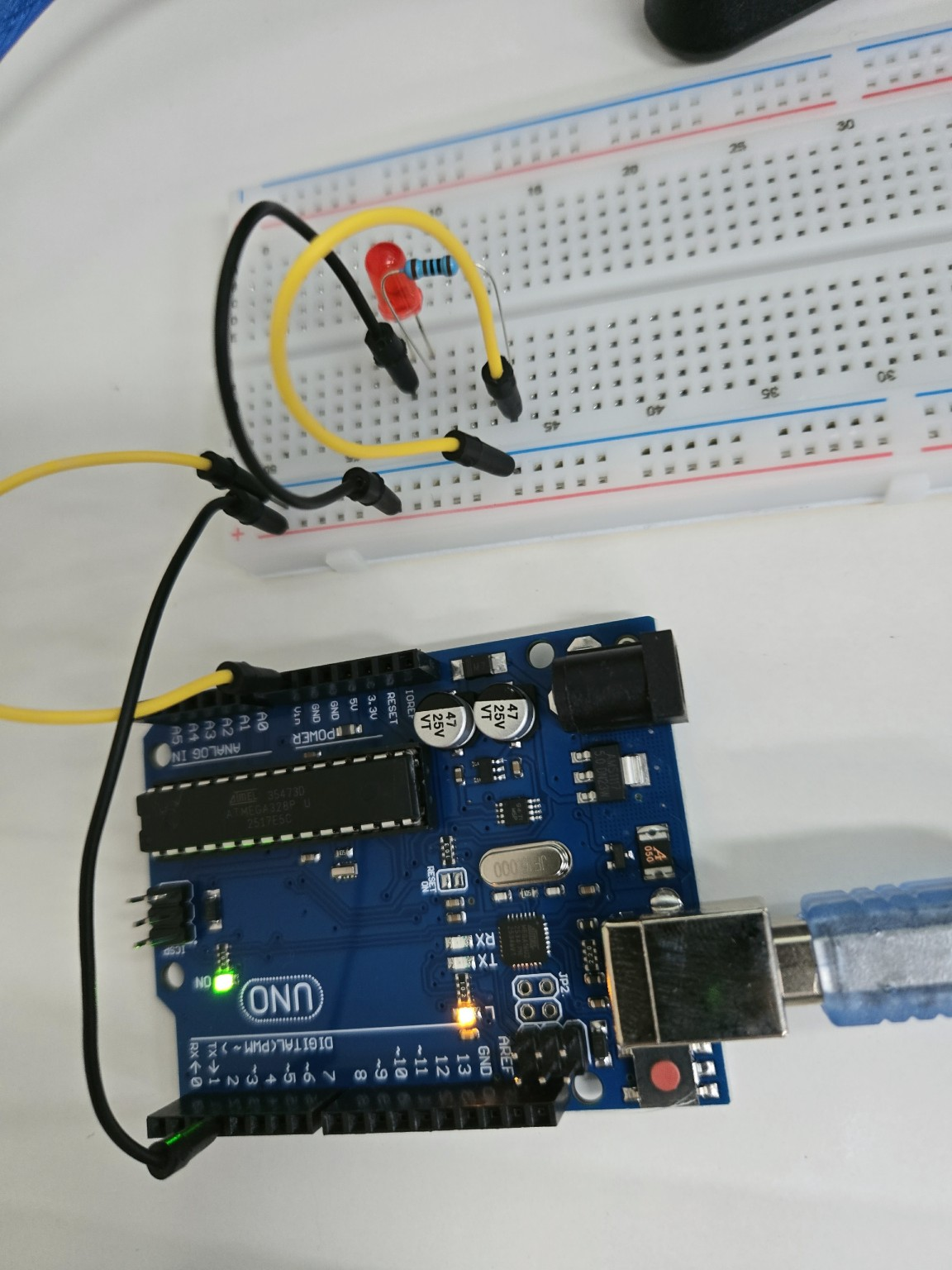
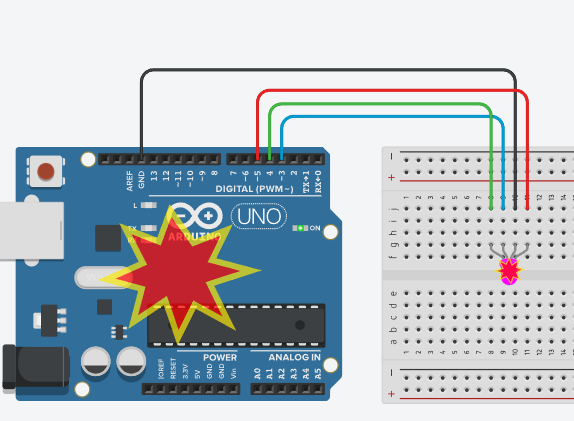
3색 LED 제어
다이오드: 한쪽 방향으로 전류가 흐르도록 제어하는 반도체 소자
#define LED_B 3       // B의 핀 번호 3
#define LED_G 4       // G의 핀 번호 4
#define LED_R 5       // R의 핀 번호 5

void setup() {
  pinMode(LED_B, OUTPUT);
  pinMode(LED_G, OUTPUT);
  pinMode(LED_R, OUTPUT);
}

void loop() {
  // 빨강
  digitalWrite(LED_R, HIGH);
  digitalWrite(LED_G, LOW);
  digitalWrite(LED_B, LOW);
  delay(1000);

  // 초록
  digitalWrite(LED_R, LOW);
  digitalWrite(LED_G, HIGH);
  digitalWrite(LED_B, LOW);
  delay(1000);

  // 파랑
  digitalWrite(LED_R, LOW);
  digitalWrite(LED_G, LOW);
  digitalWrite(LED_B, HIGH);
  delay(1000);
}
#define LED_B 3       // B의 핀 번호 3
#define LED_G 4       // G의 핀 번호 4
#define LED_R 5       // R의 핀 번호 5

void setup() {
  pinMode(LED_B, OUTPUT);
  pinMode(LED_G, OUTPUT);
  pinMode(LED_R, OUTPUT);
}

void loop() {
  // 노랑 (빨강 + 초록)
  digitalWrite(LED_R, HIGH);
  digitalWrite(LED_G, HIGH);
  digitalWrite(LED_B, LOW);
  delay(1000);

  // 하늘색 (초록 + 파랑)
  digitalWrite(LED_R, LOW);
  digitalWrite(LED_G, HIGH);
  digitalWrite(LED_B, HIGH);
  delay(1000);

  // 보라색 (빨강 + 파랑)
  digitalWrite(LED_R, HIGH);
  digitalWrite(LED_G, LOW);
  digitalWrite(LED_B, HIGH);
  delay(1000);
}
PWM 제어
PWM(Pulse Width Modulation, 펄스 폭 변조)은 디지털 출력으로 아날로그처럼 강약을 표현하는 방법
스케치 프로그램의 analogWrite(pin, 값) 함수는 전압의 크기를 0~255 사이의 값으로 제어하는 함수로 전압의 강약을 조절
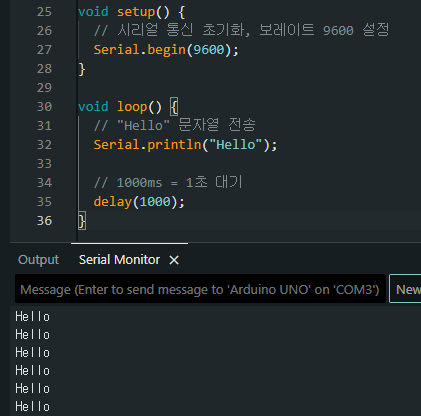
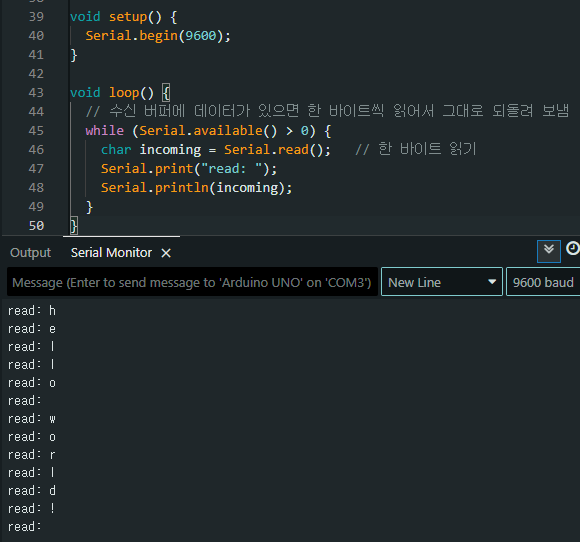
시리얼 통신
보드와 PC, 또는 다른 장치 간에 데이터를 주고받는 방법
통신 속도를 설정할 때는 Serial.begin(보레이트); 함수를 사용
다른 장치로 데이터를 보낼 때는 Serial.print() 또는 Serial.println() 함수를 사용
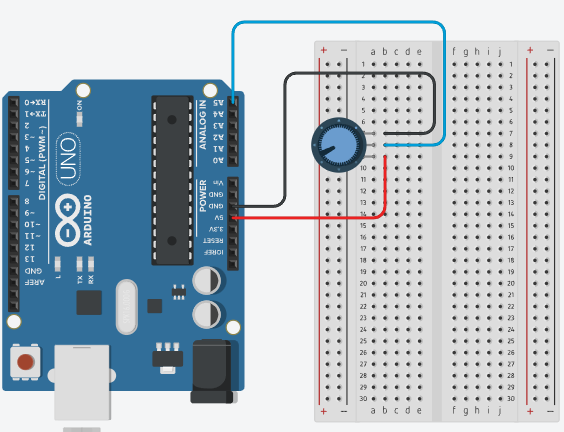
void setup () {
  Serial.begin(9600);
}

void loop() {
  int val = analogRead(A5);
  Serial.println(val);
  delay(500);
}

실습 과제
키트에 포함된 포토센서가 무엇인지, 연결은 어떻게 해야 하는지 조사해보고, 실제로 조도센서의 값을 시리얼모니터에서 실시간 확인하는 프로젝트를 진행해보세요. 힌트는? 포토센서를 가리켜 ‘조도센서’라고도 합니다.
포토센서: 빛의 세기에 따라 전기적 특성이 변하는 센서(포토레지스터,LDR)
어두울수록 저항값 높음
밝을수록 저항값 낮음
아두이노는 전압을 읽지만 LDR은 저항이 변함
ㄴ전압 분배 회로 필요: Vout = Vin * R2/(R1+R2)
ㄴLDR과 일반 전항을 직렬로 연결해 중간 지점 전압을 아두이노 A핀에서 읽음
풀업
밝아질수록 LDR 저항 낮아짐
출력 전압 감소
analogRead 값 감소
밝으면 값 작아지고 어두우면 값 커짐
풀다운
밝아질수록 LDR 저항 낮아짐
출력 전압 감소
analogRead값 증가
밝으면 값 커지고 어두우면 값 작아짐
직관적이라 가장 많이 사용
| 구분 | 풀업 | 풀다운 |
| LDR 위치 | 위(5V쪽) | 아래(GND쪽) |
| 밝아질 때 값 | 감소 | 증가 |
| 사용 빈도 | 적음 | 많음 |
| 직관성 | 낮음 | 높음 |
저항값으로 보통 10kΩ 사용
void setup(){
  Serial.begin(9600);
}
void loop(){
  int readValue = analogRead(A0);
  Serial.println(readValue);
}


'로보테크AI' 카테고리의 다른 글
| 융합_로보테크 AI 자율주행 로봇 개발자 과정-26/02/26[조별과제1] (0) | 2026.02.26 |
|---|---|
| 융합_로보테크 AI 자율주행 로봇 개발자 과정-26/02/25 (0) | 2026.02.25 |
| 융합_로보테크 AI 자율주행 로봇 개발자 과정-26/02/23[PyQt] (0) | 2026.02.23 |
| 융합_로보테크 AI 자율주행 로봇 개발자 과정-26/02/20 (1) | 2026.02.20 |
| 융합_로보테크 AI 자율주행 로봇 개발자 과정-26/02/13 (0) | 2026.02.13 |