함수
프로그래밍에서 특정 작업을 수행하는 코드 블록
어떤 기능을 하는 명령들을 하나의 함수로 만들어두면 명령을 간편하게 실행
불필요한 코드를 줄이고 코드의 재사용성을 높임
복잡한 프로그램을 관리하기 쉬운 작은 단위로 나눌 수 있음
Bash 함수 형식(3)
# 함수 선언
함수_이름() # 선언부 -------------- ①
{
    ...
}

function 함수_이름 # 선언부 ------ ②
{
    ...
}

function 함수_이름() # 선언부 ----- ③
{
    ...
}
# 함수 사용
함수_이름
함수 선언: 함수를 만드는 것
선언부의 형태 차이만 있고 의미는 모두 같음
선언부에는 함수 이름과 함께 function 키워드와 소괄호(())를 넣음
1, 2처럼 function 키워드와 소괄호는 생략 가능
함수 이름은 Bash에서 한 단어로 인식돼야함
함수 호출: 함수 이름만으로 함수 내용을 실행해 사용
#!/bin/bash

function make_a_pizza() {
    echo " - flatten the dough"
    echo " - spread the tomato source"
    echo " - top with ham, cheese, meat and veges"
    echo " - bake in the oven"
}

echo "for first pizza..."
make_a_pizza

echo "for second pizza..."
make_a_pizza

echo "for third pizza..."
make_a_pizza
steezer@DESKTOP-TF8J569:~/260311$ nano func_pizza.sh
steezer@DESKTOP-TF8J569:~/260311$ chmod +x func_pizza.sh
steezer@DESKTOP-TF8J569:~/260311$ ./func_pizza.sh
for first pizza...
 - flatten the dough
 - spread the tomato source
 - top with ham, cheese, meat and veges
 - bake in the oven
for second pizza...
 - flatten the dough
 - spread the tomato source
 - top with ham, cheese, meat and veges
 - bake in the oven
for third pizza...
 - flatten the dough
 - spread the tomato source
 - top with ham, cheese, meat and veges
 - bake in the oven
함수
입력을 받아 어떤 동작을 한 후 결과를 출력
인자: 함수의 입력
매개변수: 함수가 실행될 때 함수 내에서 인자의 값을 저장하는 변수
반환값: 함수의 출력(return)
#!/bin/bash

function magic_box() {
    input="$1"          # 매개변수
    let "result = input + 8"
    return $result      # 반환값
}

magic_box "5"           # 인자
result="$?"
echo "result is $result"
steezer@DESKTOP-TF8J569:~/260311$ nano func_magicbox.sh
steezer@DESKTOP-TF8J569:~/260311$ chmod +x func_magicbox.sh
steezer@DESKTOP-TF8J569:~/260311$ ./func_magicbox.sh
result is 13
기존 코드 수정
#!/bin/bash

function make_a_pizza()
{
    dough="$1"
    source_type="$2"
    pizza_type="$3"

    echo "make a $dough $pizza_type pizza with $source_type source..."
    base_tops="ham, cheese, meat, veges"

    if [ "$pizza_type" == "potato" ]; then
        special_top="potato"
    elif [ "$pizza_type" == "hawaiian" ]; then
        special_top="pineapple"
    elif [ "$pizza_type" == "avocado" ]; then
        special_top="avocado"
    fi

    echo " - flatten the $dough dough"
    echo " - spread the $source_type source"
    echo " - top with $base_tops and $special_top"
    echo " - bake in the oven"
}

echo "for first pizza..."
make_a_pizza "thick" "tomato" "potato"

echo "for second pizza..."
make_a_pizza "thick" "tomato" "hawaiian"

echo "for third pizza..."
make_a_pizza "thin" "spicy BBQ" "avocado"
steezer@DESKTOP-TF8J569:~/260311$ ./func_pizza.sh
for first pizza...
make a thick potato pizza with tomato source...
- flatten the thick dough
- spread the tomato source
- top with ham, cheese, meat, veges and potato
- bake in the oven
for second pizza...
make a thick hawaiian pizza with tomato source...
- flatten the thick dough
- spread the tomato source
- top with ham, cheese, meat, veges and pineapple
- bake in the oven
for third pizza...
make a thin avocado pizza with spicy BBQ source...
- flatten the thin dough
- spread the spicy BBQ source
- top with ham, cheese, meat, veges and avocado
- bake in the oven
1.함수 시작 부분에 매개변수를 명시
매개변수 3개를 각각 dough, source_type, pizza_type 변수에 저장
2.만드는 피자에 대한 설명을 출력
3.pizza_type 변수의 값에 따라 스페셜 토핑을 결정
4.dough, source_type, pizza_type, base_tops, special_top 변수의 값에 따라 피자를 만듦
5.make_a_pizza 함수를 호출하며 함수 이름 뒤에 인자를 차례로 입력
6.인자에 공백 문자가 포함되는 경우에는 반드시 큰따옴표나 작은따옴표로 묶음
반환값은 함수에서 return 키워드를 사용해 0~255 사이 정수 값을 호출한 곳으로 반환
일반적으로 0은 성공을, 그 이외 값은 실패로 간주
출력값은 함수를 실행하며 표준 출력에 출력된 내용을 반환하는 방법
#!/bin/bash

function magic_box_with_progress()
{
    input="$1"
    let "result = input + 8"
    echo "$input + 8 = $result"
    return $result
}

magic_box_with_progress "7"
result="$?"
echo "result is $result"
steezer@DESKTOP-TF8J569:~/260311$ ./func_magicbox.sh
7 + 8 = 15
result is 15
명령어 치환
달러 기호($)와 소괄호(())로 명령 또는 함수 호출을 감싸는 방법
명령어 치환으로 명령을 입력하면 해당 명령이 실행되며 표준 출력으로 출력한 내용을 반환
#!/bin/bash

function magic_box_with_progress()
{
    input="$1"
    let "result = input + 8"
    echo "$input + 8 = $result"
    return $result
}

progress=$(magic_box_with_progress "7")
result="$?"
echo "progress: $progress"
echo "result is $result"
steezer@DESKTOP-TF8J569:~/260311$ ./func_magicbox.sh
progress: 7 + 8 = 15
result is 15
변수 심화
위치 매개변수
매개변수의 순서를 나타냄
특수 매개변수
$#
스크립트나 함수의 매개변수 개수를 나타내는 특수 매개변수
$0
실행 중인 스크립트 파일의 이름을 나타내는 특수 매개변수
$*, $@
모든 위치 매개변수를 다루는 특수 매개변수
$*는 스크립트나 함수의 모든 위치 매개변수를 하나의 문자열로 인식
$@은 스크립트나 함수의 위치 매개변수를 각각 인식
$?
최근에 실행된 명령이나 함수, 스크립트의 프로세스 종료 코드 또는 반환값을 나타내는 특수 매개변수
$$
실행 중인 셸의 PID를 반환
변수 범위
변수에 접근해 사용할 수 있는 코드 영역 또는 코드 영역의 범위
함수 로컬 변수
함수 안에서 local이라는 키워드와 함께 선언된 변수
해당 함수 안에서만 사용할 수 있으며 함수 밖에서는 접근할 수 없음
글로벌 변수
함수 로컬 변수를 제외한 모든 변수
export
변수를 자식 프로세스에서도 사용할 수 있게 함
환경변수
운영체제에서 사용자 환경에 대한 정보를 담고 있는 변수
셸이나 실행되는 프로그램에 다양한 정보를 제공
스템 설정, 사용자 세션 정보, 프로그램 경로 등과 같은 중요한 데이터를 포함
주요 환경변수
| 환경변수 | 의미 |
| HOME | 사용자의 홈 디렉터리 경로를 나타냅니다. |
| PATH | 파일을 실행했을 때 실행 파일을 찾는 디렉터리 목록을 나타냅니다. |
| PWD | 현재 작업 디렉터리의 경로를 나타냅니다. |
| USER | 현재 로그인한 사용자의 이름을 나타냅니다. |
| SHELL | 사용자의 로그인 셸을 나타냅니다. |
| LANG | 시스템의 언어와 지역 설정을 나타냅니다. |
| TERM | 현재 사용 중인 터미널의 타입을 나타냅니다. |
| PS1 | 기본 셸 프롬프트의 모양을 설정합니다. |
| HOSTNAME | 시스템의 호스트 이름을 나타냅니다. |
배열
번호(인덱스)와 번호에 대응하는 데이터(값)로 이루어진 자료구조
일반적으로 배열에는 같은 종류의 데이터들이 순차적으로 저장
인덱스 배열
일반적으로 배열이라고 하면 흔히 떠올리는 형태
배열의 요소마다 0보다 크거나 같은 정수 인덱스와 값을 저장할 수 있는 공간이 있음
배열의 값에는 인덱스를 이용해 직접 접근
인덱스 배열 선언 방법
declare -a 변수
변수=()
변수=("요소1" "요소2" ... "요소n")
연관 배열
키(key)와 값(value)의 쌍으로 이루어진 자료구조
로그래밍 언어에서 맵(map), 딕셔너리(dictionary) 등으로 표현
키에 해당하는 값이 연결
중복X
연관 배열 선언 방법
declare -A 변수
변수[키]=값
unset 변수[키]
${변수[키]}
${변수[@]} ←---- 값을 참조할 때
${!변수[@]} ←--- 키를 참조할 때
쿼팅
문자열이나 변수를 큰따옴표나 작은따옴표로 감싸는 것
특수 문자의 의미를 변경하거나 제거해서 문자열이나 명령어의 해석 방식을 조정
Bash에서는 싱글 쿼트, 더블 쿼트, 이스케이프 문자를 주로 사용(', ", \)
싱글 쿼트
문자열을 작은따옴표(')로 묶는 것을 의미
싱글 쿼트된 문자열은 모든 문자의 값이 그대로 유지
문자가 다른 의미로 확장X
더블 쿼트
문자열을 큰따옴표(")로 감싸는 것을 의미
공백이 포함된 문자열을 하나의 문자열로 처리
문자열 내에서 ${변수} 형식으로 변수의 값을 사용(참조)
문자열 내에서 $()나 백틱(`)을 사용해 명령어 치환
\n과 같이 백슬래시로 시작하는 특수한 문자 사용
*와 ?를 파일 이름으로 확장X
이스케이프 문자
문자 그대로 해석할 때 싱글 쿼트
백슬래시(\)를 사용해도 문자를 문자 그대로 해석
이스케이프 문자 뒤에 개행 문자가 오면 명령을 입력하는 줄이 끝나지 않았음을 나타냄
주로 명령이 길어서 여러 줄에 걸쳐 하나의 명령을 내리고 싶을 때 사용
주요하게 봐두면 좋은 절들
3.1 3.2 3.3
4.4 4.5
5.3
6.2
7.2
9.1
+ 추가로 보면 좋을 것(12.1 리디렉션, 13.1.1 패키지와 패키지 관리, 13.3.1 bashrc, 14.1 grep, 14.2 find)
트위니 현장실습 전 4/27 ~ 5/15 사이 결석해야하면 미리 알림
ROS2-humble
터틀봇3가 ROS humble 지원
Sublime Text 설치
https://www.sublimetext.com/download
Download - Sublime Text
Sublime Text 4 is the current version of Sublime Text. For bleeding-edge releases, see the dev builds. Sublime Text may be downloaded and evaluated for free, however a license must be purchased for continued use. There is currently no enforced time limit f
www.sublimetext.com
https://www.sublimetext.com/docs/linux_repositories.html
Linux Package Manager Repositories
Sublime Text includes an auto-upgrade mechanism on Windows and Mac to make upgrades a snap. Instead of going against the grain of the Linux ecosystem, packages and package repositories are provided for most of the major distributions. Builds listed in the
www.sublimetext.com
설치 과정에서 모든 입력은 리눅스 우분투 터미널에 입력
wget -qO - https://download.sublimetext.com/sublimehq-pub.gpg | sudo tee /etc/apt/keyrings/sublimehq-pub.asc > /dev/null
stable
echo -e 'Types: deb\nURIs: https://download.sublimetext.com/\nSuites: apt/stable/\nSigned-By: /etc/apt/keyrings/sublimehq-pub.asc' | sudo tee /etc/apt/sources.list.d/sublime-text.sources
Update apt sources and install Sublime Text
sudo apt-get update
sudo apt-get install sublime-text
sublime text 사용해보기
subl .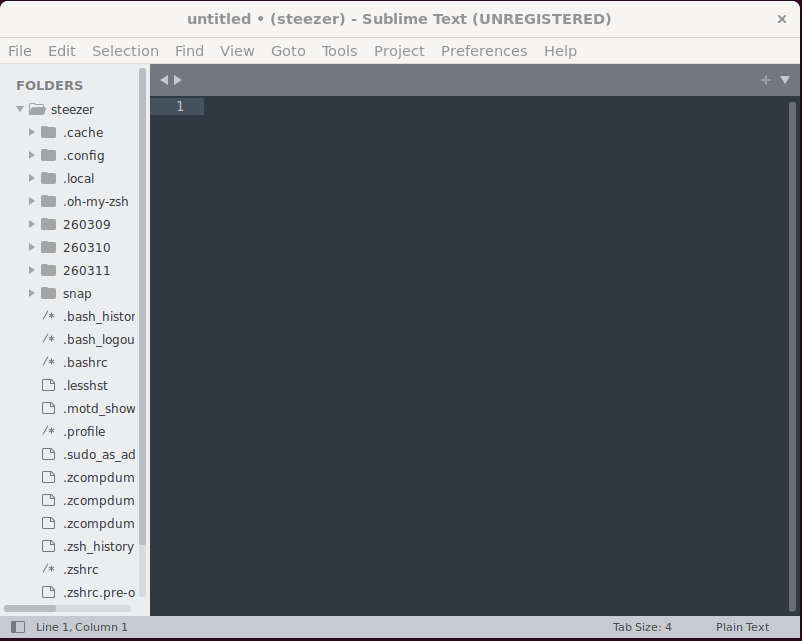
Ctrl Shift P

sspy
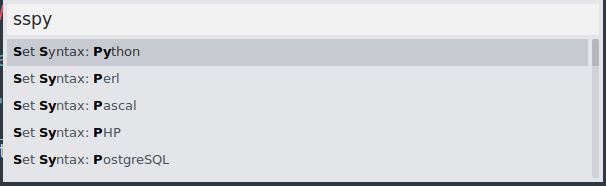

더블 클릭 + CtrlD
같은 단어 동시 선택 및 수정
ROS 설치
https://docs.ros.org/en/humble/Installation.html
Installation — ROS 2 Documentation: Humble documentation
You're reading the documentation for an older, but still supported, version of ROS 2. For information on the latest version, please have a look at Kilted. Installation Options for installing ROS 2 Humble Hawksbill: Binary packages Binaries are only created
docs.ros.org
https://docs.ros.org/en/humble/Installation/Ubuntu-Install-Debs.html
Ubuntu (deb packages) — ROS 2 Documentation: Humble documentation
You're reading the documentation for an older, but still supported, version of ROS 2. For information on the latest version, please have a look at Kilted. Ubuntu (deb packages) Table of Contents Deb packages for ROS 2 Humble Hawksbill are currently availab
docs.ros.org
locale  # check for UTF-8

sudo apt update && sudo apt install locales
sudo locale-gen en_US en_US.UTF-8
sudo update-locale LC_ALL=en_US.UTF-8 LANG=en_US.UTF-8
export LANG=en_US.UTF-8

locale  # verify settings
sudo apt install software-properties-common
sudo add-apt-repository universesudo apt update && sudo apt install curl -y
export ROS_APT_SOURCE_VERSION=$(curl -s https://api.github.com/repos/ros-infrastructure/ros-apt-source/releases/latest | grep -F "tag_name" | awk -F\" '{print $4}')
curl -L -o /tmp/ros2-apt-source.deb "https://github.com/ros-infrastructure/ros-apt-source/releases/download/${ROS_APT_SOURCE_VERSION}/ros2-apt-source_${ROS_APT_SOURCE_VERSION}.$(. /etc/os-release && echo ${UBUNTU_CODENAME:-${VERSION_CODENAME}})_all.deb"
sudo dpkg -i /tmp/ros2-apt-source.deb
Install ROS 2 packages
sudo apt update
sudo apt upgrade
sudo apt install ros-humble-desktop
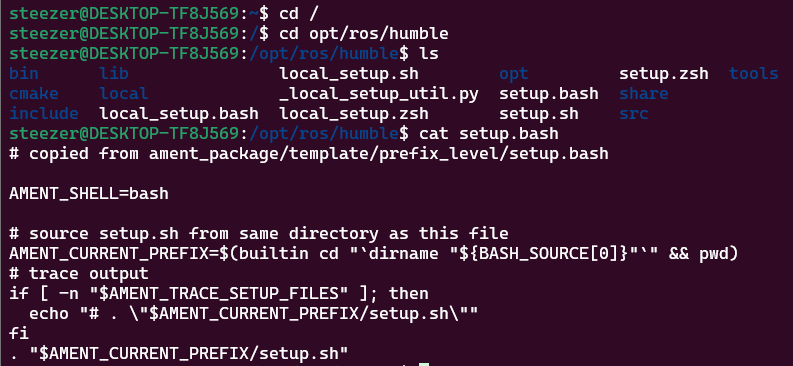
터미널 2개 실행
1
source /opt/ros/humble/setup.bash
ros2 run demo_nodes_cpp talker
2
source /opt/ros/humble/setup.bash
ros2 run demo_nodes_py listener
설치 끝
방향: ROS2를 우분투 환경에서 사용하는 방법을 학습
실제 우분투가 설치된 PC를 사용하는 것은 아님
윈도우 PC를 사용
1. ubuntu 22.04 터미널 어플리케이션 설치해서 진행
2. 가상머신 프로그램 사용해서 우분투 환경 마련하기
3. 개인 노트북 가져와서 우분투 설치해 사용하기
※어떤 환경이든 상관없음
복습
mkdir
폴더 만들기(정식은 디렉터리)
cd
폴더 간 이동
rm
파일 삭제
rm -r 디렉터리 삭제
.bashrc
사용하는 bash 셸에 대한 설정 내용이 적혀있는 문서
이 파일은 배시 셸이 열릴 때마다 해당 배시 셸에 대해서 한번 실행 됨
사용자가 이 파일에 어떤 내용을 추가하면, 추가한 내용은 그 다음에 셸이 열릴 때마다 적용
steezer@DESKTOP-TF8J569:~$ pwd
/home/steezer
steezer@DESKTOP-TF8J569:~$ ls -a
.              .bashrc      normal_file                .zcompdump-DESKTOP-TF8J569-5.8.1
..             .cache       .oh-my-zsh                 .zcompdump-DESKTOP-TF8J569-5.8.1.zwc
260309         .config      .profile                   .zsh_history
260310         greetings    .ros                       .zshrc
260311         .lesshst     snap                       .zshrc.pre-oh-my-zsh
.bash_history  .local       .sudo_as_admin_successful
.bash_logout   .motd_shown  .zcompdump
steezer@DESKTOP-TF8J569:~$ subl .bashrc
# ~/.bashrc: executed by bash(1) for non-login shells.
# see /usr/share/doc/bash/examples/startup-files (in the package bash-doc)
# for examples
# If not running interactively, don't do anything
case $- in
*i*) ;;
*) return;;
esac
# don't put duplicate lines or lines starting with space in the history.
# See bash(1) for more options
HISTCONTROL=ignoreboth
# append to the history file, don't overwrite it
shopt -s histappend
# for setting history length see HISTSIZE and HISTFILESIZE in bash(1)
HISTSIZE=1000
HISTFILESIZE=2000
# check the window size after each command and, if necessary,
# update the values of LINES and COLUMNS.
shopt -s checkwinsize
# If set, the pattern "**" used in a pathname expansion context will
# match all files and zero or more directories and subdirectories.
#shopt -s globstar
# make less more friendly for non-text input files, see lesspipe(1)
[ -x /usr/bin/lesspipe ] && eval "$(SHELL=/bin/sh lesspipe)"
# set variable identifying the chroot you work in (used in the prompt below)
if [ -z "${debian_chroot:-}" ] && [ -r /etc/debian_chroot ]; then
debian_chroot=$(cat /etc/debian_chroot)
fi
# set a fancy prompt (non-color, unless we know we "want" color)
case "$TERM" in
xterm-color|*-256color) color_prompt=yes;;
esac
# uncomment for a colored prompt, if the terminal has the capability; turned
# off by default to not distract the user: the focus in a terminal window
# should be on the output of commands, not on the prompt
#force_color_prompt=yes
if [ -n "$force_color_prompt" ]; then
if [ -x /usr/bin/tput ] && tput setaf 1 >&/dev/null; then
# We have color support; assume it's compliant with Ecma-48
# (ISO/IEC-6429). (Lack of such support is extremely rare, and such
# a case would tend to support setf rather than setaf.)
color_prompt=yes
else
color_prompt=
fi
fi
if [ "$color_prompt" = yes ]; then
PS1='${debian_chroot:+($debian_chroot)}\[\033[01;32m\]\u@\h\[\033[00m\]:\[\033[01;34m\]\w\[\033[00m\]\$ '
else
PS1='${debian_chroot:+($debian_chroot)}\u@\h:\w\$ '
fi
unset color_prompt force_color_prompt
# If this is an xterm set the title to user@host:dir
case "$TERM" in
xterm*|rxvt*)
PS1="\[\e]0;${debian_chroot:+($debian_chroot)}\u@\h: \w\a\]$PS1"
;;
*)
;;
esac
# enable color support of ls and also add handy aliases
if [ -x /usr/bin/dircolors ]; then
test -r ~/.dircolors && eval "$(dircolors -b ~/.dircolors)" || eval "$(dircolors -b)"
alias ls='ls --color=auto'
#alias dir='dir --color=auto'
#alias vdir='vdir --color=auto'
alias grep='grep --color=auto'
alias fgrep='fgrep --color=auto'
alias egrep='egrep --color=auto'
fi
# colored GCC warnings and errors
#export GCC_COLORS='error=01;31:warning=01;35:note=01;36:caret=01;32:locus=01:quote=01'
# some more ls aliases
alias ll='ls -alF'
alias la='ls -A'
alias l='ls -CF'
# Add an "alert" alias for long running commands. Use like so:
# sleep 10; alert
alias alert='notify-send --urgency=low -i "$([ $? = 0 ] && echo terminal || echo error)" "$(history|tail -n1|sed -e '\''s/^\s*[0-9]\+\s*//;s/[;&|]\s*alert$//'\'')"'
# Alias definitions.
# You may want to put all your additions into a separate file like
# ~/.bash_aliases, instead of adding them here directly.
# See /usr/share/doc/bash-doc/examples in the bash-doc package.
if [ -f ~/.bash_aliases ]; then
. ~/.bash_aliases
fi
# enable programmable completion features (you don't need to enable
# this, if it's already enabled in /etc/bash.bashrc and /etc/profile
# sources /etc/bash.bashrc).
if ! shopt -oq posix; then
if [ -f /usr/share/bash-completion/bash_completion ]; then
. /usr/share/bash-completion/bash_completion
elif [ -f /etc/bash_completion ]; then
. /etc/bash_completion
fi
fi
.bashrc 119에 추가
항상 실행할 경우 추가
echo "ROS2 humble is activated!"
source /opt/ros/humble/setup.bash
ROS2 도메인 설정
echo "ROS2 humble is activated!"
source /opt/ros/humble/setup.bash
export ROS_DOMAIN_ID=21
ROS?
Robot Operating System, 로봇 운영체제
=> 로봇 기기 간의 메시지 통신을 위해 사용하는 소프트웨어 플랫폼(중계 역할)
=> 메타 운영체제(운영체제 위 운영체제)
Turtlesim 실행
ros2 run <PKG Name> <Node Name> 구조
ros2 기본
run 실행
PKG 이름
Node 이름
ros2 run turtlesim turtlesim_node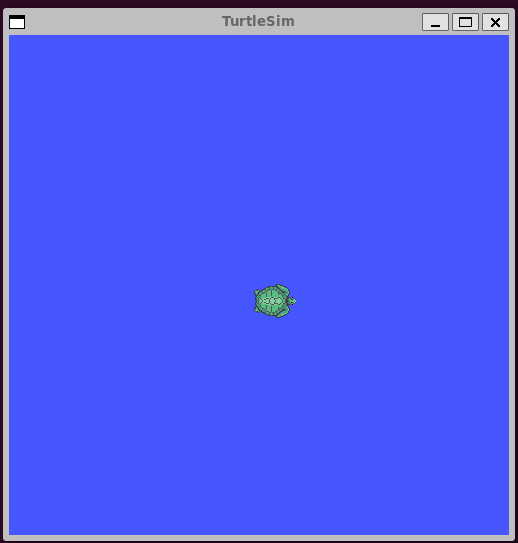
ROS Node
ROS2 humble is activated!
steezer@DESKTOP-TF8J569:~$ ros2 node list
/turtlesim
steezer@DESKTOP-TF8J569:~$ ros2 node info /turtlesim
/turtlesim
  Subscribers:
    /parameter_events: rcl_interfaces/msg/ParameterEvent
    /turtle1/cmd_vel: geometry_msgs/msg/Twist
  Publishers:
    /parameter_events: rcl_interfaces/msg/ParameterEvent
    /rosout: rcl_interfaces/msg/Log
    /turtle1/color_sensor: turtlesim/msg/Color
    /turtle1/pose: turtlesim/msg/Pose
  Service Servers:
    /clear: std_srvs/srv/Empty
    /kill: turtlesim/srv/Kill
    /reset: std_srvs/srv/Empty
    /spawn: turtlesim/srv/Spawn
    /turtle1/set_pen: turtlesim/srv/SetPen
    /turtle1/teleport_absolute: turtlesim/srv/TeleportAbsolute
    /turtle1/teleport_relative: turtlesim/srv/TeleportRelative
    /turtlesim/describe_parameters: rcl_interfaces/srv/DescribeParameters
    /turtlesim/get_parameter_types: rcl_interfaces/srv/GetParameterTypes
    /turtlesim/get_parameters: rcl_interfaces/srv/GetParameters
    /turtlesim/list_parameters: rcl_interfaces/srv/ListParameters
    /turtlesim/set_parameters: rcl_interfaces/srv/SetParameters
    /turtlesim/set_parameters_atomically: rcl_interfaces/srv/SetParametersAtomically
  Service Clients:

  Action Servers:
    /turtle1/rotate_absolute: turtlesim/action/RotateAbsolute
  Action Clients:
steezer@DESKTOP-TF8J569:~$ ros2 service list
/clear
/kill
/reset
/spawn
/turtle1/set_pen
/turtle1/teleport_absolute
/turtle1/teleport_relative
/turtlesim/describe_parameters
/turtlesim/get_parameter_types
/turtlesim/get_parameters
/turtlesim/list_parameters
/turtlesim/set_parameters
/turtlesim/set_parameters_atomically
ros2 service type /turtle1/teleport_absoluteturtlesim/srv/TeleportAbsolute
steezer@DESKTOP-TF8J569:~$ ros2 interface show turtlesim/srv/TeleportAbsolute
float32 x
float32 y
float32 theta
---
steezer@DESKTOP-TF8J569:~$ ros2 service call /turtle1/teleport_absolute turtlesim/srv/TeleportAbsolute "{x: 2, y: 2, theta: 1.57}"
requester: making request: turtlesim.srv.TeleportAbsolute_Request(x=2.0, y=2.0, theta=1.57)

response:
turtlesim.srv.TeleportAbsolute_Response()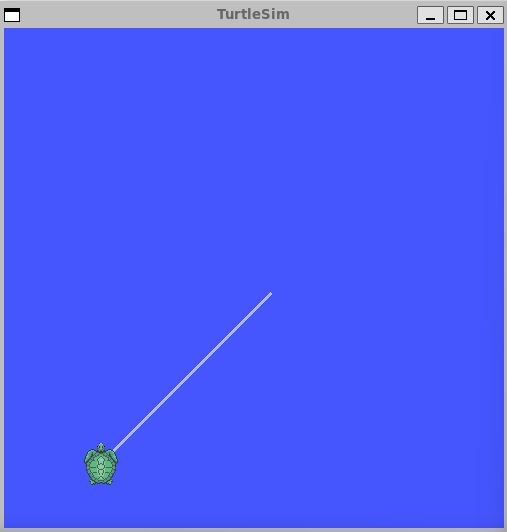
namespace
노드, 토픽, 서비스 등의 이름 충돌을 방지하고 시스템을 계층적으로 관리하기 위해 사용하는 이름 공간
여러 로봇이나 여러 노드가 동일한 이름을 사용할 때 구분하기 위해 사용
spawn
시뮬레이션 환경에 로봇(또는 객체)을 생성하는 것
steezer@DESKTOP-TF8J569:~$ ros2 service call /spawn turtlesim/srv/Spawn "{x: 1, y: 1, theta:
 0, name: 'steezer'}"
requester: making request: turtlesim.srv.Spawn_Request(x=1.0, y=1.0, theta=0.0, name='steezer')

response:
turtlesim.srv.Spawn_Response(name='steezer')
처음으로 되돌리기
steezer@DESKTOP-TF8J569:~$ ros2 service call /reset std_srvs/srv/Empty {}
requester: making request: std_srvs.srv.Empty_Request()

response:
std_srvs.srv.Empty_Response()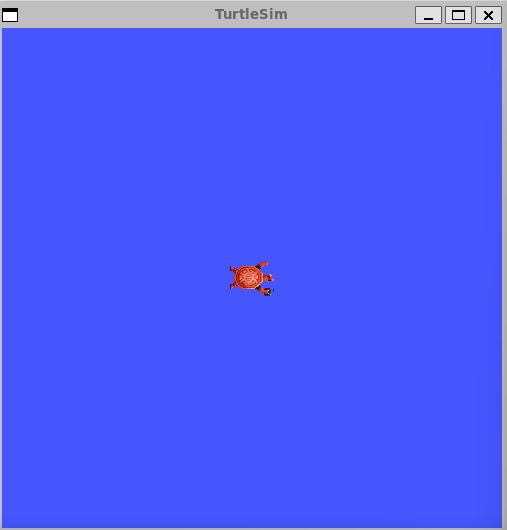
'로보테크AI' 카테고리의 다른 글
| 융합_로보테크 AI 자율주행 로봇 개발자 과정-26/03/13 +자소서 특강 (0) | 2026.03.13 |
|---|---|
| 융합_로보테크 AI 자율주행 로봇 개발자 과정-26/03/12 (0) | 2026.03.12 |
| 융합_로보테크 AI 자율주행 로봇 개발자 과정-26/03/10 (0) | 2026.03.10 |
| 융합_로보테크 AI 자율주행 로봇 개발자 과정-26/03/09[Linux] (0) | 2026.03.09 |
| 융합_로보테크 AI 자율주행 로봇 개발자 과정-26/03/06[발표회1] (0) | 2026.03.06 |