잔재 코드 정리
main, player
주석처리 + 코드 정리
아이템
item_heal=15 #H
item_attack=16 #A
item_defense=17 #B
이외에 하나도 사용 X
맵
dict_enum 안의 사용되지 않는 타일 코드 ("2","3","4","8","9","10","11")
get_monster_num() (사용 안 됨)
monster_num 필드 자체 (지금 구조에선 불필요)
검토 과정에서 사용 안되는 함수가 50%
item 모듈에서 처리할 것들을 전부 main이 해버려서 사용되는게 없음
수정본
main
import msvcrt #window 콘솔 입력 처리,키입력:kbhit(), 키읽기:getch()
import os #cls(화면 지우기), pause
import random #몬스터 이동 방향 무작위 선택, 몬스터 공격확률50%
#내부 모듈
from game_package import map_module #맵 파일(txt)->2차원 배열 관리+출력
from game_package import player #플레이어 좌표, 체력, 이동, 공격, 버프 로직
from game_package import monster #몬스터 좌표, 이동, 체력, 공격 판정
from game_package import item #아이템 코드 정의 및 효과 처리

is_not_dead = True #메인 게임 루프 제어용 플래그, 플레이어 사망 시 False 처리

#스테이지 파일 절대경로
BASE_DIR = os.path.dirname(os.path.abspath(__file__))#stage1~3까지 실행위치 상관없이 불러오기

# 오른쪽에 표시될 게임 메뉴얼
MANUAL_LINES = [
    "🎮 GAME MANUAL 🎮",
    "",
    "이동 : W A S D",
    "",
    "공격 : R (주변 8칸)",
    "",
    "",
    "꙰ 아이템 🗲",
    "",
    "✞ : HP +1 (최대 3)",
    "",
    "🗲 : 다음 공격력 2 (1회)",
    "",
    " ꙰ : 몬스터 공격 1회 무효",
]


def draw(): #콘솔 화면 전체 초기화, 이전 출력 잔상 제거
    os.system("cls")

    # HP 표시
    hp = player_.get_hp()
    max_hp = player_.max_hp #항상 피 최대 3
    hearts = "♥ " * hp + "♡ " * (max_hp - hp)
    print(f"HP: {hearts}")

    # 버프 표시 (A / B)
    buffs = []
    if hasattr(player_, "buff_attack") and player_.buff_attack:
        buffs.append("🗲") #공격력 증가 버프 A(1회)
    if hasattr(player_, "buff_block") and player_.buff_block:
        buffs.append("꙰") #방어력 증가 버프 B(1회)

    print("BUFF:", " ".join(buffs) if buffs else "-") #버프가 없을 경우 "-" 출력
    print()
    # 스테이지 정보, 현재 스테이지 번호 / 전체 스테이지 수
    print(f"STAGE : {current_stage_index + 1} / {len(stage_files)}")
    print()

    map_.draw_map(MANUAL_LINES) #맵 출력, 내부 20x20 2차원 배열 순회하며 콘솔 출력 + 오른쪽 메뉴얼 표시


def start():
    draw() #게임 시작 시 최초 화면 출력

def load_stage(stage_path): #스테이지 전환 시 호출
    global map_, monsters_, player_ # 맵, 몬스터 플레이어 상태 새로 구성

    # 스테이지 시작시 플레이어 상태 초기화
    player_.reset_status()

    # 맵 로드
    map_ = map_module.Map(stage_path)


    # 몬스터 초기화
    monsters_ = []

    # 플레이어 / 몬스터 위치 세팅
    for i in range(20):
        for j in range(20):
            if map_.get_map_array()[i][j] == "5": #플레이어 시작 위치 설정
                player_.set_position(j, i) #좌표 규칙 (x=j, y=i)

            elif map_.get_map_array()[i][j] == "7": #몬스터 생성 위치
                m = monster.Monster(3) #체력 3 공격 1
                m.set_position(j, i)
                monsters_.append(m)
    draw() #스테이지 로드 직후 화면 출력

def update():

    map_.change_map(0,0,6,1,1,3)
    #print(map_.get_map_array)
    draw()

# ---------------- Stage 관리 ----------------
stage_files = [
    os.path.join(BASE_DIR, "stage1.txt"),
    os.path.join(BASE_DIR, "stage2.txt"),
    os.path.join(BASE_DIR, "stage3.txt"),
]

current_stage_index = 0 #현재 진행 중인 스테이지 인덱스

#Awake--------------------------------------------------------------------------//
#Class 인스턴스 초기화

map_ = map_module.Map(stage_files[current_stage_index]) #첫 스테이지 맵

player_ = player.Player(3,3,1,False) #플레이어 HP 최대 3 현재 3


monsters_ = [] #load_stage에서 채워짐


draw()


#Start--------------------------------------------------------------------------//

start()

load_stage(stage_files[current_stage_index])


#Update--------------------------------------------------------------------------//

while is_not_dead: #메인 루프, 게임 종료까지 반복, 1회 루프 == 1틱


    if msvcrt.kbhit(): #키 입력이 있을 때만
        key = msvcrt.getch()

        # ---------------------------atack----------------------------------------
        if key in (b'r', b'R'):
            attack_positions = player_.get_attack_targets(map_.get_map_array()) #플레이어 주변 8칸 좌표 목록 반환

            for m in monsters_[:]:#리스트 복사본, 순회 중 제거해도 에러 방지용
                if m.get_position() in attack_positions: #공격 범위 내 몬스터 데미지 적용
                    damage = player_.attack_power
                    m.take_damage(damage)
                    player_.consume_attack_buff() #공격 버프 있으면 즉시 소모
                    if m.is_dead(): #몬스터 사망 시 리스트에서 제거 + 맵 타일로 변경
                        mx, my = m.get_position()
                        map_.change_map(my, mx, 1, my, mx, 1)
                        monsters_.remove(m)


            draw()
            continue
        # -----------------------------player------------------------------------------

        origin_x, origin_y = player_.get_position() #이동 전 좌표 저장
        movecode = player_.movement(key, map_.get_map_array())

        if movecode != "f": #이동한 위치 타일 코드 확인
            nx, ny = player_.get_position()
            target = map_.get_map_array()[ny][nx]

            # H 아이템 (15): 체력 +1 (최대면 효과 없음), 아이템은 사라짐
            # ---------------- Item 처리 ----------------
            if item.handle_item(
                    target,
                    player_,
                    map_,
                    origin_y, origin_x,
                    ny, nx
            ):
                draw()
                continue

            # 도착지
            if target == "6":

                # 마지막 스테이지면 게임 클리어
                if current_stage_index == len(stage_files) - 1:
                    print("\n 모든 스테이지를 클리어했습니다!")
                    print("게임 클리어!")
                    os.system("pause")
                    exit(0)

                # 다음 스테이지로 이동
                current_stage_index += 1
                print(f"\n ▶ 다음 스테이지로 이동합니다 ({current_stage_index + 1})")
                os.system("pause")

                load_stage(stage_files[current_stage_index])
                continue

            map_.change_map(origin_y, origin_x, 1, ny, nx, 5)
        #-----------------------------monster------------------------------------------

        for m in monsters_: #각 몬스터 랜덤 이동 시도
            m_origin_position = m.get_position()  # monster origin position
            m_movecode = m.monster_movement(map_.get_map_array())  # monster new position

            if m_movecode != "f":
                 map_.change_map(m_origin_position[1], m_origin_position[0], 1,
                        m.get_position()[1], m.get_position()[0], 7)

        # ---------------------- monster attack ----------------------
        px, py = player_.get_position() #플레이어 좌표

        for m in monsters_: #몬스터 좌표

            # 플레이어 주변 8칸 이내
            if m.monster_attack(px,py):
                if player_.consume_block_buff():
                        continue  #방어 버프로 이번 공격 무효

                player_.t_damage() #플레이어 체력 감소
                draw()

                if player_.dead(): #체력 0 게임 종료
                    draw()
                    print("\nGAME OVER")
                    os.system("pause")
                    exit(0)
        # -------------------------------------------------------------

        draw()
item
class ItemBase:

    code: str  # 예: "15", "16", "17"

    def apply(self, player):
        raise NotImplementedError("Item must implement apply()")

class HealItem(ItemBase):
    code = "15"

    def apply(self, player):
        # 체력 +1 (최대 체력 초과 불가)
        player.heal()

class AttackItem(ItemBase):
    code = "16"

    def apply(self, player):
        # 다음 공격력 2 (1회)
        player.attack_power = 2
        player.buff_attack = True

class DefenseItem(ItemBase):
    code = "17"

    def apply(self, player):
        # 몬스터 공격 1회 무효
        player.buff_block = True

ITEM_REGISTRY = {
    HealItem.code: HealItem(),
    AttackItem.code: AttackItem(),
    DefenseItem.code: DefenseItem(),
}
def handle_item(target_tile: str, player, map_, oy, ox, ny, nx) -> bool:

    item = ITEM_REGISTRY.get(target_tile)
    if not item:
        return False  # 아이템 타일이 아님

    # 아이템 효과 적용
    item.apply(player)

    # 아이템을 먹은 뒤 플레이어 이동 + 아이템 제거
    map_.change_map(oy, ox, 1, ny, nx, 5)
    return True
map_module
class Map:

    dict_enum = {
        "0": " ■ ",     #Wall
        "1": "   ",     #Road
        "2": " ? ",
        "3": " ? ",
        "4": " ? ",
        "5": " ဝိူ ",     #Player
        "6": " ☆ ",     #Exit
        "7": " 𖢥 ",     #Monster
        "8": " ? ",
        "9": " ? ",
        "10": " P ",
        "11": " ? ",
        "15": " ✞ ",    #Heal
        "16": " 🗲 ",    #Attack
        "17": "  ꙰ "    #Defense
    }


    def __init__(self, file_path: str):
        self.file_path = file_path
        self.array = []        # 인스턴스 변수
        self.monster_num = 0   # 인스턴스 변수

        with open(file_path, "r") as f:
            for line in f:
                line = line.replace(" ", "").replace("\n", "")
                self.array.append(line.split(","))


    def get_map_array(self) -> list:
        return self.array

    def change_map(self, orign_x : int , orign_y : int,
                   change_num : int ,
                   new_x : int, new_y : int, new_num :int ):
        self.array[orign_x][orign_y] = str(change_num)
        self.array[new_x][new_y] = str(new_num)


    def get_monster_num(self) -> int:
        return self.monster_num

    def draw_map(self, manual_lines=None):
        self.monster_num = 0

        for i in range(20):
            row = ""
            for j in range(20):
                if self.array[i][j] == "7":
                    self.monster_num += 1
                row += self.dict_enum[self.array[i][j]]

            # 오른쪽 메뉴얼 붙이기
            if manual_lines and i < len(manual_lines):
                print(row + "   " + manual_lines[i])
            else:
                print(row)

if __name__ != '__main__':
    print("잘못된 호출입니다.")
monster
import random

class Monster:
    def __init__(self, hp: int):
        self.x = 0
        self.y = 0
        self.hp = hp

    def set_position(self, x, y):
        self.x, self.y = x, y

    def get_position(self):
        return self.x, self.y

    def take_damage(self, amount: int):
        self.hp -= amount

    def is_dead(self):
        return self.hp <= 0

    def monster_movement(self, grid: list) -> str:
        direction = random.randint(0, 3)

        if direction == 0 and self.y - 1 >= 0 and grid[self.y - 1][self.x] == "1":
            self.y -= 1
            return "w"

        if direction == 1 and self.y + 1 < len(grid) and grid[self.y + 1][self.x] == "1":
            self.y += 1
            return "s"

        if direction == 2 and self.x - 1 >= 0 and grid[self.y][self.x - 1] == "1":
            self.x -= 1
            return "a"

        if direction == 3 and self.x + 1 < len(grid[0]) and grid[self.y][self.x + 1] == "1":
            self.x += 1
            return "d"

        return "f"

    def monster_attack(self, player_x : int, player_y: int) -> bool:

        if abs(self.x - player_x) <= 1 and abs(self.y - player_y) <= 1:
            #50% 확률 공격
            if random.random() < 0.5:
                return True

        return False
player
# 플레이어 모듈
#
# 플레이어의 위치(x, y) 관리
# 이동 가능 여부 판단 (맵 충돌 체크)
# 체력(HP) 관리 및 사망 판정
# 공격 범위 계산 (주변 8칸)
# 아이템 효과 상태 관리 (공격 / 방어 버프)
#
# 실제 전투 판정(몬스터 제거, 데미지 적용)은
# main.py 또는 monster 모듈에서 처리함
#
# [좌표 규칙 정리]
# map_module의 grid는 2차원 리스트
# 접근 방식: grid[y][x]
#
# y : 행(row)
# x : 열(col)
#
# 이동 시 좌표 변화
# w (위)    : y - 1
# s (아래)  : y + 1
# a (왼쪽)  : x - 1
# d (오른쪽): x + 1
#
# ※ 이 규칙을 Player / Monster / Map 모두 동일하게 사용


class Player :

    x = 0
    y = 0

    def __init__(self, max_hp_ : int, hp_ : int, attack_count_ : int, defense_ : bool):

        # item, main이 직접 참조하는 필드들
        self.max_hp = max_hp_ # 최대 체력 3
        self.hp = hp_ # 현재 체력 3

        self.attack_power = 1 #기본 공격력
        self.buff_attack = False #A 아이템 활성 여부
        self.buff_block = False #B 아이템 활성 여부

    def set_position(self, x, y): #맵 로딩 시 시작 위치 지정
        self.x = x
        self.y = y

    def get_position(self): #main, monster 공격 판정에서 사용
        return self.x, self.y

    def get_hp(self): #현재 체력 반환
        return int(self.hp)

    def set_hp(self, hp): #체력 값 보정
        # hp는 0~max_hp로 제한
        hp = int(hp)
        if hp < 0:
            hp = 0
        if hp > int(self.max_hp):
            hp = int(self.max_hp)
        self.hp = hp

    def movement(self, key: bytes, grid: list) -> str:
        walk_able = ("1", "6", "15", "16", "17")
        # 1길, 6출구, 15회복, 16공격, 17방어
        # wasd 이동
        if key == b'w':
            if self.y - 1 >= 0 and grid[self.y - 1][self.x] in walk_able:
                self.y -= 1
                return "w"

        elif key == b'a':
            if self.x - 1 >= 0 and grid[self.y][self.x - 1] in walk_able:
                self.x -= 1
                return "a"

        elif key == b's':
            if self.y + 1 < 20 and grid[self.y + 1][self.x] in walk_able:
                self.y += 1
                return "s"

        elif key == b'd':
            if self.x + 1 < 20 and grid[self.y][self.x + 1] in walk_able:
                self.x += 1
                return "d"
        #이동 실패(벽, 몬스터)
        return "f"

    def t_damage(self):
        # 피격: hp 1 감소(최소 0)
        self.set_hp(self.get_hp() - 1)
        return self.get_hp()

    def dead(self):
        # 사망: hp <= 0
        return self.get_hp() <= 0

    def get_attack_targets(self, grid):
        # 주변 8칸 좌표를 리스트로 반환 (유효 범위만)
        targets = []
        for dy in (-1, 0, 1):
            for dx in (-1, 0, 1):
                if dx == 0 and dy == 0:
                    continue  # 자기 자신 제외
                nx, ny = self.x + dx, self.y + dy
                if 0 <= ny < len(grid) and 0 <= nx < len(grid[0]):
                    targets.append((nx, ny))
        return targets

    def heal(self): # 회복 +1
        if self.hp < self.max_hp: #체력이 이미 최대면 X
            self.hp += 1
            return True
        return False

    def consume_attack_buff(self): # 공격 아이템
        if self.buff_attack:
            self.buff_attack = False
            self.attack_power = 1

    def consume_block_buff(self): # 방어 아이템
        if self.buff_block:
            self.buff_block = False
            return True
        return False

    def reset_status(self): #스테이지 이동 시 호출
        self.hp = self.max_hp
        self.attack_power = 1
        self.buff_attack = False
        self.buff_block = False


if __name__ != '__main__':
    print("잘못된 호출입니다.")
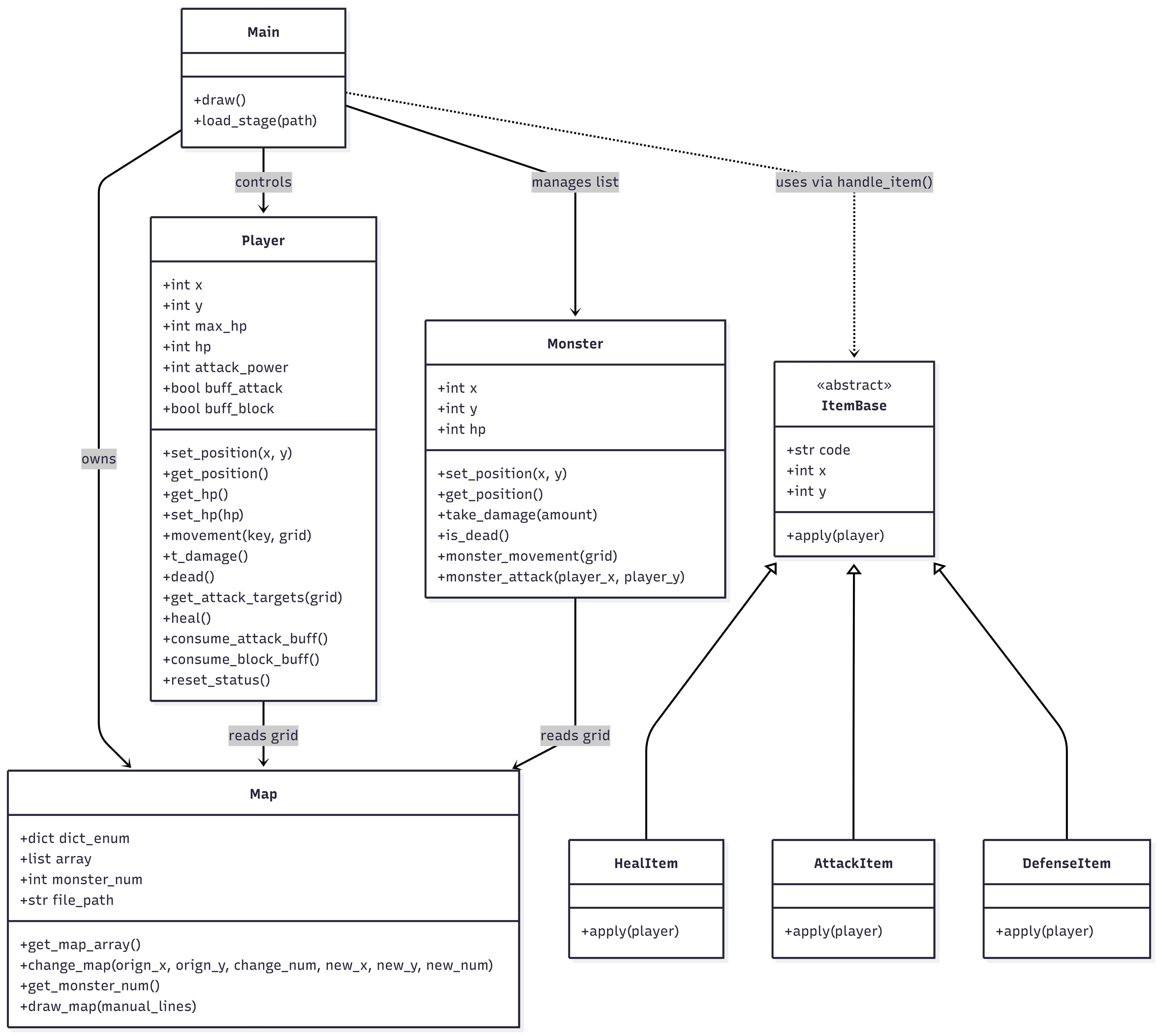
기존 main에 있던 아이템 부분 제거 -> item에 클래스 생성
player, monster, map에 있던 불필요한 잔재 코드 제거
stage3에 경로 잘못 만들어서 출구까지 길 다시 연결
마지막으로 item 수정할 때 클래스 위주로 만들게 됨
이외 다른 모듈은 이전에 함수로 구현
1인당 1모듈로 해야했지만 skill을 따로 player에서 빼내기 애매함
+ 다른 추가할만한 요소가 없음
명세서부터 정리가 안되서 겹치는 부분, 부족한 부분 많아서 코드가 꼬임
전체 코드에서 50% 넘게 중복 함수거나 사용되지 않는 것들이라 버려짐
미로
1942
보물찾기
포켓몬
장애물 피하기
데이터 분석
NumPy
파이썬에서 과학 계산과 대규모 다차원처리를 위한 핵심 라이브러리
고성능 다차원 배열
빠른 연산
다양한 수학 함수
데이터 과학의 기본
사용 편의성
pandas
파이썬에서 정형 데이터 전처리함
통합 인덱싱을 활용한 데이터 조작을 가능하게 하는 데이터프레임 오브젝트
데이터 결측치의 정렬 및 처리
실습은 PyCharm - 주피터 노트북으로
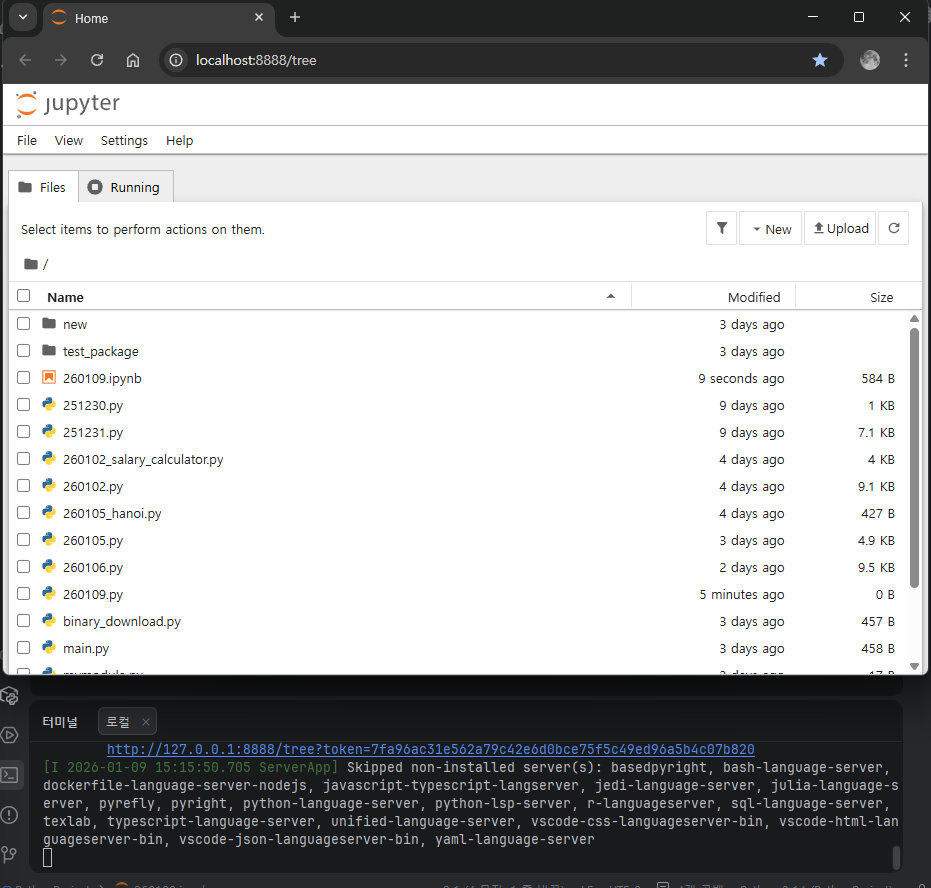
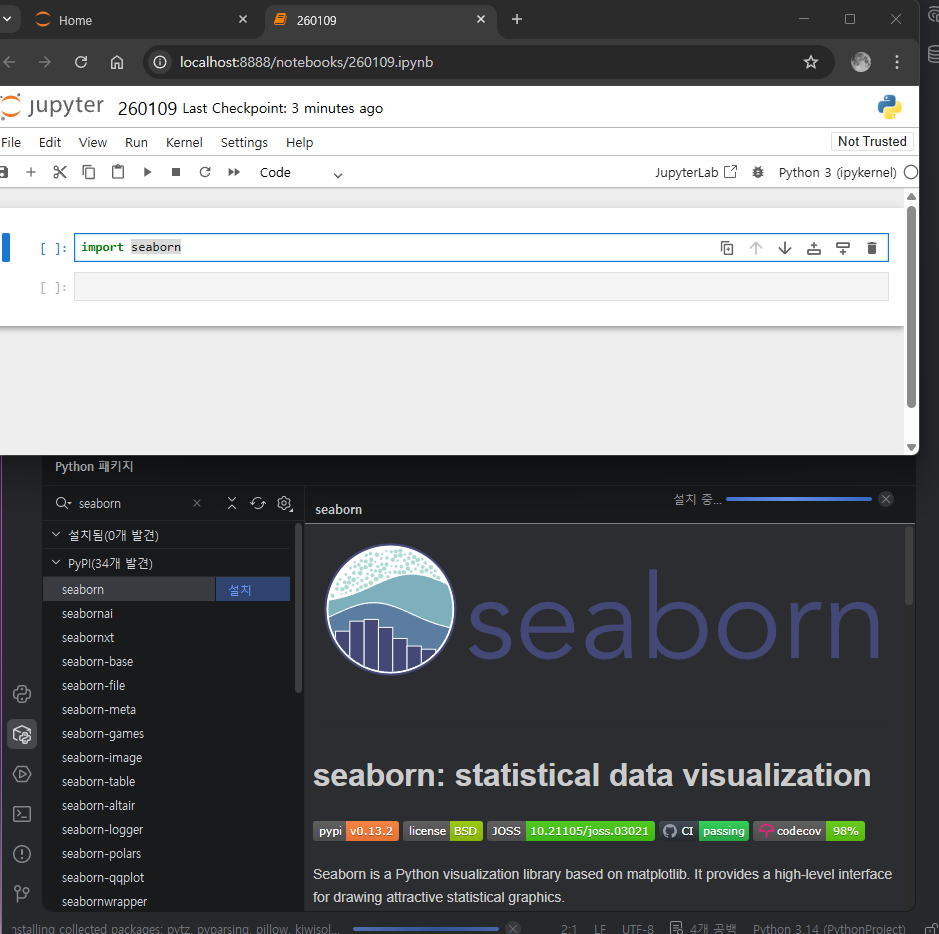
기본 데이터 제공
df = sns.load_dataset('titanic')
df
| 0 | 3 | male | 22.0 | 1 | 0 | 7.2500 | S | Third | man | True | NaN | Southampton | no | False |
| 1 | 1 | female | 38.0 | 1 | 0 | 71.2833 | C | First | woman | False | C | Cherbourg | yes | False |
| 1 | 3 | female | 26.0 | 0 | 0 | 7.9250 | S | Third | woman | False | NaN | Southampton | yes | True |
| 1 | 1 | female | 35.0 | 1 | 0 | 53.1000 | S | First | woman | False | C | Southampton | yes | False |
| 0 | 3 | male | 35.0 | 0 | 0 | 8.0500 | S | Third | man | True | NaN | Southampton | no | True |
| ... | ... | ... | ... | ... | ... | ... | ... | ... | ... | ... | ... | ... | ... | ... |
| 0 | 2 | male | 27.0 | 0 | 0 | 13.0000 | S | Second | man | True | NaN | Southampton | no | True |
| 1 | 1 | female | 19.0 | 0 | 0 | 30.0000 | S | First | woman | False | B | Southampton | yes | True |
| 0 | 3 | female | NaN | 1 | 2 | 23.4500 | S | Third | woman | False | NaN | Southampton | no | False |
| 1 | 1 | male | 26.0 | 0 | 0 | 30.0000 | C | First | man | True | C | Cherbourg | yes | True |
| 0 | 3 | male | 32.0 | 0 | 0 | 7.7500 | Q | Third | man | True | NaN | Queenstown | no | True |
891 rows × 15 columns
haed:0~4
tail: 886~891
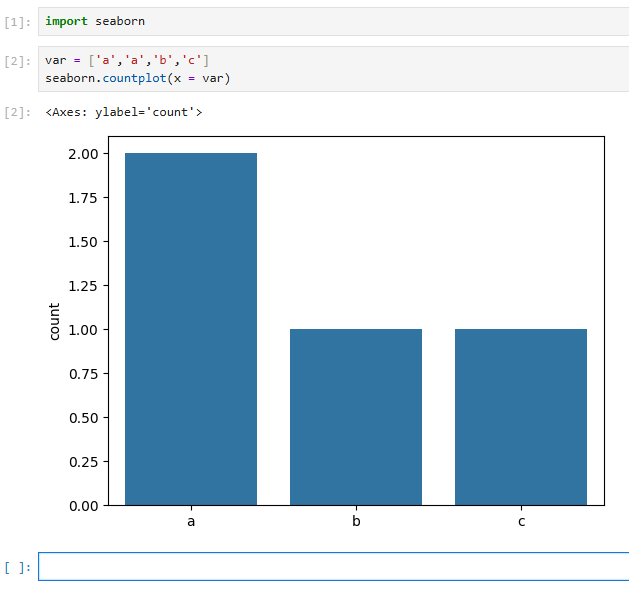
sns.countplot(data = df, x = 'sex')
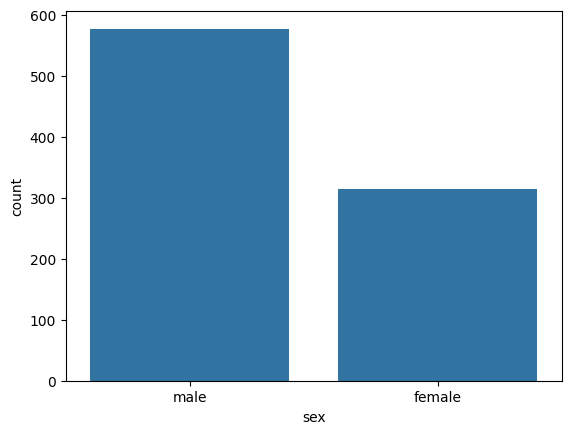
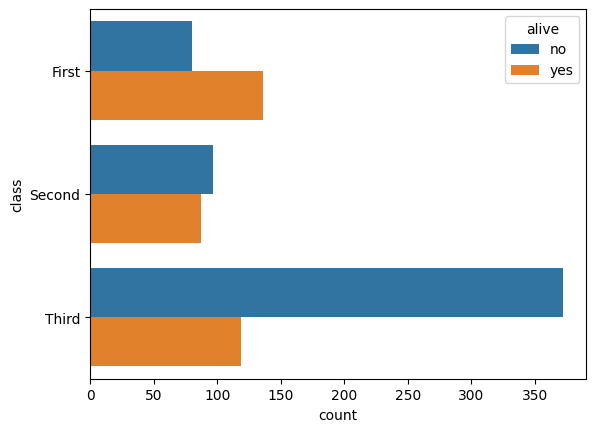
sns.countplot(data = df, x = 'class', hue = 'alive')
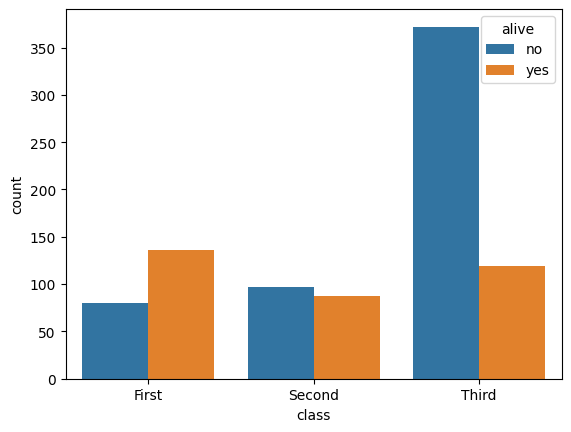
sns.countplot(data = df, y = 'class', hue = 'alive')
from sklearn.metrics import accuracy_score
y_true=[0,1,2,0]
y_pred=[0,2,2,0]
acc=accuracy_score(y_true,y_pred)
print("acc: ",acc)
#acc = Num od correct predictions/total num of predictions
acc: 0.75
import pydataset
pydataset.data()
dataset_idtitle01234...752753754755756
| AirPassengers | Monthly Airline Passenger Numbers 1949-1960 |
| BJsales | Sales Data with Leading Indicator |
| BOD | Biochemical Oxygen Demand |
| Formaldehyde | Determination of Formaldehyde |
| HairEyeColor | Hair and Eye Color of Statistics Students |
| ... | ... |
| VerbAgg | Verbal Aggression item responses |
| cake | Breakage Angle of Chocolate Cakes |
| cbpp | Contagious bovine pleuropneumonia |
| grouseticks | Data on red grouse ticks from Elston et al. 2001 |
| sleepstudy | Reaction times in a sleep deprivation study |
757 rows × 2 columns
df = pydataset.data('mtcars')
df
| 21.0 | 6 | 160.0 | 110 | 3.90 | 2.620 | 16.46 | 0 | 1 | 4 | 4 |
| 21.0 | 6 | 160.0 | 110 | 3.90 | 2.875 | 17.02 | 0 | 1 | 4 | 4 |
| 22.8 | 4 | 108.0 | 93 | 3.85 | 2.320 | 18.61 | 1 | 1 | 4 | 1 |
| 21.4 | 6 | 258.0 | 110 | 3.08 | 3.215 | 19.44 | 1 | 0 | 3 | 1 |
| 18.7 | 8 | 360.0 | 175 | 3.15 | 3.440 | 17.02 | 0 | 0 | 3 | 2 |
| 18.1 | 6 | 225.0 | 105 | 2.76 | 3.460 | 20.22 | 1 | 0 | 3 | 1 |
| 14.3 | 8 | 360.0 | 245 | 3.21 | 3.570 | 15.84 | 0 | 0 | 3 | 4 |
| 24.4 | 4 | 146.7 | 62 | 3.69 | 3.190 | 20.00 | 1 | 0 | 4 | 2 |
| 22.8 | 4 | 140.8 | 95 | 3.92 | 3.150 | 22.90 | 1 | 0 | 4 | 2 |
| 19.2 | 6 | 167.6 | 123 | 3.92 | 3.440 | 18.30 | 1 | 0 | 4 | 4 |
| 17.8 | 6 | 167.6 | 123 | 3.92 | 3.440 | 18.90 | 1 | 0 | 4 | 4 |
| 16.4 | 8 | 275.8 | 180 | 3.07 | 4.070 | 17.40 | 0 | 0 | 3 | 3 |
| 17.3 | 8 | 275.8 | 180 | 3.07 | 3.730 | 17.60 | 0 | 0 | 3 | 3 |
| 15.2 | 8 | 275.8 | 180 | 3.07 | 3.780 | 18.00 | 0 | 0 | 3 | 3 |
| 10.4 | 8 | 472.0 | 205 | 2.93 | 5.250 | 17.98 | 0 | 0 | 3 | 4 |
| 10.4 | 8 | 460.0 | 215 | 3.00 | 5.424 | 17.82 | 0 | 0 | 3 | 4 |
| 14.7 | 8 | 440.0 | 230 | 3.23 | 5.345 | 17.42 | 0 | 0 | 3 | 4 |
| 32.4 | 4 | 78.7 | 66 | 4.08 | 2.200 | 19.47 | 1 | 1 | 4 | 1 |
| 30.4 | 4 | 75.7 | 52 | 4.93 | 1.615 | 18.52 | 1 | 1 | 4 | 2 |
| 33.9 | 4 | 71.1 | 65 | 4.22 | 1.835 | 19.90 | 1 | 1 | 4 | 1 |
| 21.5 | 4 | 120.1 | 97 | 3.70 | 2.465 | 20.01 | 1 | 0 | 3 | 1 |
| 15.5 | 8 | 318.0 | 150 | 2.76 | 3.520 | 16.87 | 0 | 0 | 3 | 2 |
| 15.2 | 8 | 304.0 | 150 | 3.15 | 3.435 | 17.30 | 0 | 0 | 3 | 2 |
| 13.3 | 8 | 350.0 | 245 | 3.73 | 3.840 | 15.41 | 0 | 0 | 3 | 4 |
| 19.2 | 8 | 400.0 | 175 | 3.08 | 3.845 | 17.05 | 0 | 0 | 3 | 2 |
| 27.3 | 4 | 79.0 | 66 | 4.08 | 1.935 | 18.90 | 1 | 1 | 4 | 1 |
| 26.0 | 4 | 120.3 | 91 | 4.43 | 2.140 | 16.70 | 0 | 1 | 5 | 2 |
| 30.4 | 4 | 95.1 | 113 | 3.77 | 1.513 | 16.90 | 1 | 1 | 5 | 2 |
| 15.8 | 8 | 351.0 | 264 | 4.22 | 3.170 | 14.50 | 0 | 1 | 5 | 4 |
| 19.7 | 6 | 145.0 | 175 | 3.62 | 2.770 | 15.50 | 0 | 1 | 5 | 6 |
| 15.0 | 8 | 301.0 | 335 | 3.54 | 3.570 | 14.60 | 0 | 1 | 5 | 8 |
| 21.4 | 4 | 121.0 | 109 | 4.11 | 2.780 | 18.60 | 1 | 1 | 4 | 2 |
데이터프레임
행과 열로 구성된 (테이블) 표 형태의 데이터 구조 - pandas에서 제공하는 객체 타입
열은 속성으로 부른다 or 컬럼 or 변수
행은 row or 케이스로 부른다
빅데이터 -대략 100T 이상용량, 정확 X(남용되는 표현)
변수 간 관계
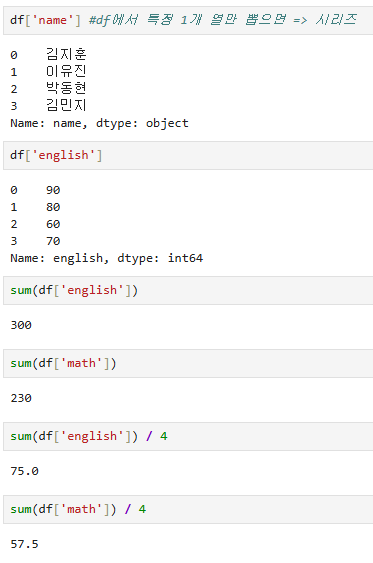
딕셔너리를 pandas.DataFrame 객체로 변환 생성
딕셔너리의 key는 df의 속성이 된다
import pandas as pd
df=pd.DataFrame({'name':['김지훈', '이유진', '박동현', '김민지'],
'english':[90, 80, 60, 70],
'math':[50, 60, 100, 20]})
| 김지훈 | 90 | 50 |
| 이유진 | 80 | 60 |
| 박동현 | 60 | 100 |
| 김민지 | 70 | 20 |
외부 데이터 이용
https://github.com/youngwoos/Doit_Python
df_exam=pd.read_excel('excel_exam.xlsx')
df_exam
sum(df_exam['english'])
df_exam
len(df_exam)#df대상으로 len함수 사용시 테이블의 총 행 추출
df_exam=pd.read_excel('excel_exam.xlsx', header = None)
칼럼명이 없는 경우 생성
head() : 상단 데이터 5행
tail() : 하단 데이터 5행
shape : row x col 숫자
info() : 속성 정보 출력
describe() : 요약 통계량 출력
데이터 타입 바꾸기
df_exam=pd.read_excel('excel_exam.xlsx')
df_exam
df_exam.to_csv('excel_new.csv')
미국 환경 보호국 공개 데이터
https://github.com/tidyverse/ggplot2/blob/main/data-raw/mpg.csv
ggplot2/data-raw/mpg.csv at main · tidyverse/ggplot2
An implementation of the Grammar of Graphics in R. Contribute to tidyverse/ggplot2 development by creating an account on GitHub.
github.com
mpg = pd.read_csv('mpg.csv')
manufacturermodeldisplyearcyltransdrvctyhwyflclass01234
| audi | a4 | 1.8 | 1999 | 4 | auto(l5) | f | 18 | 29 | p | compact |
| audi | a4 | 1.8 | 1999 | 4 | manual(m5) | f | 21 | 29 | p | compact |
| audi | a4 | 2.0 | 2008 | 4 | manual(m6) | f | 20 | 31 | p | compact |
| audi | a4 | 2.0 | 2008 | 4 | auto(av) | f | 21 | 30 | p | compact |
| audi | a4 | 2.8 | 1999 | 6 | auto(l5) | f | 16 | 26 | p | compact |
mpg.describe(include = 'all')
| 234 | 234 | 234.000000 | 234.000000 | 234.000000 | 234 | 234 | 234.000000 | 234.000000 | 234 | 234 |
| 15 | 38 | NaN | NaN | NaN | 10 | 3 | NaN | NaN | 5 | 7 |
| dodge | caravan 2wd | NaN | NaN | NaN | auto(l4) | f | NaN | NaN | r | suv |
| 37 | 11 | NaN | NaN | NaN | 83 | 106 | NaN | NaN | 168 | 62 |
| NaN | NaN | 3.471795 | 2003.500000 | 5.888889 | NaN | NaN | 16.858974 | 23.440171 | NaN | NaN |
| NaN | NaN | 1.291959 | 4.509646 | 1.611534 | NaN | NaN | 4.255946 | 5.954643 | NaN | NaN |
| NaN | NaN | 1.600000 | 1999.000000 | 4.000000 | NaN | NaN | 9.000000 | 12.000000 | NaN | NaN |
| NaN | NaN | 2.400000 | 1999.000000 | 4.000000 | NaN | NaN | 14.000000 | 18.000000 | NaN | NaN |
| NaN | NaN | 3.300000 | 2003.500000 | 6.000000 | NaN | NaN | 17.000000 | 24.000000 | NaN | NaN |
| NaN | NaN | 4.600000 | 2008.000000 | 8.000000 | NaN | NaN | 19.000000 | 27.000000 | NaN | NaN |
| NaN | NaN | 7.000000 | 2008.000000 | 8.000000 | NaN | NaN | 35.000000 | 44.000000 | NaN | NaN |
함수와 메서드 차이
내장 함수 : sum()
패키지 함수 : pd.read_csv()
메서드 : df.head() (인스턴스메서드)
attribute 어트리뷰트
변수가 지니고 있는 값
df_raw = pd.DataFrame({'var1' : [1, 2, 1], 'var2' : [2, 3, 2]})
df_raw
df_new=df_raw.copy(deep=True) #deep copy 수행
df_new
#var1 var2 로 되어있는 변수명을(속성명) 변경 rename()을 사용
df_new = df_new.rename(columns = {'var2' : 'v2'})
df_new
얕은 복사 shallow copy vs 깊은 복사 deep copy
깊은 복사는 새로운 메모리 공간에 데이터를 복사 => 원본유지 필요한 상황
얕은 복사는 메모리 주소를 공유(복사) => 메모리 절약 / 원본까지 바뀐다
주의사항
df.copy(deep=True) 하더라도, 데이터프레임 안에 파이썬 객체(리스트, 딕셔너리)가 들어있는 경우 주의 필요
데이터 프레임의 구조와 숫자/문자열 값은 복사되지만,
내부에 포함된 리스트 자체의 주소까지는 완벽하게 새로 생성 못하는 경우가 생길 수 있음
df=pd.DataFrame({'name':['aaa','bbb'],'hobbies':[['coding','reading'],['swimming']]})
df_copy=df.copy(deep=True)
df_copy.at[1,'hobbies'].append('gaming')
df
| aaa | [coding, reading] |
| bbb | [swimming, gaming] |
import copy
df_perfect_copy=copy.deepcopy(df)#원본 df는 절대 변하지 않는 완전한 깊은 복사
mpg = pd.read_csv('mpg.csv')
mpg['total']=(mpg['cty']+mpg['hwy'])/2
mpg.head()
| audi | a4 | 1.8 | 1999 | 4 | auto(l5) | f | 18 | 29 | p | compact | 23.5 |
| audi | a4 | 1.8 | 1999 | 4 | manual(m5) | f | 21 | 29 | p | compact | 25.0 |
| audi | a4 | 2.0 | 2008 | 4 | manual(m6) | f | 20 | 31 | p | compact | 25.5 |
| audi | a4 | 2.0 | 2008 | 4 | auto(av) | f | 21 | 30 | p | compact | 25.5 |
| audi | a4 | 2.8 | 1999 | 6 | auto(l5) | f | 16 | 26 | p | compact | 21.0 |
type(mpg['total'])
pandas.core.series.Seriesmpg['total'].mean()
np.float64(20.14957264957265)
'로보테크AI' 카테고리의 다른 글
| 융합_로보테크 AI 자율주행 로봇 개발자 과정-26/01/13[Tkinter] (1) | 2026.01.13 |
|---|---|
| 융합_로보테크 AI 자율주행 로봇 개발자 과정-26/01/12 (0) | 2026.01.12 |
| 융합_로보테크 AI 자율주행 로봇 개발자 과정-26/01/08 (0) | 2026.01.08 |
| 융합_로보테크 AI 자율주행 로봇 개발자 과정-26/01/07 (0) | 2026.01.07 |
| 융합_로보테크 AI 자율주행 로봇 개발자 과정-26/01/06 (1) | 2026.01.06 |