복습
파생변수 => 기존 변수 조합으로 새롭게 변수(시내+고속=>복합)
df['cty']+df['hwy']
...
mpg['total'].describe()
count    234.000000
mean      20.149573
std        5.050290
min       10.500000
25%       15.500000
50%       20.500000
75%       23.500000
max       39.500000
Name: total, dtype: float64
mpg['total'].plot.hist()

import numpy as np
#조건 where는 numpy에서 제공
#mpg['total']=np.where(조건식, 참일때,거짓일때)
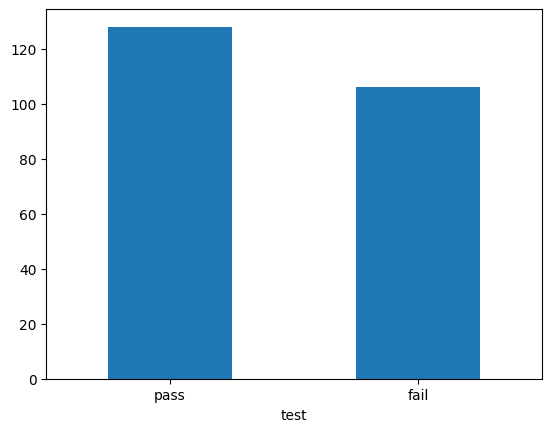
mpg['test']=np.where(mpg['total'] >= 20,'pass','fail')
mpg.head()
manufacturermodeldisplyearcyltransdrvctyhwyflclasstotaltest01234
| audi | a4 | 1.8 | 1999 | 4 | auto(l5) | f | 18 | 29 | p | compact | 23.5 | pass |
| audi | a4 | 1.8 | 1999 | 4 | manual(m5) | f | 21 | 29 | p | compact | 25.0 | pass |
| audi | a4 | 2.0 | 2008 | 4 | manual(m6) | f | 20 | 31 | p | compact | 25.5 | pass |
| audi | a4 | 2.0 | 2008 | 4 | auto(av) | f | 21 | 30 | p | compact | 25.5 | pass |
| audi | a4 | 2.8 | 1999 | 6 | auto(l5) | f | 16 | 26 | p | compact | 21.0 | pass |
count_test = mpg['test'].value_counts()
count_test.plot.bar(rot = 0)
mpg['grade'] = np.where(mpg['total'] >= 30, 'A',
np.where(mpg['total'] >= 20, 'B', 'C'))
mpg.head()
| audi | a4 | 1.8 | 1999 | 4 | auto(l5) | f | 18 | 29 | p | compact | 23.5 | pass | B |
| audi | a4 | 1.8 | 1999 | 4 | manual(m5) | f | 21 | 29 | p | compact | 25.0 | pass | B |
| audi | a4 | 2.0 | 2008 | 4 | manual(m6) | f | 20 | 31 | p | compact | 25.5 | pass | B |
| audi | a4 | 2.0 | 2008 | 4 | auto(av) | f | 21 | 30 | p | compact | 25.5 | pass | B |
| audi | a4 | 2.8 | 1999 | 6 | auto(l5) | f | 16 | 26 | p | compact | 21.0 | pass | B |
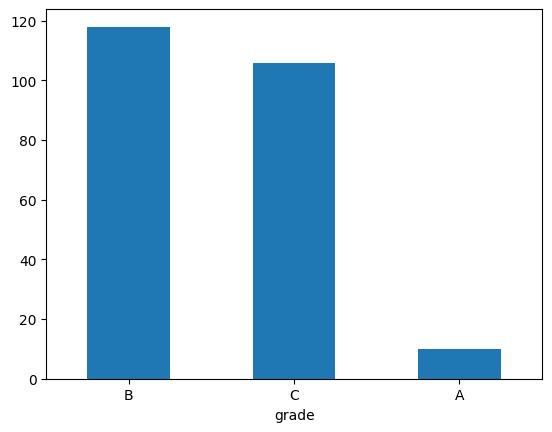
count_grade=mpg['grade'].value_counts()
count_grade
grade
B    118
C    106
A     10
Name: count, dtype: int64
count_grade.plot.bar(rot = 0)
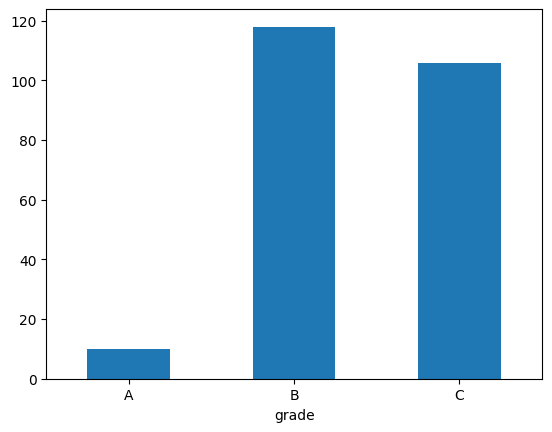
count_grade=mpg['grade'].value_counts().sort_index()
count_grade
grade
A     10
B    118
C    106
Name: count, dtype: int64
count_grade.plot.bar(rot = 0)
mpg['grade2'] = np.where(mpg['total'] >= 30, 'A',
np.where(mpg['total'] >= 25, 'B',
np.where(mpg['total'] >= 30, 'C','D')))
mpg['size'] = np.where((mpg['class'] == 'compact')|(mpg['class'] == 'subcompact')|(mpg['class'] == '2seater'), 'small', 'large')
mpg['size'].value_counts()
size
large    147
small     87
Name: count, dtype: int64
책에선 category인데 왜 class일 때 동작?
mpg['size'] = np.where(mpg['class'].isin(['compact', 'subcompact', '2seater']), 'small', 'large')
mpg['size'].value_counts()
size
large    147
small     87
Name: count, dtype: int64
분석 도전
midwest.csv => 미국 동북중부 437개 지역 인구통계 정보
midwest.csv 불러와 데이터 특징 파악
midwest = pd.read_csv('midwest.csv')
midwest.head()
midwest.tail()
midwest.shape
midwest.info()
midwest.describe()
<class 'pandas.core.frame.DataFrame'>
RangeIndex: 437 entries, 0 to 436
Data columns (total 28 columns):
 #   Column                Non-Null Count  Dtype
---  ------                --------------  -----
 0   PID                   437 non-null    int64
 1   county                437 non-null    object
 2   state                 437 non-null    object
 3   area                  437 non-null    float64
 4   poptotal              437 non-null    int64
 5   popdensity            437 non-null    float64
 6   popwhite              437 non-null    int64
 7   popblack              437 non-null    int64
 8   popamerindian         437 non-null    int64
 9   popasian              437 non-null    int64
 10  popother              437 non-null    int64
 11  percwhite             437 non-null    float64
 12  percblack             437 non-null    float64
 13  percamerindan         437 non-null    float64
 14  percasian             437 non-null    float64
 15  percother             437 non-null    float64
 16  popadults             437 non-null    int64
 17  perchsd               437 non-null    float64
 18  percollege            437 non-null    float64
 19  percprof              437 non-null    float64
 20  poppovertyknown       437 non-null    int64
 21  percpovertyknown      437 non-null    float64
 22  percbelowpoverty      437 non-null    float64
 23  percchildbelowpovert  437 non-null    float64
 24  percadultpoverty      437 non-null    float64
 25  percelderlypoverty    437 non-null    float64
 26  inmetro               437 non-null    int64
 27  category              437 non-null    object
dtypes: float64(15), int64(10), object(3)
memory usage: 95.7+ KB
| 437.000000 | 437.000000 | 4.370000e+02 | 437.000000 | 4.370000e+02 | 4.370000e+02 | 437.000000 | 437.000000 | 437.000000 | 437.000000 | ... | 437.000000 | 437.000000 | 437.000000 | 4.370000e+02 | 437.000000 | 437.000000 | 437.000000 | 437.000000 | 437.000000 | 437.000000 |
| 1437.338673 | 0.033169 | 9.613030e+04 | 3097.742985 | 8.183992e+04 | 1.102388e+04 | 343.109840 | 1310.464531 | 1612.931350 | 95.558441 | ... | 73.965546 | 18.272736 | 4.447259 | 9.364228e+04 | 97.110267 | 12.510505 | 16.447464 | 10.918798 | 11.389043 | 0.343249 |
| 876.390266 | 0.014679 | 2.981705e+05 | 7664.751786 | 2.001966e+05 | 7.895827e+04 | 868.926751 | 9518.394189 | 18526.540699 | 7.087358 | ... | 5.843177 | 6.261908 | 2.408427 | 2.932351e+05 | 2.749863 | 5.150155 | 7.228634 | 5.109166 | 3.661259 | 0.475338 |
| 561.000000 | 0.005000 | 1.701000e+03 | 85.050000 | 4.160000e+02 | 0.000000e+00 | 4.000000 | 0.000000 | 0.000000 | 10.694087 | ... | 46.912261 | 7.336108 | 0.520291 | 1.696000e+03 | 80.902441 | 2.180168 | 1.918955 | 1.938504 | 3.547067 | 0.000000 |
| 670.000000 | 0.024000 | 1.884000e+04 | 622.407407 | 1.863000e+04 | 2.900000e+01 | 44.000000 | 35.000000 | 20.000000 | 94.886032 | ... | 71.325329 | 14.113725 | 2.997957 | 1.836400e+04 | 96.894572 | 9.198715 | 11.624088 | 7.668009 | 8.911763 | 0.000000 |
| 1221.000000 | 0.030000 | 3.532400e+04 | 1156.208330 | 3.447100e+04 | 2.010000e+02 | 94.000000 | 102.000000 | 66.000000 | 98.032742 | ... | 74.246891 | 16.797562 | 3.814239 | 3.378800e+04 | 98.169562 | 11.822313 | 15.270164 | 10.007610 | 10.869119 | 0.000000 |
| 2059.000000 | 0.038000 | 7.565100e+04 | 2330.000000 | 7.296800e+04 | 1.291000e+03 | 288.000000 | 401.000000 | 345.000000 | 99.074935 | ... | 77.195345 | 20.549893 | 4.949324 | 7.284000e+04 | 98.598636 | 15.133226 | 20.351878 | 13.182182 | 13.412162 | 1.000000 |
| 3052.000000 | 0.110000 | 5.105067e+06 | 88018.396600 | 3.204947e+06 | 1.317147e+06 | 10289.000000 | 188565.000000 | 384119.000000 | 99.822821 | ... | 88.898674 | 48.078510 | 20.791321 | 5.023523e+06 | 99.860384 | 48.691099 | 64.308477 | 43.312464 | 31.161972 | 1.000000 |
8 rows × 25 columns
poptotal 변수를 total로, popasian 변수를 asian으로 수정
midwest = midwest.rename(columns = {'poptotal' : 'total'})
midwest = midwest.rename(columns = {'popasian' : 'asian'})
total, asian 변수를 이용해 '전체 인구 대비 아시아 인구 백분율' 파생변수 추가, 히스토그램 만들기
midwest['ratio'] = midwest['asian'] / midwest['total'] * 100
midwest['ratio'].plot.hist()
아시아 인구 백분율 전체 평균, 평균 초과시 large, 그 외 small 부여한 파생변수 만들기
midwest['ratio'].mean()
np.float64(0.4872461834357345)midwest['group'] = np.where(midwest['ratio'] > 0.4872, 'large', 'small')
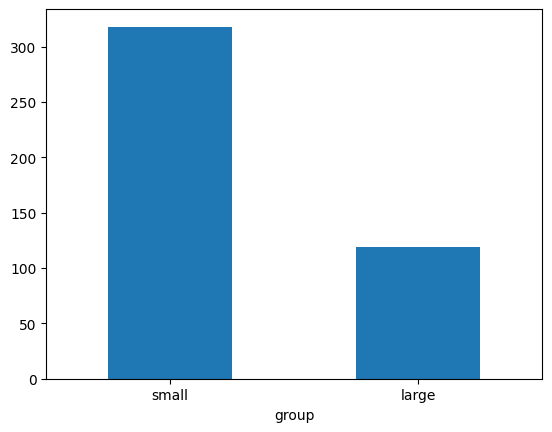
large, small에 해당하는 지역이 얼마나 많은지 빈도표와 빈도 막대그래프 만들기
count_group = midwest['group'].value_counts()
count_group
group
small    318
large    119
Name: count, dtype: int64
count_group.plot.bar(rot = 0)
데이터 전처리: 분석에 적합하게 데이터를 가공하는 작업
query() 행추출
df[] 열(변수)추출
sort)values 정렬
groupby() 집단별로 나누기
assign() 변수 추가
agg() 통계치 구하기
merge() 데이터 합치기(열)
concat() 데이터 합치기(행)
df_exam=pd.read_excel('excel_exam.xlsx')
df_exam
df_exam.to_csv('exam_new.csv')
import pandas as pd
exam = pd.read_csv('exam.csv')
exam
| 1 | 1 | 50 | 98 | 50 |
| 2 | 1 | 60 | 97 | 60 |
| 3 | 1 | 45 | 86 | 78 |
| 4 | 1 | 30 | 98 | 58 |
| 5 | 2 | 25 | 80 | 65 |
| 6 | 2 | 50 | 89 | 98 |
| 7 | 2 | 80 | 90 | 45 |
| 8 | 2 | 90 | 78 | 25 |
| 9 | 3 | 20 | 98 | 15 |
| 10 | 3 | 50 | 98 | 45 |
| 11 | 3 | 65 | 65 | 65 |
| 12 | 3 | 45 | 85 | 32 |
| 13 | 4 | 46 | 98 | 65 |
| 14 | 4 | 48 | 87 | 12 |
| 15 | 4 | 75 | 56 | 78 |
| 16 | 4 | 58 | 98 | 65 |
| 17 | 5 | 65 | 68 | 98 |
| 18 | 5 | 80 | 78 | 90 |
| 19 | 5 | 89 | 68 | 87 |
| 20 | 5 | 78 | 83 | 58 |
exam.query('nclass == 1')
| 1 | 1 | 50 | 98 | 50 |
| 2 | 1 | 60 | 97 | 60 |
| 3 | 1 | 45 | 86 | 78 |
| 4 | 1 | 30 | 98 | 58 |
exam.query('nclass in [1,3,5]')
| 1 | 1 | 50 | 98 | 50 |
| 2 | 1 | 60 | 97 | 60 |
| 3 | 1 | 45 | 86 | 78 |
| 4 | 1 | 30 | 98 | 58 |
| 9 | 3 | 20 | 98 | 15 |
| 10 | 3 | 50 | 98 | 45 |
| 11 | 3 | 65 | 65 | 65 |
| 12 | 3 | 45 | 85 | 32 |
| 17 | 5 | 65 | 68 | 98 |
| 18 | 5 | 80 | 78 | 90 |
| 19 | 5 | 89 | 68 | 87 |
| 20 | 5 | 78 | 83 | 58 |
nclass1 = exam.query('nclass==1')
nclass2 = exam.query('nclass==2')
nclass1['math'].mean()
np.float64(46.25)
데이터 프레임 출력 제한 설정하기
모든 행 출력
pd.set_option('display.max_rows', None)
mpg 데이터 이용 분석
1. 자동차 배기량에 따른 고속도로 연비배기량 4이하, 5이상 자동차 중 연비 평균 더 높은 것 비교
mpg = pd.read_csv('mpg.csv')
mpg_a = mpg.query('displ <= 4')
mpg_b = mpg.query('displ >= 5')
mpg_a['hwy'].mean()
np.float64(25.96319018404908)mpg_b['hwy'].mean()
np.float64(18.07894736842105)
2. 자동차 제조 회사에 따라 도시 연비 비교
mpg_audi = mpg.query('manufacturer == "audi"')
mpg_toyota = mpg.query('manufacturer == "toyota"')
mpg_audi['cty'].mean()
np.float64(17.61111111111111)mpg_toyota['cty'].mean()
np.float64(18.529411764705884)
3. 자동차 고속도로 연비 평균 비교
mpg_new = mpg.query('manufacturer in ["chevrolet", "ford", "honda"]')
mpg_new['hwy'].mean()
np.float64(22.50943396226415)
필요한 변수 추출
exam['math']
0     50
1     60
2     45
3     30
4     25
5     50
6     80
7     90
8     20
9     50
10    65
11    45
12    46
13    48
14    75
15    58
16    65
17    80
18    89
19    78
Name: math, dtype: int64
exam[['nclass', 'math', 'english']]
| 1 | 50 | 98 |
| 1 | 60 | 97 |
| 1 | 45 | 86 |
| 1 | 30 | 98 |
| 2 | 25 | 80 |
| 2 | 50 | 89 |
| 2 | 80 | 90 |
| 2 | 90 | 78 |
| 3 | 20 | 98 |
| 3 | 50 | 98 |
| 3 | 65 | 65 |
| 3 | 45 | 85 |
| 4 | 46 | 98 |
| 4 | 48 | 87 |
| 4 | 75 | 56 |
| 4 | 58 | 98 |
| 5 | 65 | 68 |
| 5 | 80 | 78 |
| 5 | 89 | 68 |
| 5 | 78 | 83 |
변수 제거
exam.drop(columns = ['math', 'english'])
| 1 | 1 | 50 |
| 2 | 1 | 60 |
| 3 | 1 | 78 |
| 4 | 1 | 58 |
| 5 | 2 | 65 |
| 6 | 2 | 98 |
| 7 | 2 | 45 |
| 8 | 2 | 25 |
| 9 | 3 | 15 |
| 10 | 3 | 45 |
| 11 | 3 | 65 |
| 12 | 3 | 32 |
| 13 | 4 | 65 |
| 14 | 4 | 12 |
| 15 | 4 | 78 |
| 16 | 4 | 65 |
| 17 | 5 | 98 |
| 18 | 5 | 90 |
| 19 | 5 | 87 |
| 20 | 5 | 58 |
pandas 함수 조합
exam.query('nclass ==1')[['english']]
exam11=exam.query('nclass ==1')[['english', 'math']]
exam11
150p Q2
mpg = pd.read_csv('mpg.csv')
mpg_new = mpg[['class', 'cty']]
mpg_new.query('`class` == "suv"')['cty'].mean()
np.float64(13.5)mpg_new.query('`class` == "compact"')['cty'].mean()
np.float64(20.127659574468087)
정렬
exam.sort_values('math')
내림차순
exam.sort_values('math', ascending = False)
여러 정렬 기준 적용
exam.sort_values(['nclass', 'math'])
파생변수 추가
exam.assign(
total = exam['math'] + exam['english'] + exam['science'],
mean = (exam['math'] + exam['english'] + exam['science']) / 3)
| 1 | 1 | 50 | 98 | 50 | 198 | 66.000000 |
| 2 | 1 | 60 | 97 | 60 | 217 | 72.333333 |
| 3 | 1 | 45 | 86 | 78 | 209 | 69.666667 |
| 4 | 1 | 30 | 98 | 58 | 186 | 62.000000 |
| 5 | 2 | 25 | 80 | 65 | 170 | 56.666667 |
| 6 | 2 | 50 | 89 | 98 | 237 | 79.000000 |
| 7 | 2 | 80 | 90 | 45 | 215 | 71.666667 |
| 8 | 2 | 90 | 78 | 25 | 193 | 64.333333 |
| 9 | 3 | 20 | 98 | 15 | 133 | 44.333333 |
| 10 | 3 | 50 | 98 | 45 | 193 | 64.333333 |
| 11 | 3 | 65 | 65 | 65 | 195 | 65.000000 |
| 12 | 3 | 45 | 85 | 32 | 162 | 54.000000 |
| 13 | 4 | 46 | 98 | 65 | 209 | 69.666667 |
| 14 | 4 | 48 | 87 | 12 | 147 | 49.000000 |
| 15 | 4 | 75 | 56 | 78 | 209 | 69.666667 |
| 16 | 4 | 58 | 98 | 65 | 221 | 73.666667 |
| 17 | 5 | 65 | 68 | 98 | 231 | 77.000000 |
| 18 | 5 | 80 | 78 | 90 | 248 | 82.666667 |
| 19 | 5 | 89 | 68 | 87 | 244 | 81.333333 |
| 20 | 5 | 78 | 83 | 58 | 219 | 73.000000 |
df.assign에 np.where() 적용
exam.assign(test=np.where(exam['math']>50,'pass','fail')).sort_values('test')
lambda 이용 데이터 프레임명 줄이기
long_name = pd.read_csv('exam.csv')
long_name.assign(new = long_name['math'] + long_name['english'] + long_name['science'])
long_name.assign(new = lambda x: x['math'] + x['english'] + x['science'])
앞에서 만든 변수 활용 다시 변수 만들기
exam.assign(total = exam['math'] + exam['english'] + exam['science'], mean = lambda x: x['total'] / 3)
exam.assign(total = lambda x: x['math'] + x['english'] + x['science'], mean = lambda x: x['total'] / 3)
mpg 데이터 분석 문제 해결
mpg 데이터 복사본 만들기 + cty hwy 더한 합산 연비 변수 추가
mpg = pd.read_csv('mpg.csv')
mpg_new = mpg.copy()
mpg_new = mpg_new.assign(total = mpg_new['cty'] + mpg_new['hwy'])
합산 연비 변수 / 2 => 평균 연비 변수 추가
mpg_new = mpg_new.assign(mean = mpg_new['total'] / 2)
평균 연비 변수 TOP3 데이터 출력
mpg_new.sort_values('mean', ascending = False).head(3)
앞 문제 해결 가능한 하나로 연결된 pandas 구문 만들기, 데이터는 원본으로mpg.assign(total = lambda x: x['cty'] + x['hwy'],
mean = lambda x: x['total'] / 2) \
.sort_values('mean', ascending = False) \
.head(3)
| volkswagen | new beetle | 1.9 | 1999 | 4 | manual(m5) | f | 35 | 44 | d | subcompact | 79 | 39.5 |
| volkswagen | jetta | 1.9 | 1999 | 4 | manual(m5) | f | 33 | 44 | d | compact | 77 | 38.5 |
| volkswagen | new beetle | 1.9 | 1999 | 4 | auto(l4) | f | 29 | 41 | d | subcompact | 70 | 35.0 |
집단별 요약
nclass 별로 분리하여 math 평균 구하기
exam.groupby('nclass') \
.agg(mean_math = ('math', 'mean'))
exam.groupby('nclass', as_index=False).agg(mean_math = ('math', 'sum'))
mpg.groupby(['manufacturer', 'drv']).agg(mean_cty = ('cty', 'mean'))
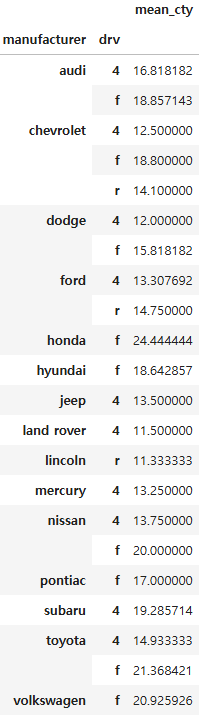
mpg.query('manufacturer == "audi"').groupby('drv').agg(n=('drv', 'count'))

pandas 함수 조합하기
Q제조 회사별 'suv' 자동차의 도시 및 고속도로 합산 연비 평균을 구해 내림차순으로 정렬하고, 1~5위까지 출력하기
suv 추출 - query()
합산 연비 변수 만들기 - assign()
회사별로 분리 - groupby()
합산 연비 평균 구하기 - agg()
내림차순 정렬 - sort_values()
1~5위까지 출력 - head()
----이전까지 작성하던 파일 날라감----
----선 그래프 복사해서 tistory에 붙이면 에러 남----
----노트북에서 결과 그래프 copy 그대로 하지 말것----
----임시저장 눌러도 이전까지(2시간 작성) 삭제됨----
선 그래프
economics = pd.read_csv('economics.csv')
economics.head()
| 1967-07-01 | 506.7 | 198712.0 | 12.6 | 4.5 | 2944 |
| 1967-08-01 | 509.8 | 198911.0 | 12.6 | 4.7 | 2945 |
| 1967-09-01 | 515.6 | 199113.0 | 11.9 | 4.6 | 2958 |
| 1967-10-01 | 512.2 | 199311.0 | 12.9 | 4.9 | 3143 |
| 1967-11-01 | 517.4 | 199498.0 | 12.8 | 4.7 | 3066 |
sns.lineplot(data = economics, x = 'date', y = 'unemploy')
economics['date2'] = pd.to_datetime(economics['date'])
economics.info()
<class 'pandas.core.frame.DataFrame'>
RangeIndex: 574 entries, 0 to 573
Data columns (total 7 columns):
 #   Column    Non-Null Count  Dtype
---  ------    --------------  -----
 0   date      574 non-null    object
 1   pce       574 non-null    float64
 2   pop       574 non-null    float64
 3   psavert   574 non-null    float64
 4   uempmed   574 non-null    float64
 5   unemploy  574 non-null    int64
 6   date2     574 non-null    datetime64[ns]
dtypes: datetime64[ns](1), float64(4), int64(1), object(1)
memory usage: 31.5+ KB
economics[['date', 'date2']]
| 1967-07-01 | 1967-07-01 |
| 1967-08-01 | 1967-08-01 |
| 1967-09-01 | 1967-09-01 |
| 1967-10-01 | 1967-10-01 |
| 1967-11-01 | 1967-11-01 |
| ... | ... |
| 2014-12-01 | 2014-12-01 |
| 2015-01-01 | 2015-01-01 |
| 2015-02-01 | 2015-02-01 |
| 2015-03-01 | 2015-03-01 |
| 2015-04-01 | 2015-04-01 |
economics['year'] = economics['date2'].dt.year
economics.head()
| 1967-07-01 | 506.7 | 198712.0 | 12.6 | 4.5 | 2944 | 1967-07-01 | 1967 |
| 1967-08-01 | 509.8 | 198911.0 | 12.6 | 4.7 | 2945 | 1967-08-01 | 1967 |
| 1967-09-01 | 515.6 | 199113.0 | 11.9 | 4.6 | 2958 | 1967-09-01 | 1967 |
| 1967-10-01 | 512.2 | 199311.0 | 12.9 | 4.9 | 3143 | 1967-10-01 | 1967 |
| 1967-11-01 | 517.4 | 199498.0 | 12.8 | 4.7 | 3066 | 1967-11-01 | 1967 |
sns.lineplot(data = economics, x = 'year', y = 'unemploy')

import pandas as pd
import numpy as np
import seaborn as sns
raw_welfare = pd.read_spss('beta2.sav')
welfare = raw_welfare.copy()
welfare
welfare.shape
welfare.info()
welfare.describe()
<class 'pandas.core.frame.DataFrame'>
RangeIndex: 14418 entries, 0 to 14417
Columns: 830 entries, h14_id to h14_pers_income5
dtypes: float64(826), object(4)
memory usage: 91.3+ MB
| 14418.000000 | 14418.000000 | 14418.000000 | 1.441800e+04 | 14418.000000 | 121.000000 | 11513.000000 | 11513.000000 | 11513.000000 | 11513.000000 | ... | 2027.000000 | 2027.000000 | 2027.000000 | 2027.000000 | 2027.000000 | 2659.000000 | 3331.000000 | 989.000000 | 14418.000000 | 715.000000 |
| 4672.108406 | 3.121723 | 1.004855 | 4.672140e+07 | 0.201484 | 2.256198 | 1.000000 | 1.000000 | 4484.952219 | 4484.952541 | ... | 3.211643 | 3.743957 | 3.513567 | 4.100641 | 3.233350 | 4141.380594 | 1389.440408 | 3457.835187 | 2.038702 | 1183.292308 |
| 2792.998128 | 3.297963 | 0.143205 | 2.793014e+07 | 0.401123 | 1.675952 | 0.906021 | 1.016782 | 4063.459773 | 4560.218659 | ... | 2.174768 | 3.138629 | 1.045929 | 0.937712 | 1.289456 | 2583.755449 | 1211.910836 | 6619.516319 | 32.965477 | 2147.418274 |
| 2.000000 | 1.000000 | 1.000000 | 2.010100e+04 | 0.000000 | 1.000000 | 0.001998 | 0.000000 | 8.960093 | 0.000000 | ... | 1.000000 | 1.000000 | 1.000000 | 1.000000 | 1.000000 | 0.000000 | 0.000000 | -47000.000000 | 0.000000 | -10600.000000 |
| 2356.000000 | 1.000000 | 1.000000 | 2.356030e+07 | 0.000000 | 1.000000 | 0.341814 | 0.269286 | 1533.021553 | 1207.736094 | ... | 1.000000 | 2.000000 | 3.000000 | 4.000000 | 2.000000 | 2448.000000 | 391.500000 | 1000.000000 | 0.000000 | 206.000000 |
| 4535.000000 | 1.000000 | 1.000000 | 4.535010e+07 | 0.000000 | 2.000000 | 0.726304 | 0.704045 | 3257.436901 | 3157.609630 | ... | 3.000000 | 3.000000 | 4.000000 | 4.000000 | 3.000000 | 3540.000000 | 1116.000000 | 2498.000000 | 0.000000 | 530.000000 |
| 6616.000000 | 7.000000 | 1.000000 | 6.616010e+07 | 0.000000 | 2.000000 | 1.366071 | 1.390045 | 6126.762919 | 6234.287538 | ... | 5.000000 | 5.000000 | 4.000000 | 5.000000 | 4.000000 | 5378.500000 | 2040.000000 | 4687.000000 | 0.000000 | 1295.000000 |
| 9800.000000 | 14.000000 | 9.000000 | 9.800070e+07 | 1.000000 | 7.000000 | 4.727006 | 5.790039 | 21200.393903 | 25968.049029 | ... | 9.000000 | 99.000000 | 9.000000 | 9.000000 | 9.000000 | 22700.000000 | 11500.000000 | 170000.000000 | 3000.000000 | 22644.000000 |
8 rows × 826 columns
변수 이름 변경
welfare = welfare.rename(
columns = {'h14_g3':'sex',
'h14_g4':'birth',
'h14_g10':'marriage_type',
'h14_g11':'religion',
'p1402_8aq1':'income',
'h14_eco9':'code_job',
'h14_reg7':'code_region'})
성별 변수 검토 및 전처리
welfare['sex'].value_counts()
sex
2.0    7913
1.0    6505
Name: count, dtype: int64
welfare['sex'] = np.where(welfare['sex'] == 1, 'male', 'female')
welfare['sex'].value_counts()
sex
female    7913
male      6505
Name: count, dtype: int64
월급 변수 검토 및 전처리
welfare['income'].dtypes
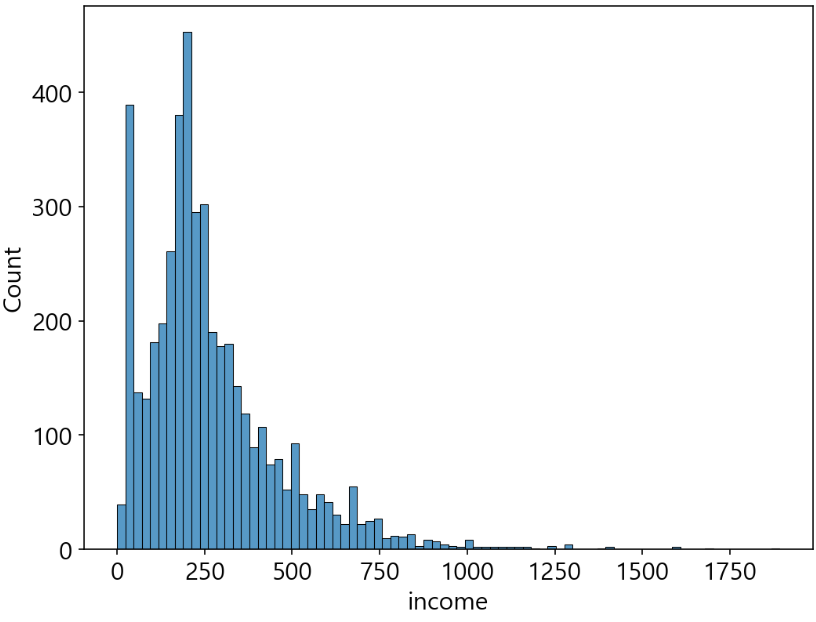
welfare['income'].describe()
count    4534.000000
mean      268.455007
std       198.021206
min         0.000000
25%       150.000000
50%       220.000000
75%       345.750000
max      1892.000000
Name: income, dtype: float64
sns.histplot(data = welfare, x = 'income')
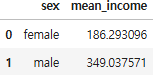
sex_income = welfare.dropna(subset = 'income').groupby('sex', as_index = False).agg(mean_income = ('income', 'mean'))
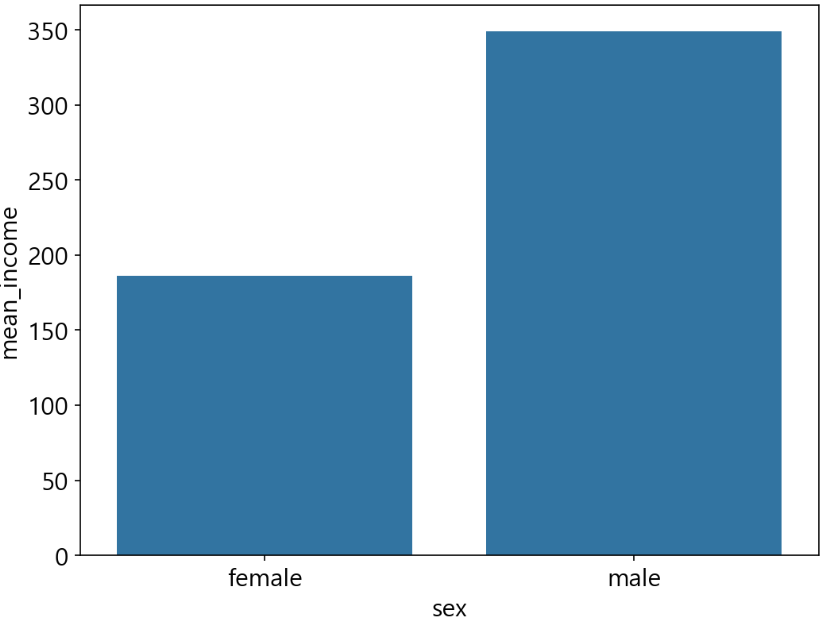
sex_income
sns.barplot(data = sex_income, x = 'sex', y = 'mean_income')
나이 변수 검토 및 전처리 하기
welfare['birth'].dtypes
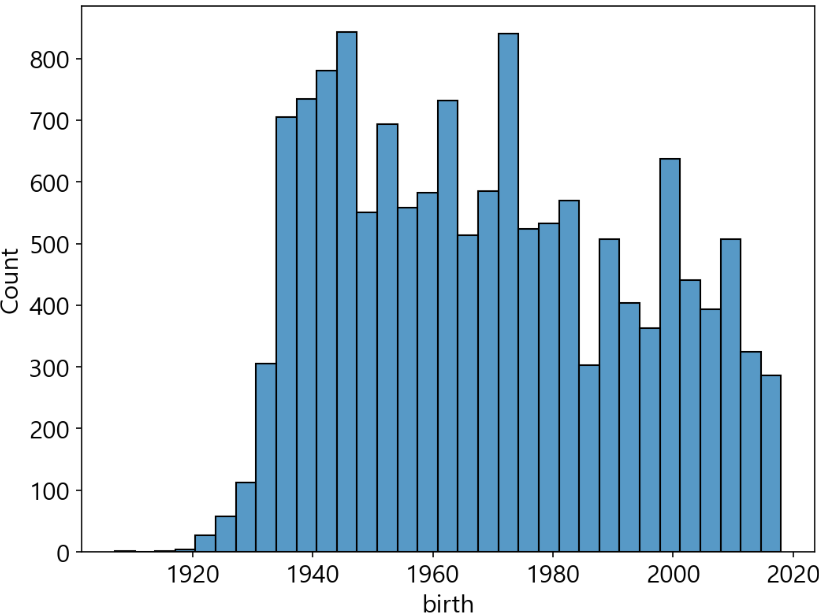
welfare['birth'].describe()
count    14418.000000
mean      1969.280205
std         24.402250
min       1907.000000
25%       1948.000000
50%       1968.000000
75%       1990.000000
max       2018.000000
Name: birth, dtype: float64
sns.histplot(data = welfare, x = 'birth')
파생변수 만들기
welfare = welfare.assign(age = 2019 - welfare['birth'] +1)
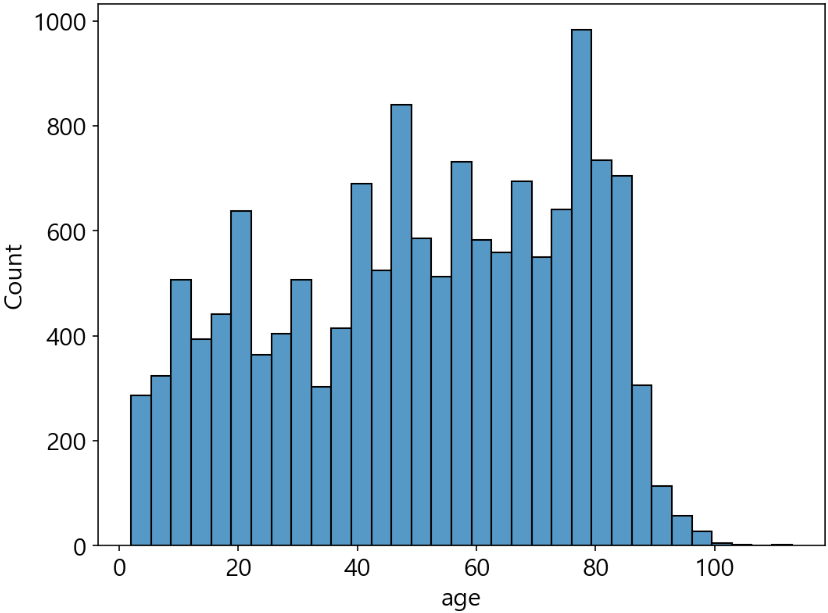
welfare['age'].describe()
count    14418.000000
mean        50.719795
std         24.402250
min          2.000000
25%         30.000000
50%         52.000000
75%         72.000000
max        113.000000
Name: age, dtype: float64
sns.histplot(data = welfare, x = 'age')
나이와 월급의 관계 분석하기
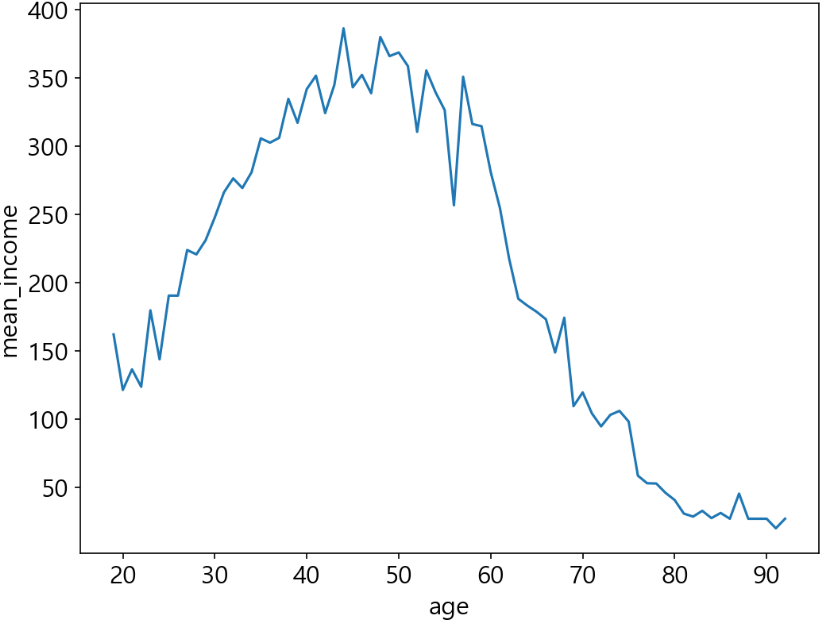
age_income = welfare.dropna(subset = 'income').groupby('age').agg(mean_income = ('income', 'mean'))
age_income.head()

sns.lineplot(data = age_income, x = 'age', y = 'mean_income')
연령대 변수 검토 및 전처리
welfare['age'].head()
0    75.0
1    72.0
2    78.0
3    58.0
4    57.0
Name: age, dtype: float64
welfare = welfare.assign(ageg = np.where(welfare['age'] < 30, 'young', np.where(welfare['age'] <= 59, 'middle', 'old')))
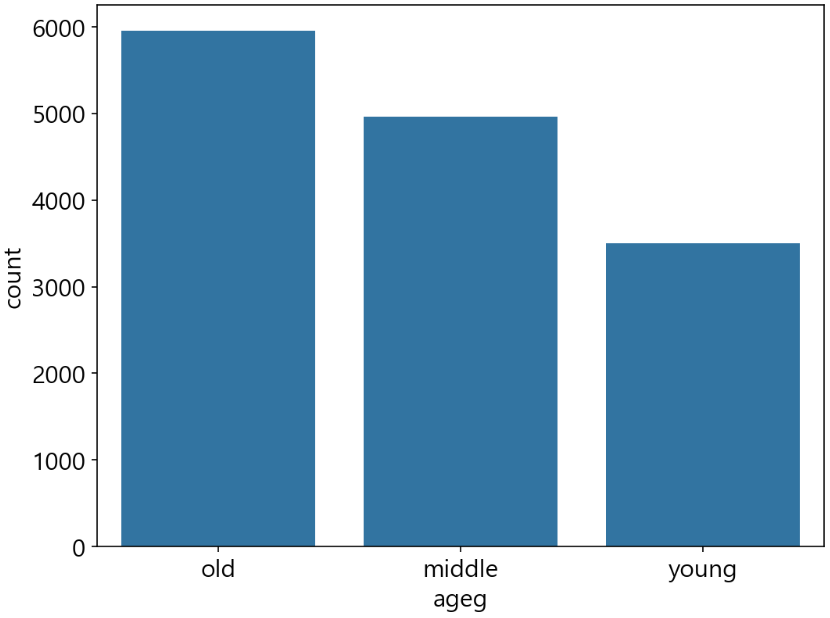
welfare['ageg'].value_counts()
ageg
old       5955
middle    4963
young     3500
Name: count, dtype: int64
sns.countplot(data = welfare, x = 'ageg')
연령대에 따른 월급 차이 분석
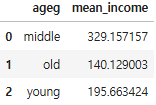
ageg_income = welfare.dropna(subset = 'income').groupby('ageg', as_index = False).agg(mean_income = ('income', 'mean'))
ageg_income
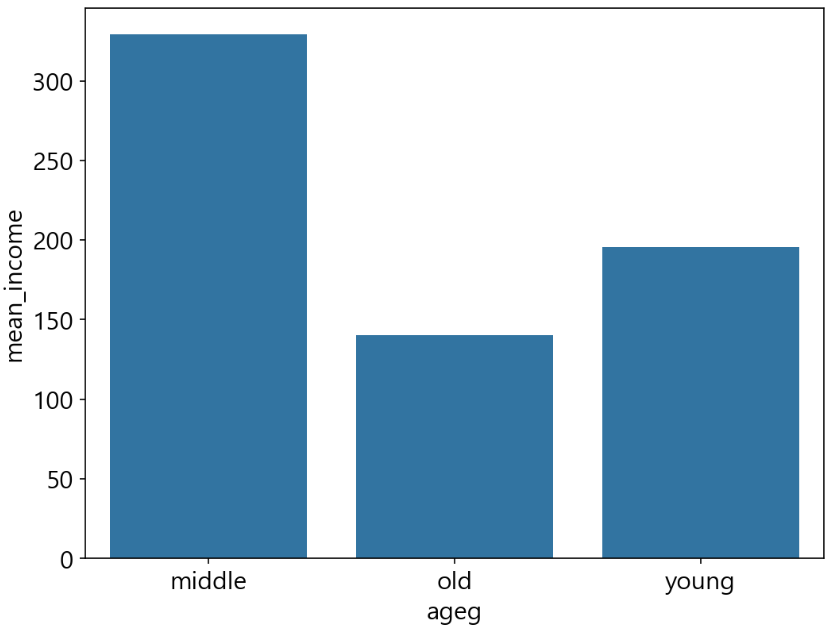
sns.barplot(data = ageg_income, x = 'ageg', y = 'mean_income')
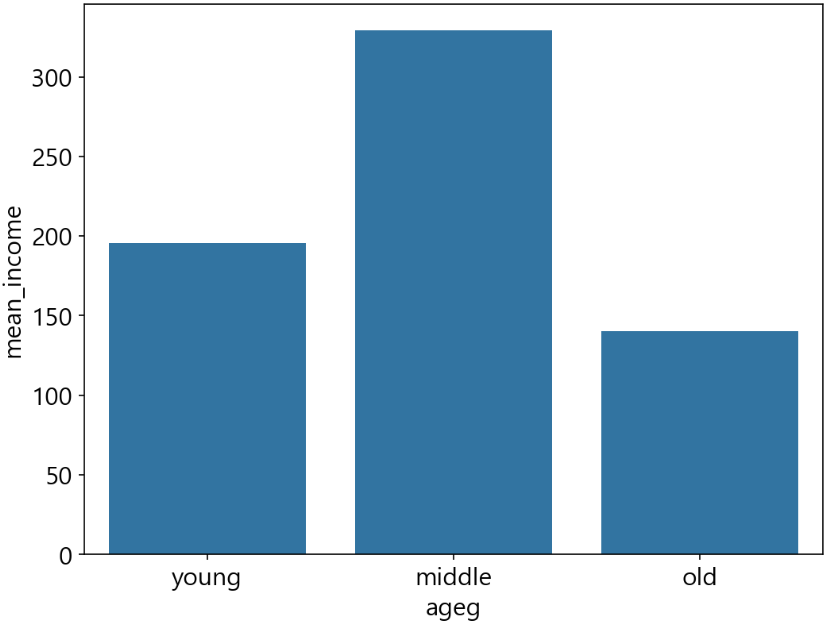
sns.barplot(data = ageg_income, x = 'ageg', y = 'mean_income', order = ['young', 'middle', 'old'])
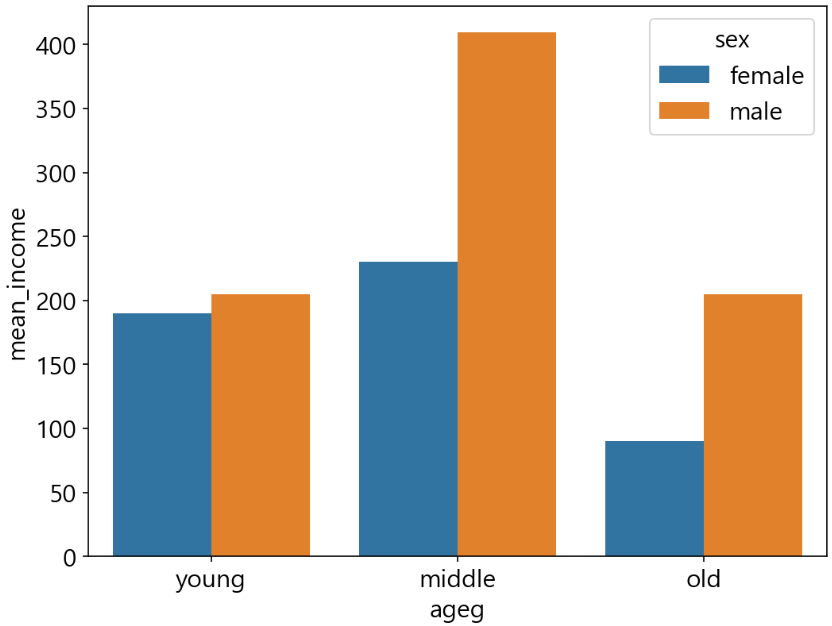
연령대 및 성별 월급 차이 분석
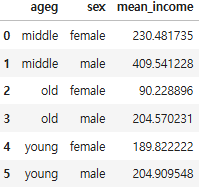
sex_income = welfare.dropna(subset = 'income').groupby(['ageg', 'sex'], as_index = False).agg(mean_income = ('income', 'mean'))
sex_income
sns.barplot(data = sex_income, x = 'ageg', y = 'mean_income', hue = 'sex', order = ['young', 'middle', 'old'])
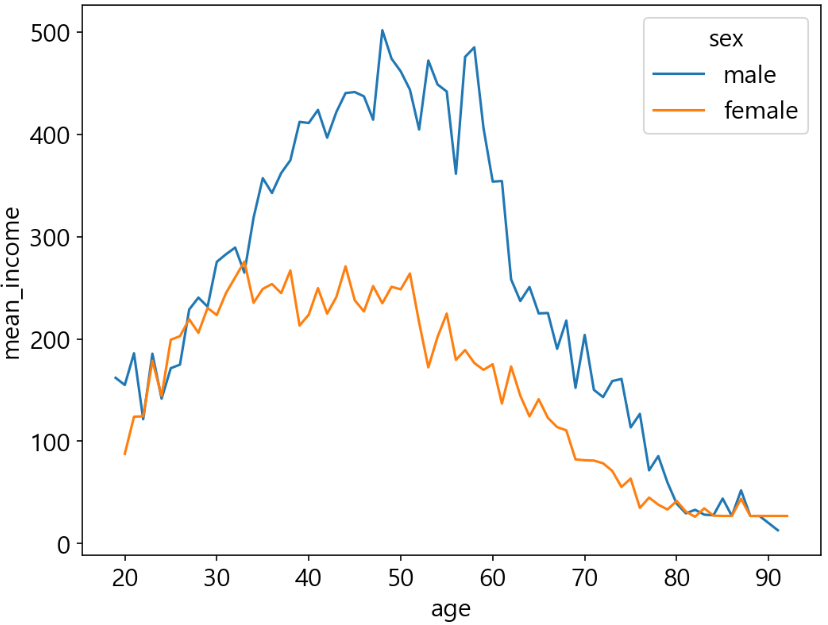
나이 및 성별 월급 차이 분석
sex_age = welfare.dropna(subset = 'income').groupby(['age', 'sex'], as_index = False).agg(mean_income = ('income', 'mean'))
sex_age.head()
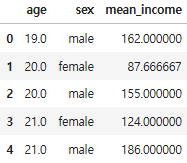
sns.lineplot(data = sex_age, x = 'age', y = 'mean_income', hue = 'sex')
'로보테크AI' 카테고리의 다른 글
| 융합_로보테크 AI 자율주행 로봇 개발자 과정-26/01/14 (0) | 2026.01.14 |
|---|---|
| 융합_로보테크 AI 자율주행 로봇 개발자 과정-26/01/13[Tkinter] (1) | 2026.01.13 |
| 융합_로보테크 AI 자율주행 로봇 개발자 과정-26/01/09[데이터 분석] (0) | 2026.01.09 |
| 융합_로보테크 AI 자율주행 로봇 개발자 과정-26/01/08 (0) | 2026.01.08 |
| 융합_로보테크 AI 자율주행 로봇 개발자 과정-26/01/07 (0) | 2026.01.07 |