Kaggle: The World’s AI Proving Ground
Discover what actually works in AI. Join millions of builders, researchers, and labs evaluating agents, models, and frontier technology through crowdsourced benchmarks, competitions, and hackathons.
www.kaggle.com
특성공학
머신러닝 모델은 다음과 같은 단계로 작업
1. 학습
2. 평가
3. 예측
학습이 잘 되는 것이 가장 중요
학습이 잘 되려면 특성이 적절하게 있는 좋은 데이터가 준비되야 함
(생선 기준)길이만 있는 것보단 길이, 높이, 두께가 있는 것이 훨씬 좋음
더 많은 특성? -> 특성공학
특성공학으로 특성이 많아지면 좋음 -> 무조건 많으면 좋은가? X
ㄴ 과대 적합 때문에 학습 데이터에만 정확하게 되어버림
문제는 과대적합->과대적합이 발생하지 않으려면?
규제 적용
규재가 적용된 선형 회귀 모델
-릿지: 계수를 제곱한 값을 기준으로 규제 적용 <= L1 방식
-라쏘: 계수의 절대값을 기준으로 규제 적용 <= L2 방식
하이퍼파라미터: 머신러닝 모델이 학습할 수 없고 사람이 알려줘야하는 파라미터
첫번째 머신러닝 미션
# 1. (선택사항) 시각화를 통해 데이터 살펴보기, 판다스의 데이터 프레임 활용
# 2. (선택사항) 데이터에 대한 전처리 - 스케일 전처리, 특성공학
# 3. 훈련세트와 테스트세트 나누기 (랜덤 스테이트는 자유롭게)
# 4. 모델 선정 - kneighbor 보다 좋은 걸 찾아서 써보기
# 5. 학습, 평가, 예측까지
# 6. (선택사항) 과대적합 또는 과소 적합 판단이 되면 수정
데이터 로드 및 초기 탐색
from sklearn.datasets import load_breast_cancer
cancer = load_breast_cancer()

cancer.data # 실제 특성값
cancer.feature_names # 각 특성의 이름을 문자열로 적은 목록
cancer.target # 특성에 따른 타깃값... 0이면 악성, 1이면 양성
print()

import pandas as pd
import matplotlib.pyplot as plt
import seaborn as sns

df_cancer = pd.DataFrame(cancer.data, columns=cancer.feature_names)
df_cancer['target'] = cancer.target

print("DataFrame head:")
print(df_cancer.head())

print("\nDataFrame info:")
df_cancer.info()

print("\nDataFrame descriptive statistics:")
print(df_cancer.describe())

plt.figure(figsize=(6, 4))
sns.countplot(x='target', data=df_cancer)
plt.title('Distribution of Target Classes')
plt.xlabel('Target (0: Malignant, 1: Benign)')
plt.ylabel('Count')
plt.show()
DataFrame head:
mean radius mean texture mean perimeter mean area mean smoothness \
0 17.99 10.38 122.80 1001.0 0.11840
1 20.57 17.77 132.90 1326.0 0.08474
2 19.69 21.25 130.00 1203.0 0.10960
3 11.42 20.38 77.58 386.1 0.14250
4 20.29 14.34 135.10 1297.0 0.10030
mean compactness mean concavity mean concave points mean symmetry \
0 0.27760 0.3001 0.14710 0.2419
1 0.07864 0.0869 0.07017 0.1812
2 0.15990 0.1974 0.12790 0.2069
3 0.28390 0.2414 0.10520 0.2597
4 0.13280 0.1980 0.10430 0.1809
mean fractal dimension ... worst texture worst perimeter worst area \
0 0.07871 ... 17.33 184.60 2019.0
1 0.05667 ... 23.41 158.80 1956.0
2 0.05999 ... 25.53 152.50 1709.0
3 0.09744 ... 26.50 98.87 567.7
4 0.05883 ... 16.67 152.20 1575.0
worst smoothness worst compactness worst concavity worst concave points \
0 0.1622 0.6656 0.7119 0.2654
1 0.1238 0.1866 0.2416 0.1860
2 0.1444 0.4245 0.4504 0.2430
3 0.2098 0.8663 0.6869 0.2575
4 0.1374 0.2050 0.4000 0.1625
worst symmetry worst fractal dimension target
0 0.4601 0.11890 0
1 0.2750 0.08902 0
2 0.3613 0.08758 0
3 0.6638 0.17300 0
4 0.2364 0.07678 0
[5 rows x 31 columns]
DataFrame info:
<class 'pandas.core.frame.DataFrame'>
RangeIndex: 569 entries, 0 to 568
Data columns (total 31 columns):
# Column Non-Null Count Dtype
--- ------ -------------- -----
0 mean radius 569 non-null float64
1 mean texture 569 non-null float64
2 mean perimeter 569 non-null float64
3 mean area 569 non-null float64
4 mean smoothness 569 non-null float64
5 mean compactness 569 non-null float64
6 mean concavity 569 non-null float64
7 mean concave points 569 non-null float64
8 mean symmetry 569 non-null float64
9 mean fractal dimension 569 non-null float64
10 radius error 569 non-null float64
11 texture error 569 non-null float64
12 perimeter error 569 non-null float64
13 area error 569 non-null float64
14 smoothness error 569 non-null float64
15 compactness error 569 non-null float64
16 concavity error 569 non-null float64
17 concave points error 569 non-null float64
18 symmetry error 569 non-null float64
19 fractal dimension error 569 non-null float64
20 worst radius 569 non-null float64
21 worst texture 569 non-null float64
22 worst perimeter 569 non-null float64
23 worst area 569 non-null float64
24 worst smoothness 569 non-null float64
25 worst compactness 569 non-null float64
26 worst concavity 569 non-null float64
27 worst concave points 569 non-null float64
28 worst symmetry 569 non-null float64
29 worst fractal dimension 569 non-null float64
30 target 569 non-null int64
dtypes: float64(30), int64(1)
memory usage: 137.9 KB
DataFrame descriptive statistics:
mean radius mean texture mean perimeter mean area \
count 569.000000 569.000000 569.000000 569.000000
mean 14.127292 19.289649 91.969033 654.889104
std 3.524049 4.301036 24.298981 351.914129
min 6.981000 9.710000 43.790000 143.500000
25% 11.700000 16.170000 75.170000 420.300000
50% 13.370000 18.840000 86.240000 551.100000
75% 15.780000 21.800000 104.100000 782.700000
max 28.110000 39.280000 188.500000 2501.000000
mean smoothness mean compactness mean concavity mean concave points \
count 569.000000 569.000000 569.000000 569.000000
mean 0.096360 0.104341 0.088799 0.048919
std 0.014064 0.052813 0.079720 0.038803
min 0.052630 0.019380 0.000000 0.000000
25% 0.086370 0.064920 0.029560 0.020310
50% 0.095870 0.092630 0.061540 0.033500
75% 0.105300 0.130400 0.130700 0.074000
max 0.163400 0.345400 0.426800 0.201200
mean symmetry mean fractal dimension ... worst texture \
count 569.000000 569.000000 ... 569.000000
mean 0.181162 0.062798 ... 25.677223
std 0.027414 0.007060 ... 6.146258
min 0.106000 0.049960 ... 12.020000
25% 0.161900 0.057700 ... 21.080000
50% 0.179200 0.061540 ... 25.410000
75% 0.195700 0.066120 ... 29.720000
max 0.304000 0.097440 ... 49.540000
worst perimeter worst area worst smoothness worst compactness \
count 569.000000 569.000000 569.000000 569.000000
mean 107.261213 880.583128 0.132369 0.254265
std 33.602542 569.356993 0.022832 0.157336
min 50.410000 185.200000 0.071170 0.027290
25% 84.110000 515.300000 0.116600 0.147200
50% 97.660000 686.500000 0.131300 0.211900
75% 125.400000 1084.000000 0.146000 0.339100
max 251.200000 4254.000000 0.222600 1.058000
worst concavity worst concave points worst symmetry \
count 569.000000 569.000000 569.000000
mean 0.272188 0.114606 0.290076
std 0.208624 0.065732 0.061867
min 0.000000 0.000000 0.156500
25% 0.114500 0.064930 0.250400
50% 0.226700 0.099930 0.282200
75% 0.382900 0.161400 0.317900
max 1.252000 0.291000 0.663800
worst fractal dimension target
count 569.000000 569.000000
mean 0.083946 0.627417
std 0.018061 0.483918
min 0.055040 0.000000
25% 0.071460 0.000000
50% 0.080040 1.000000
75% 0.092080 1.000000
max 0.207500 1.000000
[8 rows x 31 columns]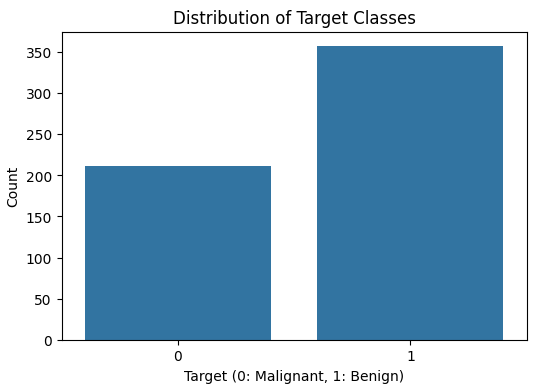
데이터 전처리
from sklearn.preprocessing import StandardScaler

X = df_cancer.drop('target', axis=1)
y = df_cancer['target']

scaler = StandardScaler()
X_scaled = scaler.fit_transform(X)

print("Original feature shape:", X.shape)
print("Scaled feature shape:", X_scaled.shape)
print("First 5 rows of scaled features:\n", X_scaled[:5])
Original feature shape: (569, 30)
Scaled feature shape: (569, 30)
First 5 rows of scaled features:
[[ 1.09706398e+00 -2.07333501e+00 1.26993369e+00 9.84374905e-01
1.56846633e+00 3.28351467e+00 2.65287398e+00 2.53247522e+00
2.21751501e+00 2.25574689e+00 2.48973393e+00 -5.65265059e-01
2.83303087e+00 2.48757756e+00 -2.14001647e-01 1.31686157e+00
7.24026158e-01 6.60819941e-01 1.14875667e+00 9.07083081e-01
1.88668963e+00 -1.35929347e+00 2.30360062e+00 2.00123749e+00
1.30768627e+00 2.61666502e+00 2.10952635e+00 2.29607613e+00
2.75062224e+00 1.93701461e+00]
[ 1.82982061e+00 -3.53632408e-01 1.68595471e+00 1.90870825e+00
-8.26962447e-01 -4.87071673e-01 -2.38458552e-02 5.48144156e-01
1.39236330e-03 -8.68652457e-01 4.99254601e-01 -8.76243603e-01
2.63326966e-01 7.42401948e-01 -6.05350847e-01 -6.92926270e-01
-4.40780058e-01 2.60162067e-01 -8.05450380e-01 -9.94437403e-02
1.80592744e+00 -3.69203222e-01 1.53512599e+00 1.89048899e+00
-3.75611957e-01 -4.30444219e-01 -1.46748968e-01 1.08708430e+00
-2.43889668e-01 2.81189987e-01]
[ 1.57988811e+00 4.56186952e-01 1.56650313e+00 1.55888363e+00
9.42210440e-01 1.05292554e+00 1.36347845e+00 2.03723076e+00
9.39684817e-01 -3.98007910e-01 1.22867595e+00 -7.80083377e-01
8.50928301e-01 1.18133606e+00 -2.97005012e-01 8.14973504e-01
2.13076435e-01 1.42482747e+00 2.37035535e-01 2.93559404e-01
1.51187025e+00 -2.39743838e-02 1.34747521e+00 1.45628455e+00
5.27407405e-01 1.08293217e+00 8.54973944e-01 1.95500035e+00
1.15225500e+00 2.01391209e-01]
[-7.68909287e-01 2.53732112e-01 -5.92687167e-01 -7.64463792e-01
3.28355348e+00 3.40290899e+00 1.91589718e+00 1.45170736e+00
2.86738293e+00 4.91091929e+00 3.26373441e-01 -1.10409044e-01
2.86593405e-01 -2.88378148e-01 6.89701660e-01 2.74428041e+00
8.19518384e-01 1.11500701e+00 4.73268037e+00 2.04751088e+00
-2.81464464e-01 1.33984094e-01 -2.49939304e-01 -5.50021228e-01
3.39427470e+00 3.89339743e+00 1.98958826e+00 2.17578601e+00
6.04604135e+00 4.93501034e+00]
[ 1.75029663e+00 -1.15181643e+00 1.77657315e+00 1.82622928e+00
2.80371830e-01 5.39340452e-01 1.37101143e+00 1.42849277e+00
-9.56046689e-03 -5.62449981e-01 1.27054278e+00 -7.90243702e-01
1.27318941e+00 1.19035676e+00 1.48306716e+00 -4.85198799e-02
8.28470780e-01 1.14420474e+00 -3.61092272e-01 4.99328134e-01
1.29857524e+00 -1.46677038e+00 1.33853946e+00 1.22072425e+00
2.20556166e-01 -3.13394511e-01 6.13178758e-01 7.29259257e-01
-8.68352984e-01 -3.97099619e-01]]
훈련세트, 테스트 세트 분리
from sklearn.model_selection import train_test_split

X_train, X_test, y_train, y_test = train_test_split(X_scaled, y, test_size=0.25, random_state=42)

print("X_train shape:", X_train.shape)
print("y_train shape:", y_train.shape)
print("X_test shape:", X_test.shape)
print("y_test shape:", y_test.shape)
X_train shape: (426, 30)
y_train shape: (426,)
X_test shape: (143, 30)
y_test shape: (143,)
모델 선정 및 학습
from sklearn.ensemble import RandomForestClassifier

# RandomForestClassifier: 여러 결정 트리를 사용하여 분류 성능을 향상시키는 앙상블 모델
# 과적합을 줄이고 높은 정확도를 제공(k-Nearest Neighbor보다 좋은 성능 기대)
model = RandomForestClassifier(random_state=42)

model.fit(X_train, y_train)
모델 평가 및 예측
from sklearn.metrics import accuracy_score, precision_score, recall_score, f1_score

y_pred = model.predict(X_test)

accuracy = accuracy_score(y_test, y_pred)
precision = precision_score(y_test, y_pred)
recall = recall_score(y_test, y_pred)
f1 = f1_score(y_test, y_pred)

print(f"Accuracy: {accuracy:.4f}")
print(f"Precision: {precision:.4f}")
print(f"Recall: {recall:.4f}")
print(f"F1-score: {f1:.4f}")
Accuracy: 0.9650
Precision: 0.9667
Recall: 0.9775
F1-score: 0.9721
과대적합/과소적합 진단 및 수정
y_train_pred = model.predict(X_train)
accuracy_train = accuracy_score(y_train, y_train_pred)
precision_train = precision_score(y_train, y_train_pred)
recall_train = recall_score(y_train, y_train_pred)
f1_train = f1_score(y_train, y_train_pred)
print("\n--- Training Set Performance ---")
print(f"Accuracy: {accuracy_train:.4f}")
print(f"Precision: {precision_train:.4f}")
print(f"Recall: {recall_train:.4f}")
print(f"F1-score: {f1_train:.4f}")
print("\n--- Test Set Performance (for comparison) ---")
print(f"Accuracy: {accuracy:.4f}")
print(f"Precision: {precision:.4f}")
print(f"Recall: {recall:.4f}")
print(f"F1-score: {f1:.4f}")--- Training Set Performance ---
Accuracy: 1.0000
Precision: 1.0000
Recall: 1.0000
F1-score: 1.0000
--- Test Set Performance (for comparison) ---
Accuracy: 0.9650
Precision: 0.9667
Recall: 0.9775
F1-score: 0.9721
과대적합 관리
from sklearn.ensemble import RandomForestClassifier

# 조정된 하이퍼파라미터로 새로운 RandomForestClassifier를 인스턴스화
# max_depth는 각 트리의 깊이를 제한하여 너무 특정적인 패턴을 학습하는 것을 방지
# min_samples_leaf는 각 리프 노드가 최소한의 샘플을 갖도록 하여 모델을 더 견고하게 만듦
model_tuned = RandomForestClassifier(max_depth=8, min_samples_leaf=5, random_state=42)

# 튜닝된 모델 학습
model_tuned.fit(X_train, y_train)

from sklearn.metrics import accuracy_score, precision_score, recall_score, f1_score

y_train_pred_tuned = model_tuned.predict(X_train)
y_test_pred_tuned = model_tuned.predict(X_test)

# 훈련 세트에서 평가
accuracy_train_tuned = accuracy_score(y_train, y_train_pred_tuned)
precision_train_tuned = precision_score(y_train, y_train_pred_tuned)
recall_train_tuned = recall_score(y_train, y_train_pred_tuned)
f1_train_tuned = f1_score(y_train, y_train_pred_tuned)

# 테스트 세트에서 평가
accuracy_test_tuned = accuracy_score(y_test, y_test_pred_tuned)
precision_test_tuned = precision_score(y_test, y_test_pred_tuned)
recall_test_tuned = recall_score(y_test, y_test_pred_tuned)
f1_test_tuned = f1_score(y_test, y_test_pred_tuned)

print("--- Tuned Model Training Set Performance ---")
print(f"Accuracy: {accuracy_train_tuned:.4f}")
print(f"Precision: {precision_train_tuned:.4f}")
print(f"Recall: {recall_train_tuned:.4f}")
print(f"F1-score: {f1_train_tuned:.4f}")

print("\n--- Tuned Model Test Set Performance ---")
print(f"Accuracy: {accuracy_test_tuned:.4f}")
print(f"Precision: {precision_test_tuned:.4f}")
print(f"Recall: {recall_test_tuned:.4f}")
print(f"F1-score: {f1_test_tuned:.4f}")
--- Tuned Model Training Set Performance ---
Accuracy: 0.9789
Precision: 0.9779
Recall: 0.9888
F1-score: 0.9833
--- Tuned Model Test Set Performance ---
Accuracy: 0.9720
Precision: 0.9670
Recall: 0.9888
F1-score: 0.9778
정답 코드
from sklearn.datasets import load_breast_cancer
cancer = load_breast_cancer()

import pandas as pd
cancer_df = pd.DataFrame(cancer.data, columns=cancer.feature_names)
cancer_df["target"] = cancer.target
cancer_df

from sklearn.preprocessing import StandardScaler
ss = StandardScaler()
ss.fit(cancer.data)
input_scaled = ss.transform(cancer.data)

from sklearn.model_selection import train_test_split
train_input, test_input, train_target, test_target = \
train_test_split(input_scaled, cancer.target, random_state=21)

from sklearn.neighbors import KNeighborsClassifier
kn = KNeighborsClassifier()
kn.fit(train_input, train_target)
print("훈련세트 스코어:", kn.score(train_input, train_target))
print("테스트세트 스코어:", kn.score(test_input, test_target))

import numpy as np
indexes = np.arange(len(test_input))
np.random.shuffle(indexes)
print("무작위 예측:", kn.predict(test_input[indexes[:5]]))
print("실제 타겟은:", test_target[indexes[:5]])
로지스틱 회귀
학습 후에 데이터 샘플을 주면 모델이 골라주던 방식
ㄴ-> 모델이 A일 확률은 n%, B일 확률은 n%
ㄴ 가장 높은 확률을 알려주는 형식
데이터 준비
import pandas as pd

fish = pd.read_csv('https://bit.ly/fish_csv_data')
fish.head()


#    Species	Weight	Length	Diagonal Height	Width
# 0	Bream	242.0	25.4	30.0	11.5200	4.0200
# 1	Bream	290.0	26.3	31.2	12.4800	4.3056
# 2	Bream	340.0	26.5	31.1	12.3778	4.6961
# 3	Bream	363.0	29.0	33.5	12.7300	4.4555
# 4	Bream	430.0	29.0	34.0	12.4440	5.1340

print(pd.unique(fish['Species']))
# ['Bream' 'Roach' 'Whitefish' 'Parkki' 'Perch' 'Pike' 'Smelt']

fish_input = fish[['Weight','Length','Diagonal','Height','Width']].to_numpy()

print(fish_input[:5])
# [[242.      25.4     30.      11.52     4.02  ]
#  [290.      26.3     31.2     12.48     4.3056]
#  [340.      26.5     31.1     12.3778   4.6961]
#  [363.      29.      33.5     12.73     4.4555]
#  [430.      29.      34.      12.444    5.134 ]]

fish_target = fish['Species'].to_numpy()

from sklearn.model_selection import train_test_split

train_input, test_input, train_target, test_target = train_test_split(
    fish_input, fish_target, random_state=42)

from sklearn.preprocessing import StandardScaler

ss = StandardScaler()
ss.fit(train_input)
train_scaled = ss.transform(train_input)
test_scaled = ss.transform(test_input)
k-최근접 이웃 분류기의 확률 예측
from sklearn.neighbors import KNeighborsClassifier

kn = KNeighborsClassifier(n_neighbors=3)
kn.fit(train_scaled, train_target)

print(kn.score(train_scaled, train_target))
print(kn.score(test_scaled, test_target))

# 0.8907563025210085
# 0.85

print(kn.classes_)
# ['Bream' 'Parkki' 'Perch' 'Pike' 'Roach' 'Smelt' 'Whitefish']

print(kn.predict(test_scaled[:5]))
# ['Perch' 'Smelt' 'Pike' 'Perch' 'Perch']

import numpy as np

proba = kn.predict_proba(test_scaled[:5])
print(np.round(proba, decimals=4))
# [[0.     0.     1.     0.     0.     0.     0.    ]
#  [0.     0.     0.     0.     0.     1.     0.    ]
#  [0.     0.     0.     1.     0.     0.     0.    ]
#  [0.     0.     0.6667 0.     0.3333 0.     0.    ]
#  [0.     0.     0.6667 0.     0.3333 0.     0.    ]]

distances, indexes = kn.kneighbors(test_scaled[3:4])
print(train_target[indexes])
# [['Roach' 'Perch' 'Perch']]
로지스틱 회귀
이름은 회귀이지만 분류 모델
선형 회귀와 동일하게 선형 방정식 학습
ex)
z = a*(Weight) + b*(Length) + c*(Diagonal) + d*(Height) + e*(Width) + f
ㄴ a,b,c,d,e => 가중치 or 계수, z => 0~1(0~100%),
z가 아주 작은 음수일때 0, 아주 큰 양수일 때 1이 되게 하려면? => 시그모이드, 로지스틱 함수 사용
시그모이드: 선형 방정식의 출력을 0과 1사이의 값으로 압축하며 이진 분류를 위해 사용
import numpy as np
import matplotlib.pyplot as plt

z = np.arange(-5, 5, 0.1)
phi = 1 / (1 + np.exp(-z))

plt.plot(z, phi)
plt.xlabel('z')
plt.ylabel('phi')
plt.show()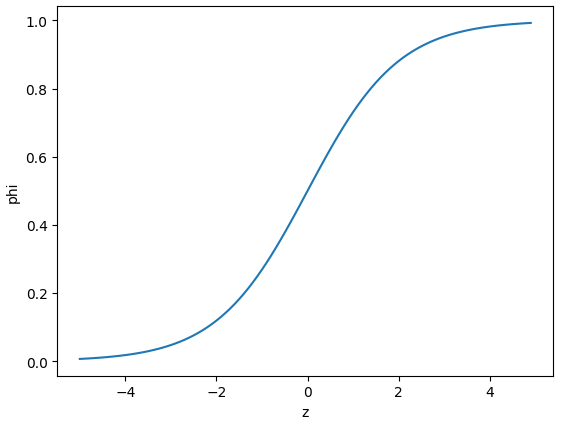
딱 0.5일 경우 라이브러리마다 다르지만 사이킷런은 음성 클래스로 판단
로지스틱 회귀로 이진 분류 수행
불리언 인덱싱: 넘파이 배열은 True, False 값을 전달하여 행을 선택할 수 있음
char_arr = np.array(['A', 'B', 'C', 'D', 'E'])
print(char_arr[[True, False, True, False, False]])
# ['A' 'C']

bream_smelt_indexes = (train_target == 'Bream') | (train_target == 'Smelt')
train_bream_smelt = train_scaled[bream_smelt_indexes]
target_bream_smelt = train_target[bream_smelt_indexes]

from sklearn.linear_model import LogisticRegression

lr = LogisticRegression()
lr.fit(train_bream_smelt, target_bream_smelt)

print(lr.predict(train_bream_smelt[:5]))
# ['Bream' 'Smelt' 'Bream' 'Bream' 'Bream']

print(lr.predict_proba(train_bream_smelt[:5]))
# [[0.99759855 0.00240145]
#  [0.02735183 0.97264817]
#  [0.99486072 0.00513928]
#  [0.98584202 0.01415798]
#  [0.99767269 0.00232731]]

print(lr.classes_)
# ['Bream' 'Smelt']

print(lr.coef_, lr.intercept_)
# [[-0.4037798  -0.57620209 -0.66280298 -1.01290277 -0.73168947]] [-2.16155132]

decisions = lr.decision_function(train_bream_smelt[:5])
print(decisions)
# [-6.02991358  3.57043428 -5.26630496 -4.24382314 -6.06135688]

from scipy.special import expit

print(expit(decisions))
# [0.00240145 0.97264817 0.00513928 0.01415798 0.00232731]
로지스틱 회귀로 다중 분류 수행하기
lr = LogisticRegression(C=20, max_iter=1000)
lr.fit(train_scaled, train_target)

print(lr.score(train_scaled, train_target))
print(lr.score(test_scaled, test_target))
# 0.9327731092436975
# 0.925

print(lr.predict(test_scaled[:5]))
# ['Perch' 'Smelt' 'Pike' 'Roach' 'Perch']

proba = lr.predict_proba(test_scaled[:5])
print(np.round(proba, decimals=3))
# [[0.    0.014 0.842 0.    0.135 0.007 0.003]
#  [0.    0.003 0.044 0.    0.007 0.946 0.   ]
#  [0.    0.    0.034 0.934 0.015 0.016 0.   ]
#  [0.011 0.034 0.305 0.006 0.567 0.    0.076]
#  [0.    0.    0.904 0.002 0.089 0.002 0.001]]

print(lr.classes_)
# ['Bream' 'Parkki' 'Perch' 'Pike' 'Roach' 'Smelt' 'Whitefish']

print(lr.coef_.shape, lr.intercept_.shape)
# (7, 5) (7,)

decision = lr.decision_function(test_scaled[:5])
print(np.round(decision, decimals=2))
# [[ -6.5    1.03   5.16  -2.73   3.34   0.33  -0.63]
#  [-10.86   1.93   4.77  -2.4    2.98   7.84  -4.26]
#  [ -4.34  -6.23   3.17   6.49   2.36   2.42  -3.87]
#  [ -0.68   0.45   2.65  -1.19   3.26  -5.75   1.26]
#  [ -6.4   -1.99   5.82  -0.11   3.5   -0.11  -0.71]]

from scipy.special import softmax

proba = softmax(decision, axis=1)
print(np.round(proba, decimals=3))
# [[0.    0.014 0.841 0.    0.136 0.007 0.003]
#  [0.    0.003 0.044 0.    0.007 0.946 0.   ]
#  [0.    0.    0.034 0.935 0.015 0.016 0.   ]
#  [0.011 0.034 0.306 0.007 0.567 0.    0.076]
#  [0.    0.    0.904 0.002 0.089 0.002 0.001]]
소프트맥스: 다중 분류에서 여러 선형 방정식의 출력 결과를 정규화하여 합이 1이 되도록 만듦
지도학습: (문제 -> 정답)을 알려준 다음 비슷한 문제를 내고 맞추게 하는 것
선형회귀: (특징 -> 결과값)을 알려준 다음 경향성을 파악하게 만들고 문제를 내는 것
점진적 학습
데이터를 한번에 다 주지 않고, 조금씩 나눠 모델을 학습 시킴
확률적 경사 하강법
훈련 세트에서 샘플 하나씩 꺼내 손실 함수의 경사를 따라 최적의 모델을 찾는 알고리즘
손실 함수
확률적 경사 하강법이 최적화할 대상
ㄴ로지스틱 손실 함수 or 이진 크로스엔트로피 손실 함수
ㄴ크로스엔트로피 손실 함수: 다중 분류에서 사용하는 손실 함수
에포크
확률적 경사 하강법에서 전체 샘플을 모두 사용하는 한 번 반복을 의미
조기 종료
과대적합이 시작하기 전에 훈련을 멈추는 것
힌지 손실
서포트 벡터 머신이라 불리는 머신러닝 알고리즘을 위한 손실 함수
import pandas as pd

fish = pd.read_csv('https://bit.ly/fish_csv_data')

fish_input = fish[['Weight','Length','Diagonal','Height','Width']].to_numpy()
fish_target = fish['Species'].to_numpy()

from sklearn.model_selection import train_test_split

train_input, test_input, train_target, test_target = train_test_split(
    fish_input, fish_target, random_state=42)

from sklearn.preprocessing import StandardScaler

ss = StandardScaler()
ss.fit(train_input)
train_scaled = ss.transform(train_input)
test_scaled = ss.transform(test_input)

from sklearn.linear_model import SGDClassifier

sc = SGDClassifier(loss='log_loss', max_iter=10, random_state=42)
sc.fit(train_scaled, train_target)

print(sc.score(train_scaled, train_target))
print(sc.score(test_scaled, test_target))
# 0.773109243697479
# 0.775
# /usr/local/lib/python3.10/dist-packages/sklearn/linear_model/_stochastic_gradient.py:702: ConvergenceWarning: Maximum number of iteration reached before convergence. Consider increasing max_iter to improve the fit.
#   warnings.warn(

sc.partial_fit(train_scaled, train_target)

print(sc.score(train_scaled, train_target))
print(sc.score(test_scaled, test_target))
# 0.8151260504201681
# 0.85
에포크와 과대/과소 적합
import numpy as np

sc = SGDClassifier(loss='log_loss', random_state=42)

train_score = []
test_score = []

classes = np.unique(train_target)

for _ in range(0, 300):
    sc.partial_fit(train_scaled, train_target, classes=classes)

    train_score.append(sc.score(train_scaled, train_target))
    test_score.append(sc.score(test_scaled, test_target))

import matplotlib.pyplot as plt

plt.plot(train_score)
plt.plot(test_score)
plt.xlabel('epoch')
plt.ylabel('accuracy')
plt.show()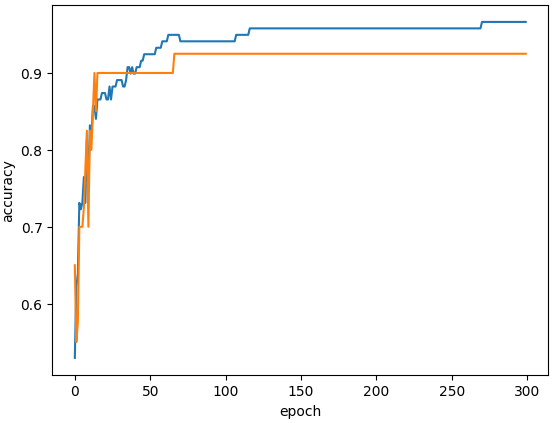
sc = SGDClassifier(loss='log_loss', max_iter=100, tol=None, random_state=42)
sc.fit(train_scaled, train_target)

print(sc.score(train_scaled, train_target))
print(sc.score(test_scaled, test_target))

# 0.957983193277311
# 0.925

sc = SGDClassifier(loss='hinge', max_iter=100, tol=None, random_state=42)
sc.fit(train_scaled, train_target)

print(sc.score(train_scaled, train_target))
print(sc.score(test_scaled, test_target))
# 0.9495798319327731
# 0.925
두번째 머신러닝 미션
iris
from sklearn.datasets import load_iris
iris = load_iris() # 붓꽃 다중분류 데이터
import pandas as pd
iris_df = pd.DataFrame(iris.data, columns=iris.feature_names)
iris_df["target"] = iris.target
print(iris_df) # sepal : 꽃받침, petal: 꽃
#타깃0 : setosa, 타깃1 : versicolor, 타깃2 : virginica sepal length (cm) sepal width (cm) petal length (cm) petal width (cm) \
0 5.1 3.5 1.4 0.2
1 4.9 3.0 1.4 0.2
2 4.7 3.2 1.3 0.2
3 4.6 3.1 1.5 0.2
4 5.0 3.6 1.4 0.2
.. ... ... ... ...
145 6.7 3.0 5.2 2.3
146 6.3 2.5 5.0 1.9
147 6.5 3.0 5.2 2.0
148 6.2 3.4 5.4 2.3
149 5.9 3.0 5.1 1.8
target
0 0
1 0
2 0
3 0
4 0
.. ...
145 2
146 2
147 2
148 2
149 2
[150 rows x 5 columns]# 훈련세트 나누기
from sklearn.model_selection import train_test_split
train_input, test_input, train_target, test_target = \
train_test_split(iris.data, iris.target, test_size=0.2, random_state=7)
print(train_input.shape)
print(test_input.shape)(120, 4)
(30, 4)from sklearn.linear_model import LogisticRegression
model = LogisticRegression()
model.fit(train_input, train_target)
print("훈련세트 점수:", model.score(train_input, train_target))
print("테스트세트 점수:", model.score(test_input, test_target))훈련세트 점수: 0.9916666666666667
테스트세트 점수: 0.8666666666666667
# 과대 적합import numpy as np
indexes = np.arange(len(test_input))
np.random.shuffle(indexes)
print("무작위 예측:", model.predict(test_input[indexes[:5]]))
print("실제 타깃은:", test_target[indexes[:5]])무작위 예측: [1 0 1 1 1]
실제 타깃은: [2 0 1 1 1]# 하이퍼파라미터 튜닝
c_list = [0.01, 0.1, 1, 10, 100]
train_score = []
test_score = []
for c in c_list :
model = LogisticRegression(C=c, max_iter=1000)
model.fit(train_input, train_target)
train_score.append(model.score(train_input, train_target))
test_score.append(model.score(test_input, test_target))print(train_score)
print(test_score)[0.8833333333333333, 0.9666666666666667, 0.9916666666666667, 0.9916666666666667, 0.9833333333333333]
[0.7666666666666667, 0.8333333333333334, 0.8666666666666667, 0.8666666666666667, 0.8666666666666667]import matplotlib.pyplot as plt
plt.plot(np.log10(c_list), train_score)
plt.plot(np.log10(c_list), test_score)
plt.xlabel("C")
plt.ylabel("R^2")
plt.show()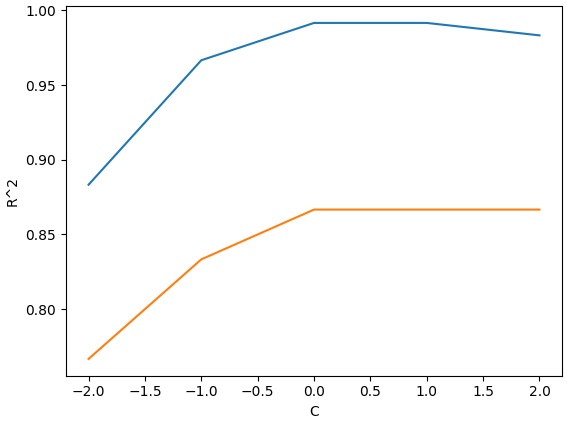
'로보테크AI' 카테고리의 다른 글
| 융합_로보테크 AI 자율주행 로봇 개발자 과정-26/03/20 (0) | 2026.03.20 |
|---|---|
| 융합_로보테크 AI 자율주행 로봇 개발자 과정-26/03/18[ML, DL] (0) | 2026.03.18 |
| 융합_로보테크 AI 자율주행 로봇 개발자 과정-26/03/17 (0) | 2026.03.17 |
| 융합_로보테크 AI 자율주행 로봇 개발자 과정-26/03/16[트위니 특강] (0) | 2026.03.16 |
| 융합_로보테크 AI 자율주행 로봇 개발자 과정-26/03/13 +자소서 특강 (0) | 2026.03.13 |