트리 알고리즘
결정트리
import pandas as pd

wine = pd.read_csv('https://bit.ly/wine_csv_data')

wine.head()
alcohol sugar pH class
0 9.4 1.9 3.51 0.0
1 9.8 2.6 3.20 0.0
2 9.8 2.3 3.26 0.0
3 9.8 1.9 3.16 0.0
4 9.4 1.9 3.51 0.0wine.info()
<class 'pandas.core.frame.DataFrame'>
RangeIndex: 6497 entries, 0 to 6496
Data columns (total 4 columns):
# Column Non-Null Count Dtype
--- ------ -------------- -----
0 alcohol 6497 non-null float64
1 sugar 6497 non-null float64
2 pH 6497 non-null float64
3 class 6497 non-null float64
dtypes: float64(4)
memory usage: 203.2 KB
누락된 값이 있다면 그 데이터를 버리거나 평균값으로 채운 후 사용
wine.describe()


alcohol	sugar	pH	class
count	6497.000000	6497.000000	6497.000000	6497.000000
mean	10.491801	5.443235	3.218501	0.753886
std	1.192712	4.757804	0.160787	0.430779
min	8.000000	0.600000	2.720000	0.000000
25%	9.500000	1.800000	3.110000	1.000000
50%	10.300000	3.000000	3.210000	1.000000
75%	11.300000	8.100000	3.320000	1.000000
max	14.900000	65.800000	4.010000	1.000000
평균(mean)
표준편차(std)
최소(min)
최대(max)
1사분위수(25%)
중간값
3사분위수(75%)
data = wine[['alcohol', 'sugar', 'pH']]
target = wine['class']

from sklearn.model_selection import train_test_split

train_input, test_input, train_target, test_target = train_test_split(
    data, target, test_size=0.2, random_state=42)

print(train_input.shape, test_input.shape)
# (5197, 3) (1300, 3)

from sklearn.preprocessing import StandardScaler

ss = StandardScaler()
ss.fit(train_input)

train_scaled = ss.transform(train_input)
test_scaled = ss.transform(test_input)

from sklearn.linear_model import LogisticRegression

lr = LogisticRegression()
lr.fit(train_scaled, train_target)

print(lr.score(train_scaled, train_target))
print(lr.score(test_scaled, test_target))
# 0.7808350971714451
# 0.7776923076923077
설명하기 쉬운 모델과 어려운 모델
ㄴ결정 트리: 질문을 차례대로 던지면서 데이터를 분류하거나 값을 예측하는 트리 구조의 머신러닝 모델
print(lr.coef_, lr.intercept_)
# [[ 0.51268071  1.67335441 -0.68775646]] [1.81773456]

from sklearn.tree import DecisionTreeClassifier

dt = DecisionTreeClassifier(random_state=42)
dt.fit(train_scaled, train_target)

print(dt.score(train_scaled, train_target))
print(dt.score(test_scaled, test_target))
# 0.996921300750433
# 0.8592307692307692

import matplotlib.pyplot as plt
from sklearn.tree import plot_tree

plt.figure(figsize=(10,7))
plot_tree(dt)
plt.show()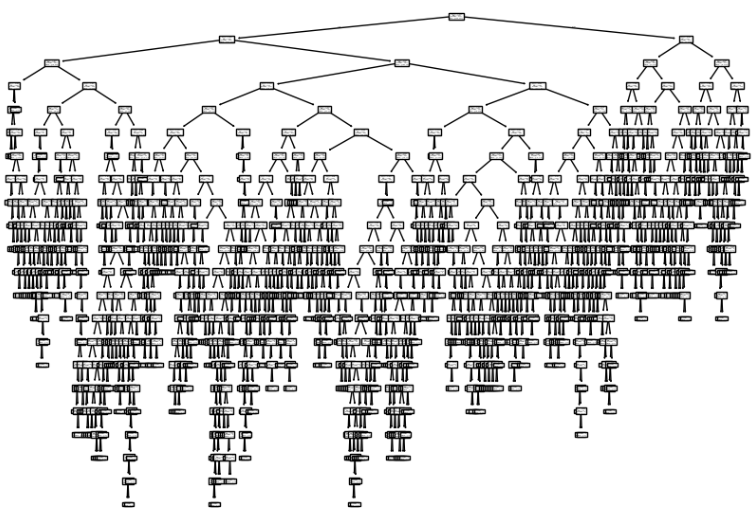
노드
결정 트리를 구성하는 핵심 요소
훈련 데이터의 특성에 대한 테스트를 표현
plt.figure(figsize=(10,7))
plot_tree(dt, max_depth=1, filled=True,
          feature_names=['alcohol', 'sugar', 'pH'])
plt.show()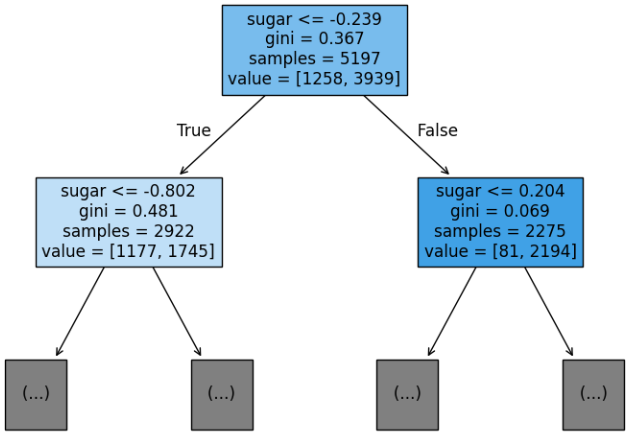
gini
지니 불순도
DecisionTreeClassifier 클래스의 criterion 매개변수의 기본값
지니 불순도 = 1- (음성 클래스 비율^2 + 양성 클래스 비율^2)
가지치기
dt = DecisionTreeClassifier(max_depth=3, random_state=42)
dt.fit(train_scaled, train_target)

print(dt.score(train_scaled, train_target))
print(dt.score(test_scaled, test_target))
# 0.8454877814123533
# 0.8415384615384616

plt.figure(figsize=(20,15))
plot_tree(dt, filled=True, feature_names=['alcohol', 'sugar', 'pH'])
plt.show()
결정 트리는 표준화 전처리 과정이 필요X
dt = DecisionTreeClassifier(max_depth=3, random_state=42)
dt.fit(train_input, train_target)

print(dt.score(train_input, train_target))
print(dt.score(test_input, test_target))
# 0.8454877814123533
# 0.8415384615384616

plt.figure(figsize=(20,15))
plot_tree(dt, filled=True, feature_names=['alcohol', 'sugar', 'pH'])
plt.show()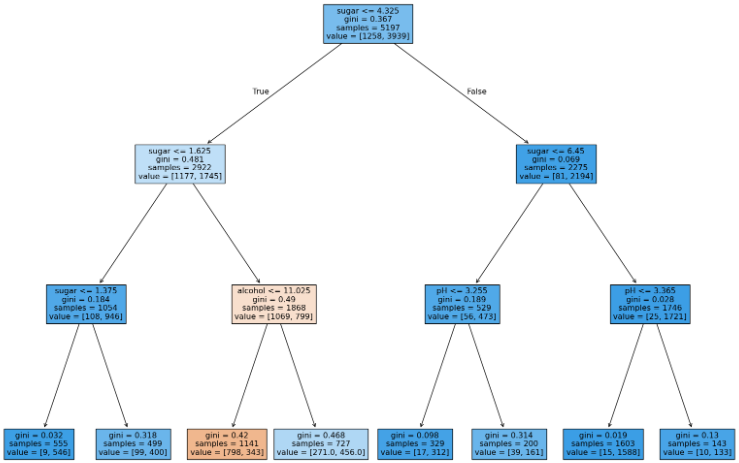
결정 트리의 특성 중요도를 특성 선택에 활용 가능
print(dt.feature_importances_)
# [0.12345626 0.86862934 0.0079144 ]
교차 검증과 그리드 서치
검증 세트
학습 중인 모델의 성능을 중간 점검하고 하이퍼파라미터를 조정하기 위해 쓰는, 학습 데이터와 테스트 데이터 사이의 평가용 데이터
import pandas as pd

wine = pd.read_csv('https://bit.ly/wine_csv_data')

data = wine[['alcohol', 'sugar', 'pH']]
target = wine['class']

from sklearn.model_selection import train_test_split

train_input, test_input, train_target, test_target = train_test_split(
    data, target, test_size=0.2, random_state=42)

sub_input, val_input, sub_target, val_target = train_test_split(
    train_input, train_target, test_size=0.2, random_state=42)

print(sub_input.shape, val_input.shape)
# (4157, 3) (1040, 3)

from sklearn.tree import DecisionTreeClassifier

dt = DecisionTreeClassifier(random_state=42)
dt.fit(sub_input, sub_target)

print(dt.score(sub_input, sub_target))
print(dt.score(val_input, val_target))
# 0.9971133028626413
# 0.864423076923077
교차 검증
검증 세트를 떼어 내어 평가하는 과정을 여러 번 반복한 후 점수를 평균하여 최종 검증 점수를 얻음
from sklearn.model_selection import cross_validate

scores = cross_validate(dt, train_input, train_target)
print(scores)
# {'fit_time': array([0.01357293, 0.01049137, 0.0158186 , 0.02071619, 0.01681733]), 'score_time': array([0.00281429, 0.01179957, 0.0074544 , 0.00354481, 0.00379682]), 'test_score': array([0.86923077, 0.84615385, 0.87680462, 0.84889317, 0.83541867])}

import numpy as np

print(np.mean(scores['test_score']))
# 0.855300214703487

from sklearn.model_selection import StratifiedKFold

scores = cross_validate(dt, train_input, train_target, cv=StratifiedKFold())
print(np.mean(scores['test_score']))
# 0.855300214703487

splitter = StratifiedKFold(n_splits=10, shuffle=True, random_state=42)
scores = cross_validate(dt, train_input, train_target, cv=splitter)
print(np.mean(scores['test_score']))
# 0.8574181117533719
하이퍼파라미터 튜닝
사용자 지정 파라미터
결정트리의 하이퍼 파라미터
max-depth: 트리의 최대 깊이(질문을 몇개나?)
min_samples_split: 노드를 분할하기 위한 최소 샘플 수
min_imputiry_decrease: 불순도 개선을 최소 어느 정도 할지
from sklearn.model_selection import GridSearchCV

params = {'min_impurity_decrease': [0.0001, 0.0002, 0.0003, 0.0004, 0.0005]}

gs = GridSearchCV(DecisionTreeClassifier(random_state=42), params, n_jobs=-1)

gs.fit(train_input, train_target)
dt = gs.best_estimator_
print(dt.score(train_input, train_target))
# 0.9615162593804117

print(gs.best_params_)
# {'min_impurity_decrease': 0.0001}

print(gs.cv_results_['mean_test_score'])
# [0.86819297 0.86453617 0.86492226 0.86780891 0.86761605]

print(gs.cv_results_['params'][gs.best_index_])
# {'min_impurity_decrease': 0.0001}

params = {'min_impurity_decrease': np.arange(0.0001, 0.001, 0.0001),
          'max_depth': range(5, 20, 1),
          'min_samples_split': range(2, 100, 10)
          }

gs = GridSearchCV(DecisionTreeClassifier(random_state=42), params, n_jobs=-1)
gs.fit(train_input, train_target)
print(gs.best_params_)
# {'max_depth': 14, 'min_impurity_decrease': np.float64(0.0004), 'min_samples_split': 12}

print(np.max(gs.cv_results_['mean_test_score']))
# 0.8683865773302731
랜덤 서치
매개번수 값의 목록을 전달하는 것이 아닌 매개변수를 샘플링할 수 있는 확률 분포 객체를 전달
from scipy.stats import uniform, randint

rgen = randint(0, 10)
rgen.rvs(10)
# array([8, 6, 8, 7, 9, 7, 8, 2, 6, 0])

np.unique(rgen.rvs(1000), return_counts=True)
# (array([0, 1, 2, 3, 4, 5, 6, 7, 8, 9]),
#  array([104,  95, 103,  86,  82, 112,  99, 114,  94, 111]))

ugen = uniform(0, 1)
ugen.rvs(10)
# array([0.67774492, 0.06850628, 0.95871181, 0.370847  , 0.80036078,
#        0.01648066, 0.4291538 , 0.21331192, 0.9464653 , 0.89549718])

params = {'min_impurity_decrease': uniform(0.0001, 0.001),
          'max_depth': randint(20, 50),
          'min_samples_split': randint(2, 25),
          'min_samples_leaf': randint(1, 25),
          }

from sklearn.model_selection import RandomizedSearchCV

rs = RandomizedSearchCV(DecisionTreeClassifier(random_state=42), params,
                        n_iter=100, n_jobs=-1, random_state=42)
rs.fit(train_input, train_target)
print(rs.best_params_)
# {'max_depth': 39, 'min_impurity_decrease': np.float64(0.00034102546602601173), 'min_samples_leaf': 7, 'min_samples_split': 13}

print(np.max(rs.cv_results_['mean_test_score']))
0.8695428296438884

dt = rs.best_estimator_

print(dt.score(test_input, test_target))
# 0.86
트리의 앙상블
정형 데이터: 어떤 구조로 되어 있는, csv나 db, excel 형태
비정형 데이터: 정형 데이터로 표현하기 힘든, 텍스트, 사진, 음악, 영상 등
앙상블 학습
정형 데이터를 다루는데 가장 뛰어난 성과를 내는 알고리즘
랜덤 포레스트
앙상블 학습의 대표 중 하나
결정 트리를 랜덤하게 만들어 결정 트리의 숲을 만듦
ㄴ부트스트랩 샘플(중복 가능 샘플)
import numpy as np
import pandas as pd
from sklearn.model_selection import train_test_split

wine = pd.read_csv('https://bit.ly/wine_csv_data')

data = wine[['alcohol', 'sugar', 'pH']]
target = wine['class']

train_input, test_input, train_target, test_target = train_test_split(
    data, target, test_size=0.2, random_state=42)

from sklearn.model_selection import cross_validate
from sklearn.ensemble import RandomForestClassifier

rf = RandomForestClassifier(n_jobs=-1, random_state=42)
scores = cross_validate(rf, train_input, train_target, return_train_score=True, n_jobs=-1)

print(np.mean(scores['train_score']), np.mean(scores['test_score']))
# 0.9973541965122431 0.8905151032797809

rf.fit(train_input, train_target)
print(rf.feature_importances_)
# [0.23167441 0.50039841 0.26792718]

rf = RandomForestClassifier(oob_score=True, n_jobs=-1, random_state=42)

rf.fit(train_input, train_target)
print(rf.oob_score_)
# 0.8934000384837406
엑스트라 트리
랜덤 포레스트와 비슷하게 결정 트리를 사용하여 앙상블 모델을 만들지만 부트스트랩 샘플은 사용X
대신 랜덤하게 노드를 분할해 과대적합 감소
그레이디언드 부스팅
랜덤 포레스트나 엑스트라 트리와 달리 결정 트리를 연속적으로 추가하여 손실 함수를 최소화하는 앙상블 방법
훈련 속도는 조금 느리지만 더 좋은 성능
ㄴ히스토그램 기반 그레이디언트 부스팅: 기존 그레이디언트 부스팅의 속도 개선(안정적인 결과, 높은 성능)
실습
타이타닉 생존자 예측(이중 분류)
/content/drive/MyDrive/R2/MLDL/titanic_train.csv
import pandas as pd
import numpy as np
import matplotlib.pyplot as plt

titanic_df = pd.read_csv("/content/drive/MyDrive/R2/MLDL/titanic_train.csv")
print(titanic_df)

#----------------------------------------------------------------------------------

     PassengerId  Survived  Pclass  \
0              1         0       3
1              2         1       1
2              3         1       3
3              4         1       1
4              5         0       3
..           ...       ...     ...
886          887         0       2
887          888         1       1
888          889         0       3
889          890         1       1
890          891         0       3

                                                  Name     Sex   Age  SibSp  \
0                              Braund, Mr. Owen Harris    male  22.0      1
1    Cumings, Mrs. John Bradley (Florence Briggs Th...  female  38.0      1
2                               Heikkinen, Miss. Laina  female  26.0      0
3         Futrelle, Mrs. Jacques Heath (Lily May Peel)  female  35.0      1
4                             Allen, Mr. William Henry    male  35.0      0
..                                                 ...     ...   ...    ...
886                              Montvila, Rev. Juozas    male  27.0      0
887                       Graham, Miss. Margaret Edith  female  19.0      0
888           Johnston, Miss. Catherine Helen "Carrie"  female   NaN      1
889                              Behr, Mr. Karl Howell    male  26.0      0
890                                Dooley, Mr. Patrick    male  32.0      0

     Parch            Ticket     Fare Cabin Embarked
0        0         A/5 21171   7.2500   NaN        S
1        0          PC 17599  71.2833   C85        C
2        0  STON/O2. 3101282   7.9250   NaN        S
3        0            113803  53.1000  C123        S
4        0            373450   8.0500   NaN        S
..     ...               ...      ...   ...      ...
886      0            211536  13.0000   NaN        S
887      0            112053  30.0000   B42        S
888      2        W./C. 6607  23.4500   NaN        S
889      0            111369  30.0000  C148        C
890      0            370376   7.7500   NaN        Q

[891 rows x 12 columns]
# 결손값 확인 목적으로 조사하기
titanic_df.info()
#-----------------------------------------
<class 'pandas.core.frame.DataFrame'>
RangeIndex: 891 entries, 0 to 890
Data columns (total 12 columns):
# Column Non-Null Count Dtype
--- ------ -------------- -----
0 PassengerId 891 non-null int64
1 Survived 891 non-null int64
2 Pclass 891 non-null int64
3 Name 891 non-null object
4 Sex 891 non-null object
5 Age 714 non-null float64
6 SibSp 891 non-null int64
7 Parch 891 non-null int64
8 Ticket 891 non-null object
9 Fare 891 non-null float64
10 Cabin 204 non-null object
11 Embarked 889 non-null object
dtypes: float64(2), int64(5), object(5)
memory usage: 83.7+ KB# 비어있는 나이를 모두 평균값으로 채우기
titanic_df['Age'].fillna(titanic_df['Age'].mean(),inplace=True) # inplace: 복사X 원본으로
#------------------------------------------------------------------------------------------
/tmp/ipykernel_5675/2224426429.py:2: FutureWarning: A value is trying to be set on a copy of a DataFrame or Series through chained assignment using an inplace method.
The behavior will change in pandas 3.0. This inplace method will never work because the intermediate object on which we are setting values always behaves as a copy.
For example, when doing 'df[col].method(value, inplace=True)', try using 'df.method({col: value}, inplace=True)' or df[col] = df[col].method(value) instead, to perform the operation inplace on the original object.
titanic_df['Age'].fillna(titanic_df['Age'].mean(),inplace=True) # inplace: 복사X 원본으로# 머신러닝 알고리즘에 불필요한 피처 제거(불필요한지 여부는 직접 판단)
titanic_df.drop(['PassengerId', 'Name', 'Ticket', 'Cabin', 'Embarked'], axis=1, inplace=True)
titanic_df.head()
#----------------------------------------------------------------------------
Survived Pclass Sex Age SibSp Parch Fare
0 0 3 male 22.0 1 0 7.2500
1 1 1 female 38.0 1 0 71.2833
2 1 3 female 26.0 0 0 7.9250
3 1 1 female 35.0 1 0 53.1000
4 0 3 male 35.0 0 0 8.0500# 문자열 값을 숫자로 반환하기
titanic_df.loc[titanic_df['Sex'] == 'male', 'Sex'] = 1
titanic_df.loc[titanic_df['Sex'] == 'female', 'Sex'] = 0
titanic_df
#-----------------------------------------------------------
Survived Pclass Sex Age SibSp Parch Fare
0 0 3 1 22.000000 1 0 7.2500
1 1 1 0 38.000000 1 0 71.2833
2 1 3 0 26.000000 0 0 7.9250
3 1 1 0 35.000000 1 0 53.1000
4 0 3 1 35.000000 0 0 8.0500
... ... ... ... ... ... ... ...
886 0 2 1 27.000000 0 0 13.0000
887 1 1 0 19.000000 0 0 30.0000
888 0 3 0 29.699118 1 2 23.4500
889 1 1 1 26.000000 0 0 30.0000
890 0 3 1 32.000000 0 0 7.7500
891 rows × 7 columns# 타깃과 피처 구분하기
titanic_target = titanic_df['Survived'].to_numpy()
# axis 값을 0으로 하면 행 제거, 1로 하면 열 제거
titanic_feature = titanic_df.drop(['Survived'], axis=1).to_numpy()# 결정 트리 기반의 모델로 학습부터 예측까지
# 모델 생성 : 하이퍼 파라미터 튜닝
# 교차 검증 : 좀 더 신뢰가 가는 학습 절차 진행from sklearn.model_selection import train_test_split
train_feature, test_feature, train_target, test_target = train_test_split(
titanic_feature, titanic_target, test_size=0.2, random_state=42)
print(f"Training feature shape: {train_feature.shape}")
print(f"Testing feature shape: {test_feature.shape}")
print(f"Training target shape: {train_target.shape}")
print(f"Testing target shape: {test_target.shape}")
#----------------------------------------------------------
Training feature shape: (712, 6)
Testing feature shape: (179, 6)
Training target shape: (712,)
Testing target shape: (179,)params = {
'max_depth': range(1, 11),
'min_samples_split': range(2, 21),
'min_samples_leaf': range(1, 21)
}
print(params)
#----------------------------------------------
{'max_depth': range(1, 11), 'min_samples_split': range(2, 21), 'min_samples_leaf': range(1, 21)}from sklearn.model_selection import GridSearchCV
from sklearn.tree import DecisionTreeClassifier
dt = DecisionTreeClassifier(random_state=42)
gs = GridSearchCV(dt, params, n_jobs=-1)
gs.fit(train_feature, train_target)print(gs.best_params_)
# {'max_depth': 3, 'min_samples_leaf': 5, 'min_samples_split': 2}
print(gs.best_score_)
# 0.8244065793361568best_dt = gs.best_estimator_
print(f"Test set accuracy of the best model: {best_dt.score(test_feature, test_target):.4f}")
# Test set accuracy of the best model: 0.7989# 정답코드
from sklearn.model_selection import train_test_split
train_input, test_input, train_target, test_target = train_test_split(titanic_feature, titanic_target, test_size=0.2, random_state=11)
from sklearn.tree import DecisionTreeClassifier
from sklearn.ensemble import RandomForestClassifier
from sklearn.metrics import accuracy_score
# 결정트리, Random Forest, 로지스틱 회귀를 위한 사이킷런 Classifier 클래스 생성
dt_clf = DecisionTreeClassifier(random_state=11)
rf_clf = RandomForestClassifier(random_state=11)
# DecisionTreeClassifier 학습/예측/평가
dt_clf.fit(train_input, train_target)
dt_pred = dt_clf.predict(test_input)
print('DecisionTreeClassifier 정확도: {0:.4f}'.format(accuracy_score(test_target, dt_pred)))
# RandomForestClassifier 학습/예측/평가
rf_clf.fit(train_input , train_target)
rf_pred = rf_clf.predict(test_input)
print('RandomForestClassifier 정확도:{0:.4f}'.format(accuracy_score(test_target, rf_pred)))
from sklearn.model_selection import GridSearchCV
from sklearn.model_selection import StratifiedKFold
parameters = {
'max_depth':[2,3,5,10],
'min_samples_split':[2,3,5],
'min_samples_leaf':[1,5,8]
}
grid_rflf = GridSearchCV(rf_clf , param_grid=parameters , scoring='accuracy' , cv=StratifiedKFold(n_splits=5))
grid_rflf.fit(train_input , train_target)
print('GridSearchCV 최적 하이퍼 파라미터 :',grid_rflf.best_params_)
print('GridSearchCV 최고 정확도: {0:.4f}'.format(grid_rflf.best_score_))
best_rflf = grid_rflf.best_estimator_
# GridSearchCV의 최적 하이퍼 파라미터로 학습된 Estimator로 예측 및 평가 수행.
dpredictions = best_rflf.predict(test_input)
accuracy = accuracy_score(test_target , dpredictions)
print('테스트 세트에서의 RandomForestClassifier 정확도 : {0:.4f}'.format(accuracy))
비지도 학습
타깃이 없을 때 사용하는 머신러닝 알고리즘
!wget
코랩의 코드 셸에서 ! 시작시 리눅스 셸로 명령 이해
wget은 원격 주소에서 데이터를 다운로드하여 저장
히스토그램
구간별로 값이 발생한 빈도를 그래프로 표시한 것
보통 x축이 값의 구간, y축이 발생 빈도
군집
비슷한 샘플끼리 하나의 그룹으로 모으는 대표적인 비지도 학습 작업
ㄴ클러스터: 군집 알고리즘으로 모은 샘플 그룹
!wget https://bit.ly/fruits_300_data -O fruits_300.npy

#------------------------------------------------------
--2026-03-20 06:26:48--  https://bit.ly/fruits_300_data
Resolving bit.ly (bit.ly)... 67.199.248.11, 67.199.248.10
Connecting to bit.ly (bit.ly)|67.199.248.11|:443... connected.
HTTP request sent, awaiting response... 301 Moved Permanently
Location: https://github.com/rickiepark/hg-mldl/raw/master/fruits_300.npy [following]
--2026-03-20 06:26:48--  https://github.com/rickiepark/hg-mldl/raw/master/fruits_300.npy
Resolving github.com (github.com)... 140.82.116.4
Connecting to github.com (github.com)|140.82.116.4|:443... connected.
HTTP request sent, awaiting response... 302 Found
Location: https://raw.githubusercontent.com/rickiepark/hg-mldl/master/fruits_300.npy [following]
--2026-03-20 06:26:48--  https://raw.githubusercontent.com/rickiepark/hg-mldl/master/fruits_300.npy
Resolving raw.githubusercontent.com (raw.githubusercontent.com)... 185.199.108.133, 185.199.109.133, 185.199.110.133, ...
Connecting to raw.githubusercontent.com (raw.githubusercontent.com)|185.199.108.133|:443... connected.
HTTP request sent, awaiting response... 200 OK
Length: 3000128 (2.9M) [application/octet-stream]
Saving to: ‘fruits_300.npy’

fruits_300.npy      100%[===================>]   2.86M  --.-KB/s    in 0.04s

2026-03-20 06:26:49 (66.9 MB/s) - ‘fruits_300.npy’ saved [3000128/3000128]
import numpy as np
import matplotlib.pyplot as plt
fruits = np.load('fruits_300.npy')
print(fruits.shape)
# (300, 100, 100)
print(fruits[0, 0, :])
#------------------------------------------------------------------------
[ 1 1 1 1 1 1 1 1 1 1 1 1 1 1 1 1 2 1
2 2 2 2 2 2 1 1 1 1 1 1 1 1 2 3 2 1
2 1 1 1 1 2 1 3 2 1 3 1 4 1 2 5 5 5
19 148 192 117 28 1 1 2 1 4 1 1 3 1 1 1 1 1
2 2 1 1 1 1 1 1 1 1 1 1 1 1 1 1 1 1
1 1 1 1 1 1 1 1 1 1]plt.imshow(fruits[0], cmap='gray')
plt.show()
plt.imshow(fruits[0], cmap='gray_r')
plt.show()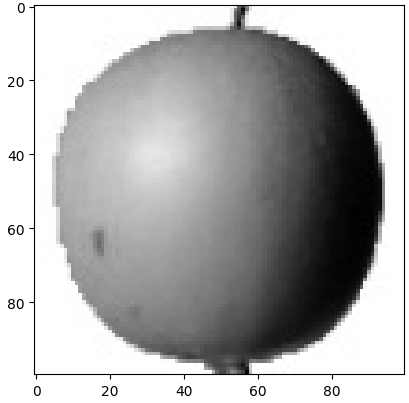
fig, axs = plt.subplots(1, 2)
axs[0].imshow(fruits[100], cmap='gray_r')
axs[1].imshow(fruits[200], cmap='gray_r')
plt.show()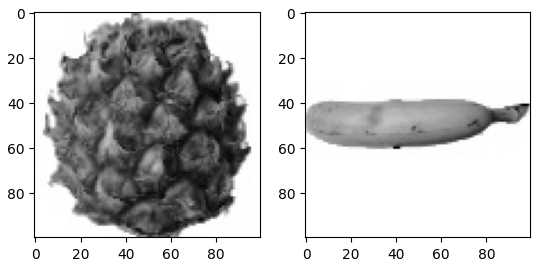
픽셀 값 분석하기
apple = fruits[0:100].reshape(-1, 100*100)
pineapple = fruits[100:200].reshape(-1, 100*100)
banana = fruits[200:300].reshape(-1, 100*100)

print(apple.shape)
# (100, 10000)

print(apple.mean(axis=1))
#-----------------------------------------------------------------------
[ 88.3346  97.9249  87.3709  98.3703  92.8705  82.6439  94.4244  95.5999
  90.681   81.6226  87.0578  95.0745  93.8416  87.017   97.5078  87.2019
  88.9827 100.9158  92.7823 100.9184 104.9854  88.674   99.5643  97.2495
  94.1179  92.1935  95.1671  93.3322 102.8967  94.6695  90.5285  89.0744
  97.7641  97.2938 100.7564  90.5236 100.2542  85.8452  96.4615  97.1492
  90.711  102.3193  87.1629  89.8751  86.7327  86.3991  95.2865  89.1709
  96.8163  91.6604  96.1065  99.6829  94.9718  87.4812  89.2596  89.5268
  93.799   97.3983  87.151   97.825  103.22    94.4239  83.6657  83.5159
 102.8453  87.0379  91.2742 100.4848  93.8388  90.8568  97.4616  97.5022
  82.446   87.1789  96.9206  90.3135  90.565   97.6538  98.0919  93.6252
  87.3867  84.7073  89.1135  86.7646  88.7301  86.643   96.7323  97.2604
  81.9424  87.1687  97.2066  83.4712  95.9781  91.8096  98.4086 100.7823
 101.556  100.7027  91.6098  88.8976]

plt.hist(apple.mean(axis=1), alpha=0.8, label='apple')
plt.hist(pineapple.mean(axis=1), alpha=0.8, label='pineapple')
plt.hist(banana.mean(axis=1), alpha=0.8, label='banana')
plt.legend()
plt.show()
fig, axs = plt.subplots(1, 3, figsize=(20, 5))
axs[0].bar(range(10000), apple.mean(axis=0))
axs[1].bar(range(10000), pineapple.mean(axis=0))
axs[2].bar(range(10000), banana.mean(axis=0))
plt.show()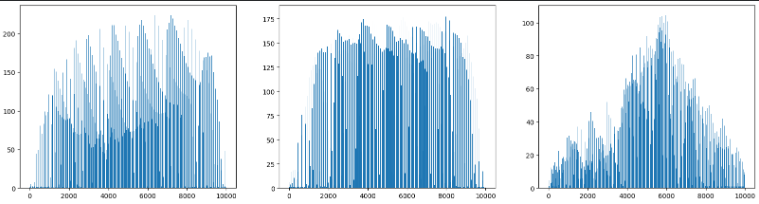
apple_mean = apple.mean(axis=0).reshape(100, 100)
pineapple_mean = pineapple.mean(axis=0).reshape(100, 100)
banana_mean = banana.mean(axis=0).reshape(100, 100)

fig, axs = plt.subplots(1, 3, figsize=(20, 5))
axs[0].imshow(apple_mean, cmap='gray_r')
axs[1].imshow(pineapple_mean, cmap='gray_r')
axs[2].imshow(banana_mean, cmap='gray_r')
plt.show()
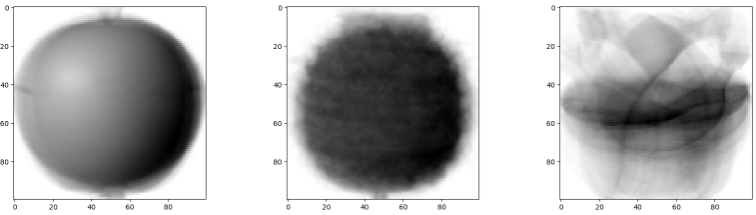
평균값과 가까운 사진 고르기
abs_diff = np.abs(fruits - apple_mean)
abs_mean = np.mean(abs_diff, axis=(1,2))
print(abs_mean.shape)
# (300,)

apple_index = np.argsort(abs_mean)[:100]
apple_index = apple_index.reshape(10, 10)
fig, axs = plt.subplots(10, 10, figsize=(10,10))
for i in range(10):
    for j in range(10):
        axs[i, j].imshow(fruits[apple_index[i, j]], cmap='gray_r')
        axs[i, j].axis('off')
plt.show()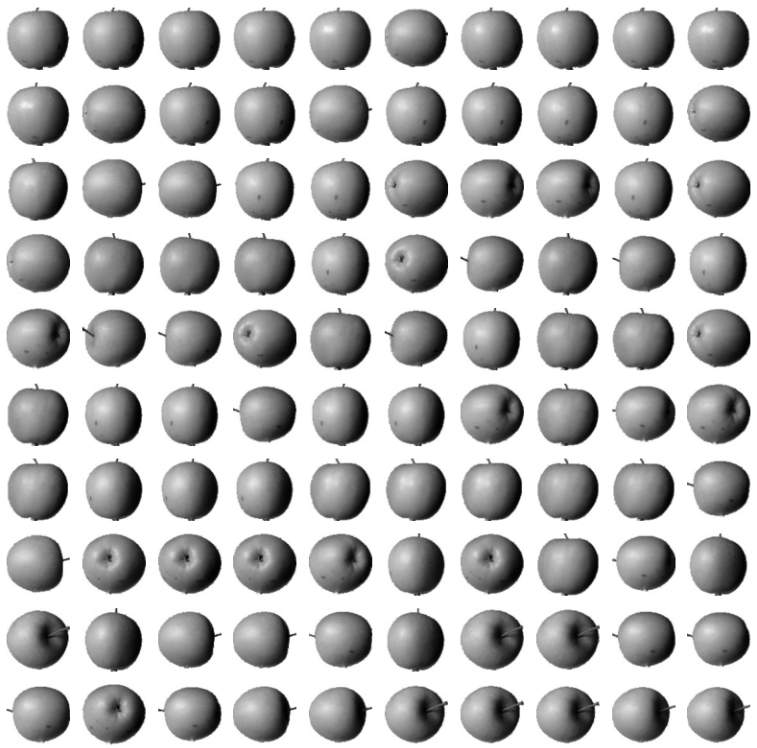
k-평균 알고리즘
1 무작위로 k개의 클러스터 중심을 정함
2 각 샘플에서 가장 가까운 클러스터 중심을 찾아 해당 클러스터의 샘플로 지정
3 클러스터에 속한 샘플의 평균값으로 클러스터 중심을 변경
4 클러스터 중심에 변화가 없을 때까지 2번으로 돌아가 반복
!wget https://bit.ly/fruits_300_data -O fruits_300.npy
#-----------------------------------------------------
--2026-03-20 08:23:33--  https://bit.ly/fruits_300_data
Resolving bit.ly (bit.ly)... 67.199.248.10, 67.199.248.11
Connecting to bit.ly (bit.ly)|67.199.248.10|:443... connected.
HTTP request sent, awaiting response... 301 Moved Permanently
Location: https://github.com/rickiepark/hg-mldl/raw/master/fruits_300.npy [following]
--2026-03-20 08:23:34--  https://github.com/rickiepark/hg-mldl/raw/master/fruits_300.npy
Resolving github.com (github.com)... 140.82.116.4
Connecting to github.com (github.com)|140.82.116.4|:443... connected.
HTTP request sent, awaiting response... 302 Found
Location: https://raw.githubusercontent.com/rickiepark/hg-mldl/master/fruits_300.npy [following]
--2026-03-20 08:23:34--  https://raw.githubusercontent.com/rickiepark/hg-mldl/master/fruits_300.npy
Resolving raw.githubusercontent.com (raw.githubusercontent.com)... 185.199.108.133, 185.199.109.133, 185.199.110.133, ...
Connecting to raw.githubusercontent.com (raw.githubusercontent.com)|185.199.108.133|:443... connected.
HTTP request sent, awaiting response... 200 OK
Length: 3000128 (2.9M) [application/octet-stream]
Saving to: ‘fruits_300.npy’

fruits_300.npy      100%[===================>]   2.86M  --.-KB/s    in 0.04s

2026-03-20 08:23:34 (73.4 MB/s) - ‘fruits_300.npy’ saved [3000128/3000128]

import numpy as np

fruits = np.load('fruits_300.npy')
fruits_2d = fruits.reshape(-1, 100*100)

from sklearn.cluster import KMeans

km = KMeans(n_clusters=3, random_state=42)
km.fit(fruits_2d)

print(km.labels_)
#---------------------------------------------------------------------------------------
[2 2 2 2 2 0 2 2 2 2 2 2 2 2 2 2 2 2 0 2 2 2 2 2 2 2 0 2 2 2 2 2 2 2 2 2 2
 2 2 2 2 2 0 2 0 2 2 2 2 2 2 2 0 2 2 2 2 2 2 2 2 2 0 0 2 2 2 2 2 2 2 2 0 2
 2 2 2 2 2 2 2 2 2 2 2 2 2 2 2 2 2 0 2 2 2 2 2 2 2 2 0 0 0 0 0 0 0 0 0 0 0
 0 0 0 0 0 0 0 0 0 0 0 0 0 0 0 0 0 0 0 0 0 0 0 0 0 0 0 0 0 0 0 0 0 0 0 0 0
 0 0 0 0 0 0 0 0 0 0 0 0 0 0 0 0 0 0 0 0 0 0 0 0 0 0 0 0 0 0 0 0 0 0 0 0 0
 0 0 0 0 0 0 0 0 0 0 0 0 0 0 0 1 1 1 1 1 1 1 1 1 1 1 1 1 1 1 1 1 1 1 1 1 1
 1 1 1 1 1 1 1 1 1 0 1 1 1 1 1 1 1 1 1 1 1 1 1 1 1 1 1 1 1 1 1 1 1 1 1 1 1
 1 1 1 1 1 1 1 1 1 1 1 1 1 1 0 1 1 1 1 1 1 1 1 1 1 1 1 1 1 1 1 1 1 1 1 1 1
 1 1 1 1]

print(np.unique(km.labels_, return_counts=True))
# (array([0, 1, 2], dtype=int32), array([112,  98,  90]))

import matplotlib.pyplot as plt

def draw_fruits(arr, ratio=1):
    n = len(arr)    # n은 샘플 개수
    # 한 줄에 10개씩 이미지 그림, 샘플 개수를 10으로 나누어 전체 행 개수를 계산
    rows = int(np.ceil(n/10))
    # 행이 1개면 열 개수는 샘플 개수, 그렇지 않으면 10개
    cols = n if rows < 2 else 10
    fig, axs = plt.subplots(rows, cols,
                            figsize=(cols*ratio, rows*ratio), squeeze=False)
    for i in range(rows):
        for j in range(cols):
            if i*10 + j < n:    # n 개까지만 그림
                axs[i, j].imshow(arr[i*10 + j], cmap='gray_r')
            axs[i, j].axis('off')
    plt.show()

draw_fruits(fruits[km.labels_==0])
draw_fruits(fruits[km.labels_==1])
draw_fruits(fruits[km.labels_==2])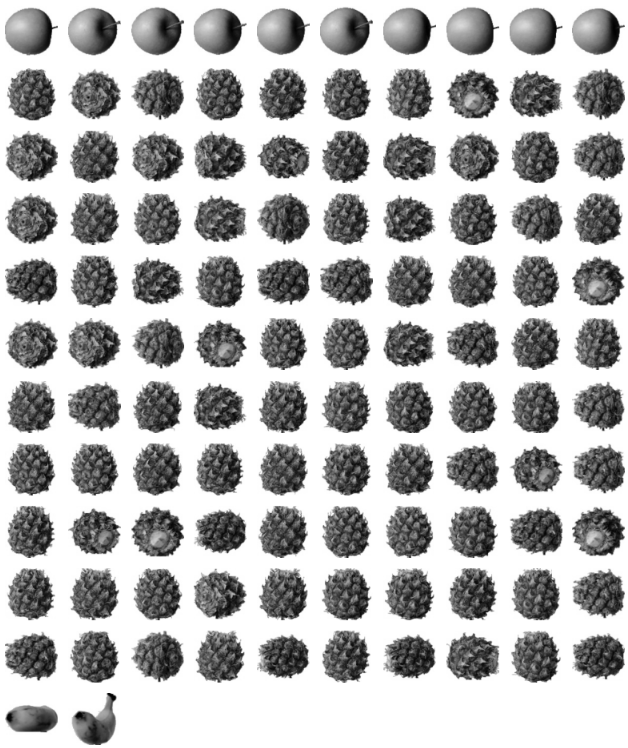


클러스터 중심
KMeans 클래스가 최종적으로 찾은 클러스터 중심은 cluster_centers_ 속성에 저장됨
이 배열은 Fruits_2d 샘플의 클러스터 중심이기 때문에 각 중심을 이미지로 출력하려면 100^2로 2차원 배열로 바꿔야 함
draw_fruits(km.cluster_centers_.reshape(-1, 100, 100), ratio=3)

print(km.transform(fruits_2d[100:101]))
# [[3400.24197319 8837.37750892 5279.33763699]]

print(km.predict(fruits_2d[100:101]))
# [0]

draw_fruits(fruits[100:101])

print(km.n_iter_)
# 4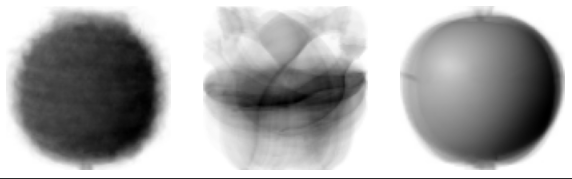

최적의 k 찾기
엘보우 방법
이너셔: 클러스터의 샘플이 얼마나 가깝게 있는지를 나타내는 값
클러스터 개수를 증가시키면서 이너셔를 그래프로 그리면 감소하는 속도가 꺾이는 지점 생김
ㄴ이 지점부터는 클러스터 개수를 늘려도 클러스터에 잘 밀집된 정도가 크게 개선되지 않음
ㄴ 즉 이너셔가 크게 줄어들지 않고, 이 지점을 엘보우 방법이라 함
inertia = []
for k in range(2, 7):
    km = KMeans(n_clusters=k, random_state=42)
    km.fit(fruits_2d)
    inertia.append(km.inertia_)

plt.plot(range(2, 7), inertia)
plt.xlabel('k')
plt.ylabel('inertia')
plt.show()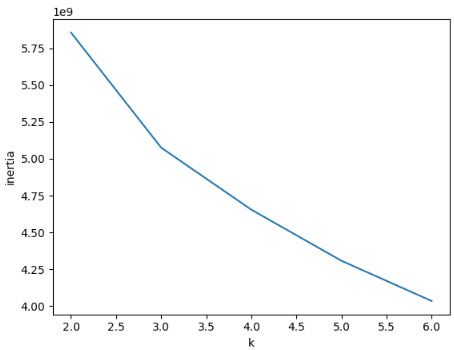
'로보테크AI' 카테고리의 다른 글
| 융합_로보테크 AI 자율주행 로봇 개발자 과정-26/03/19 (0) | 2026.03.19 |
|---|---|
| 융합_로보테크 AI 자율주행 로봇 개발자 과정-26/03/18[ML, DL] (0) | 2026.03.18 |
| 융합_로보테크 AI 자율주행 로봇 개발자 과정-26/03/17 (0) | 2026.03.17 |
| 융합_로보테크 AI 자율주행 로봇 개발자 과정-26/03/16[트위니 특강] (0) | 2026.03.16 |
| 융합_로보테크 AI 자율주행 로봇 개발자 과정-26/03/13 +자소서 특강 (0) | 2026.03.13 |