k-평균
처음에 랜덤하게 클러스터 중심을 정하고클러스터를 만듦
그다음 클러스터의 중심을 이동하고 다시 클러스터를 만드는 식으로 반복해서 최적의 클러스터를 구성하는 알고리즘
클러스터 중심
k-평균 알고리즘이 만든 클러스터에 속한 샘플의 특성 평균값
센트로이드라고도 부름
가장 가까운 클래서터 중심을 샘플의 또 다른 특성으로 사용하거나 새로운 샘플에 대한 예측으로 활용 가능
엘보우 방법
최적의 클러스터 개수를 정하는 방법 중 하나
이너셔는 클러스터 중ㅇ심과 샘플 사이 거리의 제곱 합
클러스터 개수에 따라 이너셔 감소가 꺾이는 지점이 적절한 클러스터 개수 k가 될 수 있음
그래프 모양을 따 엘보우 방법이라 함
차원 축소
원본 데이터의 특성을 적은 수의 새로운 특성으로 변환하는 비지도 학습의 한 종류
차원 축소는 저장 공간을 줄이고 시각화하기 쉬움
다른 알고리즘의 성능을 높일 수도 있음
주성분 분석
차원 축소 알고리즘의 하나로 데이터에서 가장 분산이 큰 방향을 찾는 방법
이런 방향을 주성분이라 부름
원본 데이터를 주성분에 투영하여 새로운 특성을 만들 수 있음
일반적으로 주성분은 원본 데이터에 있는 특성 개수보다 작음
용량 감소
속도 증가
성능 유지
설명된 분산
주성분 분석에서 주성분이 얼마나 원본 데이터의 분산을 잘 나타내는지 기록하는 것
사이킷런의 PCA 클래스는 주성분 개수나 설명된 분산의 비율을 지정하여 주성분 분석을 수행할 수 있음
PCA 클래스
!wget https://bit.ly/fruits_300_data -O fruits_300.npy
#----------------------------------------------------------
--2026-03-23 01:17:21--  https://bit.ly/fruits_300_data
Resolving bit.ly (bit.ly)... 67.199.248.10, 67.199.248.11
Connecting to bit.ly (bit.ly)|67.199.248.10|:443... connected.
HTTP request sent, awaiting response... 301 Moved Permanently
Location: https://github.com/rickiepark/hg-mldl/raw/master/fruits_300.npy [following]
--2026-03-23 01:17:21--  https://github.com/rickiepark/hg-mldl/raw/master/fruits_300.npy
Resolving github.com (github.com)... 140.82.113.4
Connecting to github.com (github.com)|140.82.113.4|:443... connected.
HTTP request sent, awaiting response... 302 Found
Location: https://raw.githubusercontent.com/rickiepark/hg-mldl/master/fruits_300.npy [following]
--2026-03-23 01:17:21--  https://raw.githubusercontent.com/rickiepark/hg-mldl/master/fruits_300.npy
Resolving raw.githubusercontent.com (raw.githubusercontent.com)... 185.199.111.133, 185.199.109.133, 185.199.110.133, ...
Connecting to raw.githubusercontent.com (raw.githubusercontent.com)|185.199.111.133|:443... connected.
HTTP request sent, awaiting response... 200 OK
Length: 3000128 (2.9M) [application/octet-stream]
Saving to: ‘fruits_300.npy’

fruits_300.npy      100%[===================>]   2.86M  --.-KB/s    in 0.1s

2026-03-23 01:17:22 (27.3 MB/s) - ‘fruits_300.npy’ saved [3000128/3000128]


import numpy as np

fruits = np.load('fruits_300.npy')
fruits_2d = fruits.reshape(-1, 100*100)


from sklearn.decomposition import PCA

pca = PCA(n_components=50)
pca.fit(fruits_2d)


print(pca.components_.shape)
# (50, 10000)


import matplotlib.pyplot as plt

def draw_fruits(arr, ratio=1):
    n = len(arr)    # n은 샘플 개수
    # 한 줄에 10개씩 이미지 그림, 샘플 개수를 10으로 나누어 전체 행 개수 계산
    rows = int(np.ceil(n/10))
    # 행이 1개면 열 개수 = 샘플 개수, 그렇지 않으면 10개
    cols = n if rows < 2 else 10
    fig, axs = plt.subplots(rows, cols,
                            figsize=(cols*ratio, rows*ratio), squeeze=False)
    for i in range(rows):
        for j in range(cols):
            if i*10 + j < n:    # n 개까지만 그림
                axs[i, j].imshow(arr[i*10 + j], cmap='gray_r')
            axs[i, j].axis('off')
    plt.show()


draw_fruits(pca.components_.reshape(-1, 100, 100))


print(fruits_2d.shape)
# (300, 10000)


fruits_pca = pca.transform(fruits_2d)


print(fruits_pca.shape)
# (300, 50)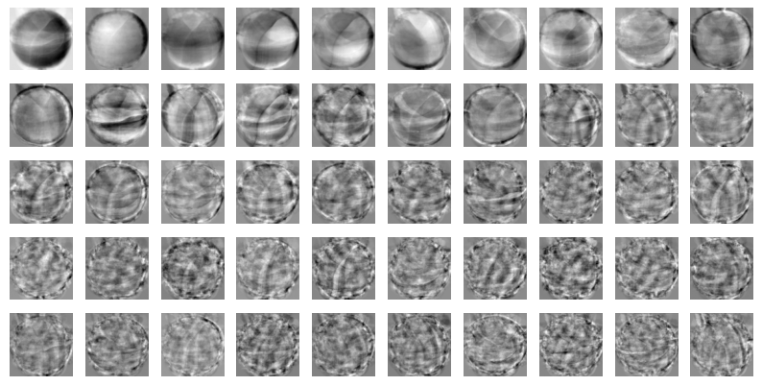
원본 데이터 재구성
fruits_inverse = pca.inverse_transform(fruits_pca)
print(fruits_inverse.shape)
# (300, 10000)


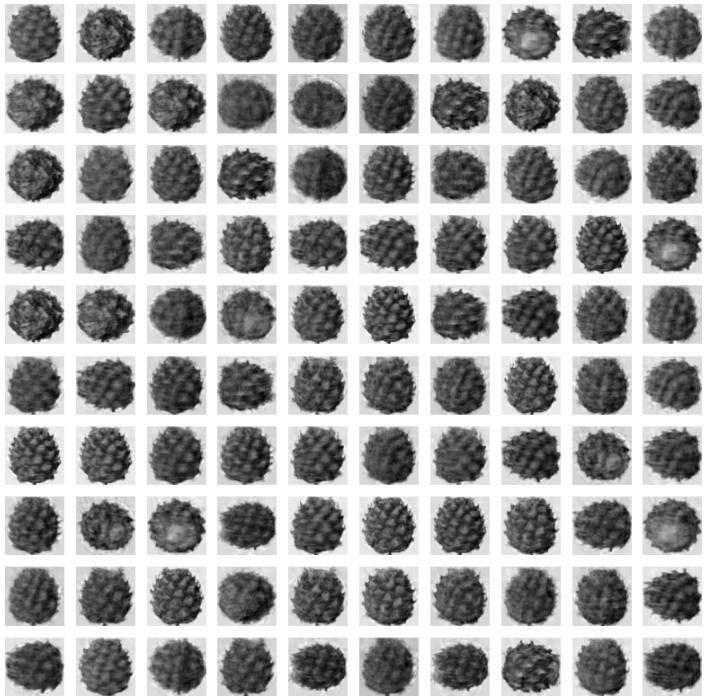
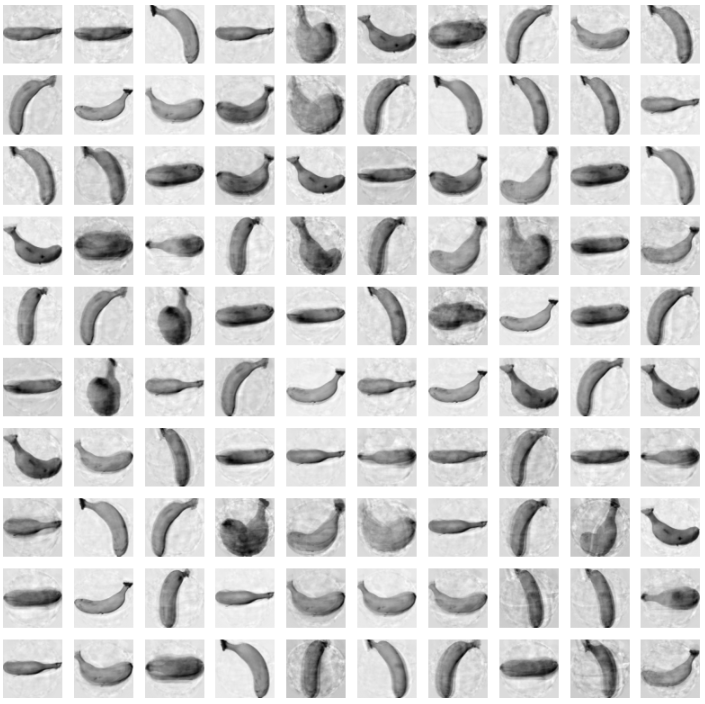
fruits_reconstruct = fruits_inverse.reshape(-1, 100, 100)


for start in [0, 100, 200]:
    draw_fruits(fruits_reconstruct[start:start+100])
    print("\n")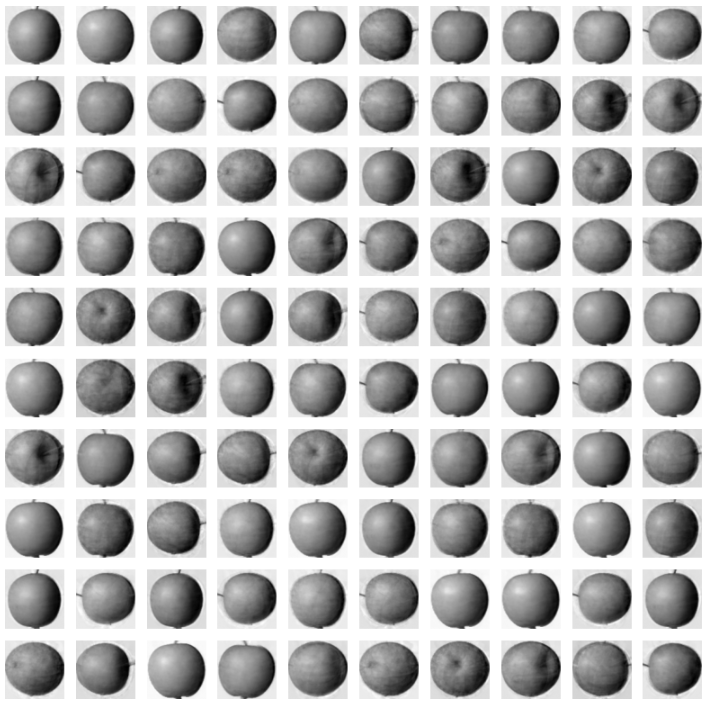
설명된 분산
print(np.sum(pca.explained_variance_ratio_))
# 0.9214723812648029


plt.plot(pca.explained_variance_ratio_)
plt.show()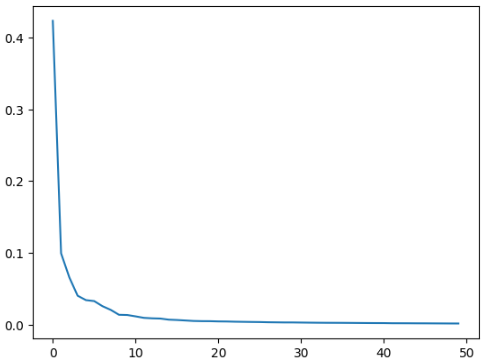
다른 알고리즘과 함께 사용
from sklearn.linear_model import LogisticRegression

lr = LogisticRegression()


target = np.array([0] * 100 + [1] * 100 + [2] * 100)


from sklearn.model_selection import cross_validate

scores = cross_validate(lr, fruits_2d, target)
print(np.mean(scores['test_score']))
print(np.mean(scores['fit_time']))
# 0.9966666666666667
# 1.090923261642456


scores = cross_validate(lr, fruits_pca, target)
print(np.mean(scores['test_score']))
print(np.mean(scores['fit_time']))
# 0.9966666666666667
# 0.031305360794067386


pca = PCA(n_components=0.5)
pca.fit(fruits_2d)


print(pca.n_components_)
# 2


fruits_pca = pca.transform(fruits_2d)
print(fruits_pca.shape)
# (300, 2)


scores = cross_validate(lr, fruits_pca, target)
print(np.mean(scores['test_score']))
print(np.mean(scores['fit_time']))
#-------------------------------------------------------
0.99
0.04858112335205078
/usr/local/lib/python3.12/dist-packages/sklearn/linear_model/_logistic.py:465: ConvergenceWarning: lbfgs failed to converge (status=1):
STOP: TOTAL NO. OF ITERATIONS REACHED LIMIT.

Increase the number of iterations (max_iter) or scale the data as shown in:
    https://scikit-learn.org/stable/modules/preprocessing.html
Please also refer to the documentation for alternative solver options:
    https://scikit-learn.org/stable/modules/linear_model.html#logistic-regression
  n_iter_i = _check_optimize_result(
/usr/local/lib/python3.12/dist-packages/sklearn/linear_model/_logistic.py:465: ConvergenceWarning: lbfgs failed to converge (status=1):
STOP: TOTAL NO. OF ITERATIONS REACHED LIMIT.

Increase the number of iterations (max_iter) or scale the data as shown in:
    https://scikit-learn.org/stable/modules/preprocessing.html
Please also refer to the documentation for alternative solver options:
    https://scikit-learn.org/stable/modules/linear_model.html#logistic-regression
  n_iter_i = _check_optimize_result(
/usr/local/lib/python3.12/dist-packages/sklearn/linear_model/_logistic.py:465: ConvergenceWarning: lbfgs failed to converge (status=1):
STOP: TOTAL NO. OF ITERATIONS REACHED LIMIT.

Increase the number of iterations (max_iter) or scale the data as shown in:
    https://scikit-learn.org/stable/modules/preprocessing.html
Please also refer to the documentation for alternative solver options:
    https://scikit-learn.org/stable/modules/linear_model.html#logistic-regression
  n_iter_i = _check_optimize_result(


  from sklearn.cluster import KMeans

km = KMeans(n_clusters=3, random_state=42)
km.fit(fruits_pca)


print(np.unique(km.labels_, return_counts=True))
# (array([0, 1, 2], dtype=int32), array([110,  99,  91]))


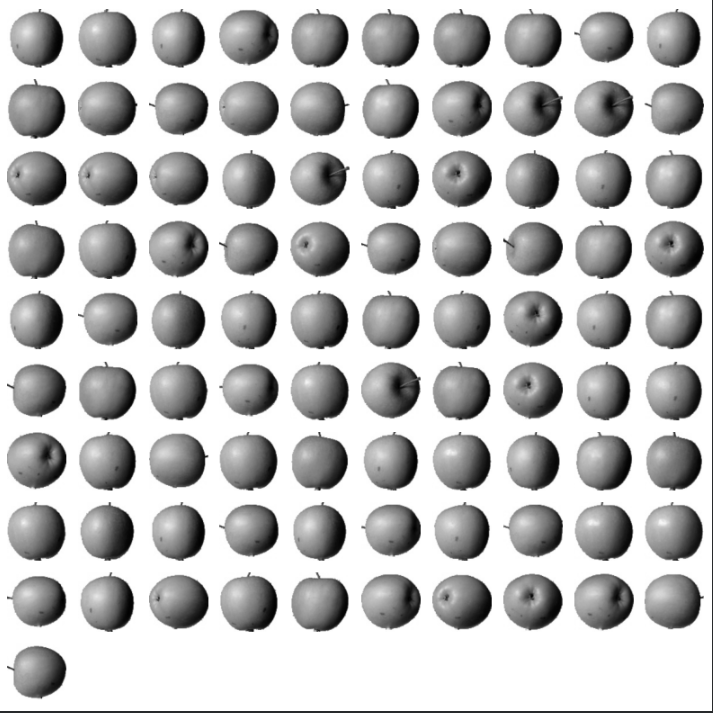
for label in range(0, 3):
    draw_fruits(fruits[km.labels_ == label])
    print("\n")


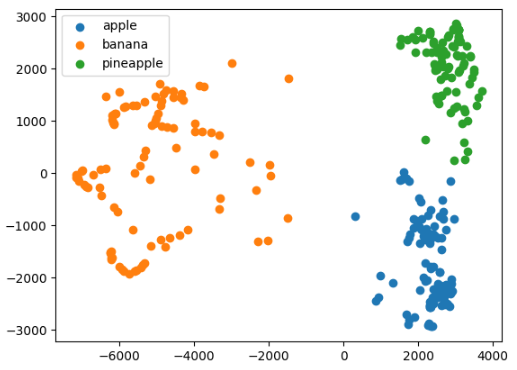
for label in range(0, 3):
    data = fruits_pca[km.labels_ == label]
    plt.scatter(data[:,0], data[:,1])
plt.legend(['apple', 'banana', 'pineapple'])
plt.show()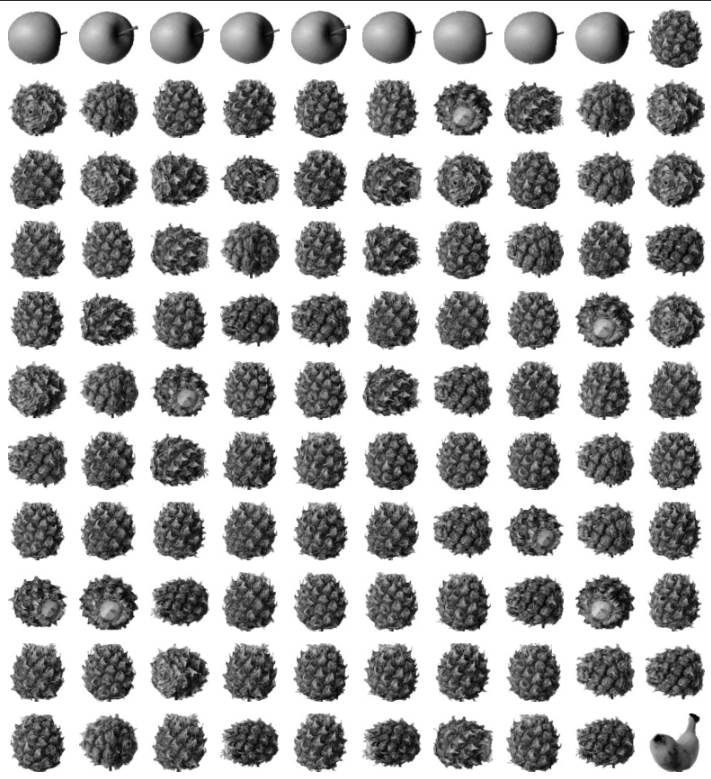

클러스터링 샘플 연습
# 1. 파일 불러와서 배열로 저장하고, 타깃(color) 제거
# 2. 적절한 군집 중심점 개수 파악하기 (feat. 엘보우)
# 3. 모델에서 라벨 종류 및 개수 출력해보기 (np.unique)
# 4. 군집화한 결과를 산점도로 그려서 확인하면서 마무리
import pandas as pd
from sklearn.preprocessing import StandardScaler


df = pd.read_csv('/content/drive/MyDrive/R2/MLDL/clustering_example.csv')


X = df[['x', 'y']]

# StandardScaler 초기화
scaler = StandardScaler()

# 데이터에 맞게 학습하고 변환
X_scaled = scaler.fit_transform(X)

print("Original DataFrame head:\n", df.head())
print("\nFeatures (X) head:\n", X.head())
print("\nScaled Features (X_scaled) head:\n", X_scaled[:5])
#----------------------------------------------------------
Original DataFrame head:
             x           y  color
0  317.614913  197.197881      2
1  187.085153  164.653509      0
2  245.989615  233.783184      2
3  356.170303  206.712568      2
4  424.640194  141.090956      1

Features (X) head:
             x           y
0  317.614913  197.197881
1  187.085153  164.653509
2  245.989615  233.783184
3  356.170303  206.712568
4  424.640194  141.090956

Scaled Features (X_scaled) head:
 [[ 0.27451234 -0.10316928]
 [-1.72605221 -0.58489275]
 [-0.82325289  0.43836827]
 [ 0.86543158  0.03766761]
 [ 1.91483546 -0.93366688]]
from sklearn.cluster import KMeans
# 3개의 클러스터로 KMeans 초기화 (원래 'color' 컬럼에서 3개의 잠재 그룹이 있다고 가정)
# 재현성을 위해 random_state 설정
km = KMeans(n_clusters=3, random_state=42, n_init='auto')
# 스케일된 데이터에 KMeans 모델 학습
km.fit(X_scaled)
# 클러스터 레이블을 원본 DataFrame에 추가
df['cluster_label'] = km.labels_
# DataFrame에서 고유한 클러스터 레이블과 각 개수 출력
print(df['cluster_label'].value_counts())
#----------------------------------------------------
cluster_label
0 4224
2 4069
1 2800
Name: count, dtype: int64import matplotlib.pyplot as plt
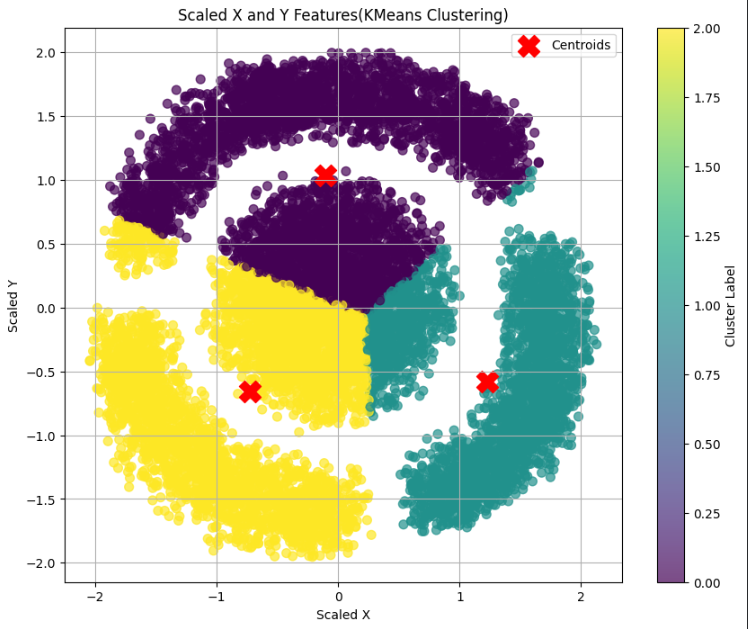
# 클러스터링된 데이터의 산점도 생성
plt.figure(figsize=(10, 8))
scatter = plt.scatter(X_scaled[:, 0], X_scaled[:, 1], c=km.labels_, cmap='viridis', s=50, alpha=0.7)
# 클러스터 중심점(센트로이드) 표시
plt.scatter(km.cluster_centers_[:, 0], km.cluster_centers_[:, 1], s=300, c='red', marker='X', label='Centroids')
plt.title('Scaled X and Y Features(KMeans Clustering)')
plt.xlabel('Scaled X')
plt.ylabel('Scaled Y')
plt.colorbar(scatter, label='Cluster Label')
plt.legend()
plt.grid(True)
plt.show()
inertia_values = []
for k in range(1, 11):
    km = KMeans(n_clusters=k, random_state=42, n_init='auto')
    km.fit(X_scaled)
    inertia_values.append(km.inertia_)
import matplotlib.pyplot as plt
# inertia 값 시각화
plt.figure(figsize=(10, 6))
plt.plot(range(1, 11), inertia_values, marker='o')
plt.title('Optimal K(Elbow Method)')
plt.xlabel('Number of Clusters')
plt.ylabel('Inertia')
plt.xticks(range(1, 11))
plt.grid(True)
plt.show()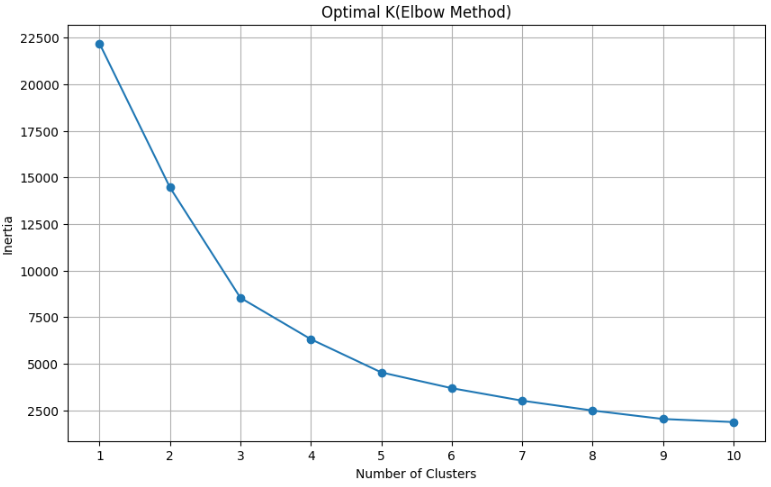
import matplotlib.pyplot as plt

plt.figure(figsize=(10, 8))

# 고유한 클러스터 레이블 가져오기
unique_labels = df['cluster_label'].unique()

# 범례 생성을 위해 각 클러스터를 개별적으로 시각화
for label in unique_labels:
    cluster_data = df[df['cluster_label'] == label]
    plt.scatter(cluster_data['x'], cluster_data['y'], label=f'Cluster {label}', alpha=0.7)

plt.title('K-Means Clustering Results (Original Features)')
plt.xlabel('X')
plt.ylabel('Y')
plt.legend()
plt.grid(True)
plt.show()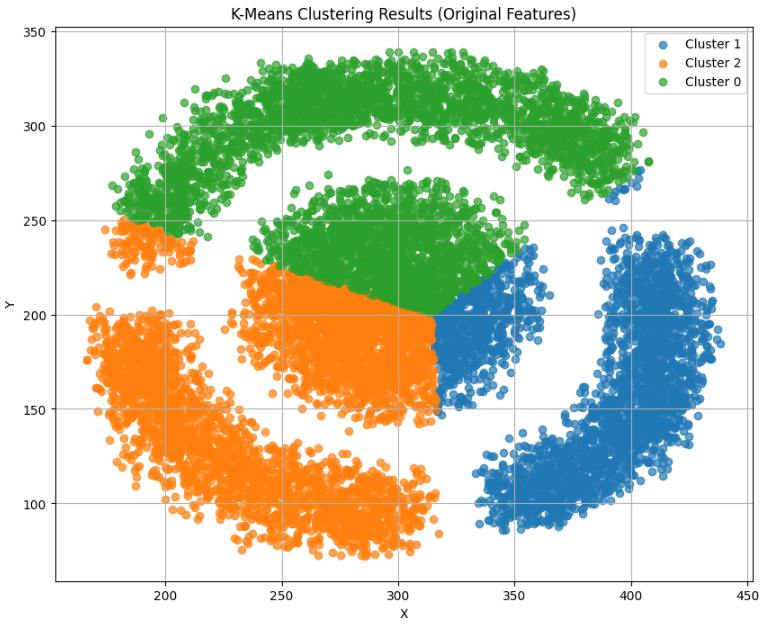
정답 코드
# 1. 파일 불러와서 배열로 저장하고, 타깃(color) 제거
import pandas as pd
import numpy as np

df = pd.read_csv("/content/clustering_example.csv")
df.drop("color", axis=1, inplace=True)
data = df.to_numpy()

# 2. 적절한 군집 중심점 개수 파악하기 (feat. 엘보우)
from sklearn.cluster import KMeans
import matplotlib.pyplot as plt

inertia = []
for k in range(2, 7) :
    km = KMeans(n_clusters=k, random_state=11)
    km.fit(data)
    inertia.append(km.inertia_)

plt.plot(range(2, 7), inertia)
plt.xlabel('k')
plt.ylabel('inertia')
plt.show()

# 3. 모델에서 라벨 종류 및 개수 출력해보기 (np.unique)
km = KMeans(n_clusters=3, random_state=23)
km.fit(data)
print(np.unique(km.labels_, return_counts=True))

# 4. 군집화한 결과를 산점도로 그려서 확인하면서 마무리~^^
plt.scatter(data[:, 0], data[:, 1])
plt.axis("off")
plt.show()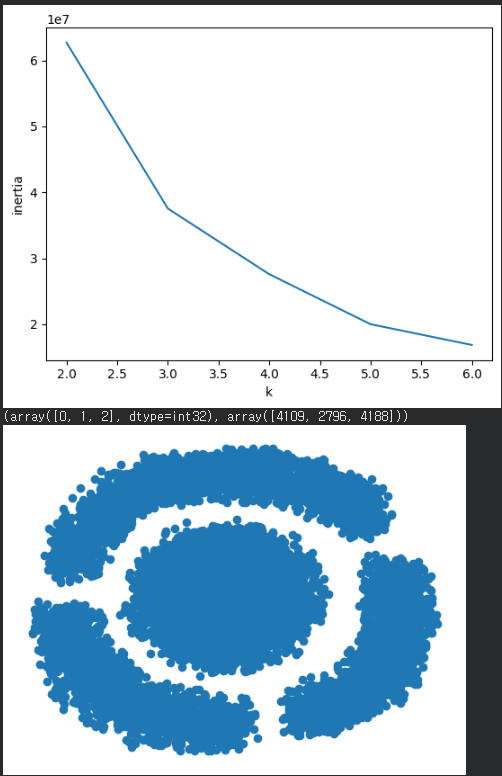
붓꽃 다중분류2(점수)
# 최대한 점수가 높으면서, 과적합이 나오지 않게 분류 -> 스코어 까지 진행
from sklearn.datasets import load_iris
from sklearn.model_selection import train_test_split
iris = load_iris()
X = iris.data
y = iris.target
X_train, X_test, y_train, y_test = train_test_split(X, y, test_size=0.2, random_state=42)
print(f"Shape of X_train: {X_train.shape}")
print(f"Shape of X_test: {X_test.shape}")
print(f"Shape of y_train: {y_train.shape}")
print(f"Shape of y_test: {y_test.shape}")
#---------------------------------------------
Shape of X_train: (120, 4)
Shape of X_test: (30, 4)
Shape of y_train: (120,)
Shape of y_test: (30,)
from sklearn.preprocessing import StandardScaler
# StandardScaler 인스턴스를 생성
scaler = StandardScaler()
# 학습 데이터 X_train에 맞게 스케일러를 학습(fit)
scaler.fit(X_train)
# 학습 데이터 X_train과 테스트 데이터 X_test 모두를 변환(transform)
X_train_scaled = scaler.transform(X_train)
X_test_scaled = scaler.transform(X_test)
print(f"Shape of X_train_scaled: {X_train_scaled.shape}")
print(f"Shape of X_test_scaled: {X_test_scaled.shape}")
# hape of X_train_scaled: (120, 4)
# ape of X_test_scaled: (30, 4)
from sklearn.pipeline import Pipeline
from sklearn.linear_model import LogisticRegression
from sklearn.svm import SVC
from sklearn.ensemble import RandomForestClassifier
from sklearn.model_selection import GridSearchCV
from sklearn.preprocessing import StandardScaler
# 1. Logistic Regression 파이프라인 및 파라미터 그리드
pipe_lr = Pipeline([
('scaler', StandardScaler()),
('lr', LogisticRegression(random_state=42, max_iter=1000))
])
param_grid_lr = {
'lr__C': [0.01, 0.1, 1, 10, 100],
'lr__solver': ['liblinear', 'lbfgs']
}
# 2. SVC 파이프라인 및 파라미터 그리드
pipe_svc = Pipeline([
('scaler', StandardScaler()),
('svc', SVC(random_state=42))
])
param_grid_svc = {
'svc__C': [0.01, 0.1, 1, 10, 100],
'svc__kernel': ['linear', 'rbf']
}
# 3. Random Forest Classifier 파이프라인 및 파라미터 그리드
pipe_rf = Pipeline([
('scaler', StandardScaler()),
('rf', RandomForestClassifier(random_state=42))
])
param_grid_rf = {
'rf__n_estimators': [50, 100, 200],
'rf__max_depth': [None, 10, 20]
}
# 4. 각 모델에 대한 GridSearchCV 설정
grid_lr = GridSearchCV(pipe_lr, param_grid_lr, cv=5, n_jobs=-1)
grid_svc = GridSearchCV(pipe_svc, param_grid_svc, cv=5, n_jobs=-1)
grid_rf = GridSearchCV(pipe_rf, param_grid_rf, cv=5, n_jobs=-1)
# 5. 스케일링되지 않은 학습 데이터에 GridSearchCV 학습 수행
print("Fitting Logistic Regression...")
grid_lr.fit(X_train, y_train)
print("Fitting SVC...")
grid_svc.fit(X_train, y_train)
print("Fitting Random Forest...")
grid_rf.fit(X_train, y_train)
# Logistic Regression의 최고 점수와 최적 파라미터 출력
print("Logistic Regression - Best Score:", grid_lr.best_score_)
print("Logistic Regression - Best Parameters:", grid_lr.best_params_)
# SVC의 최고 점수와 최적 파라미터 출력
print("SVC - Best Score:", grid_svc.best_score_)
print("SVC - Best Parameters:", grid_svc.best_params_)
# Random Forest의 최고 점수와 최적 파라미터 출력
print("Random Forest - Best Score:", grid_rf.best_score_)
print("Random Forest - Best Parameters:", grid_rf.best_params_)
# 각 모델의 최고 점수를 딕셔너리로 저장
best_scores = {
'Logistic Regression': grid_lr.best_score_,
'SVC': grid_svc.best_score_,
'Random Forest': grid_rf.best_score_
}
# 최고 점수를 가진 모델 선택
best_model_name = max(best_scores, key=best_scores.get)
best_cv_score = best_scores[best_model_name]
print(f"\nOverall Best Model (from CV): {best_model_name} with score: {best_cv_score:.4f}")
# 선택된 최고 모델의 최적 estimator 가져오기
if best_model_name == 'Logistic Regression':
best_estimator = grid_lr.best_estimator_
elif best_model_name == 'SVC':
best_estimator = grid_svc.best_estimator_
else:
best_estimator = grid_rf.best_estimator_
# 보지 않은 테스트 데이터에 대해 최고 모델 성능 평가
test_accuracy = best_estimator.score(X_test, y_test)
# 결과 출력
print(f"\nOverall Best Model ({best_model_name})의 테스트 데이터 성능:")
print(f"Test Set Accuracy: {test_accuracy:.4f}")
#-------------------------------------------------------------------------
Logistic Regression - Best Score: 0.9583333333333334
Logistic Regression - Best Parameters: {'lr__C': 1, 'lr__solver': 'lbfgs'}
SVC - Best Score: 0.9583333333333334
SVC - Best Parameters: {'svc__C': 0.1, 'svc__kernel': 'linear'}
Random Forest - Best Score: 0.9416666666666667
Random Forest - Best Parameters: {'rf__max_depth': None, 'rf__n_estimators': 50}
Overall Best Model (from CV): Logistic Regression with score: 0.9583
Performance of the overall best model (Logistic Regression) on the test set:
Test Set Accuracy: 1.0000
from sklearn.datasets import load_iris
from sklearn.model_selection import train_test_split, cross_val_score
from sklearn.pipeline import Pipeline
from sklearn.preprocessing import StandardScaler
from sklearn.linear_model import LogisticRegression
import numpy as np
# 1. 데이터 로드
iris = load_iris()
X = iris.data
y = iris.target
# 2. 모델 (스케일링 + 로지스틱 회귀)
model = Pipeline([
('scaler', StandardScaler()),
('lr', LogisticRegression(max_iter=1000))
])
# 3. 여러 번 train/test 나눠서 테스트
test_scores = []
for i in range(20):
X_train, X_test, y_train, y_test = train_test_split(
X, y, test_size=0.2, random_state=i
)
model.fit(X_train, y_train)
test_scores.append(model.score(X_test, y_test))
# 4. Cross Validation 점수
cv_scores = cross_val_score(model, X, y, cv=5)
# 5. 결과 출력
print("결과")
print(f"Test Accuracy 평균: {np.mean(test_scores):.4f}")
print(f"Test Accuracy 표준편차: {np.std(test_scores):.4f}")
print(f"CV Accuracy 평균: {np.mean(cv_scores):.4f}")
# 6. 판단 기준
if abs(np.mean(test_scores) - np.mean(cv_scores)) < 0.02:
print("\n 과적합 X")
else:
print("\n 과적합 O")
#-----------------------------------------------------------------
결과
Test Accuracy 평균: 0.9533
Test Accuracy 표준편차: 0.0440
CV Accuracy 평균: 0.9600
과적합 Ximport numpy as np
from sklearn.datasets import load_iris
from sklearn.model_selection import GridSearchCV, StratifiedKFold, cross_val_score
from sklearn.pipeline import Pipeline
from sklearn.preprocessing import StandardScaler
from sklearn.linear_model import LogisticRegression
# 1. 데이터 로드
iris = load_iris()
X = iris.data
y = iris.target
# 2. 파이프라인
pipe_lr = Pipeline([
('scaler', StandardScaler()),
('lr', LogisticRegression(max_iter=2000))
])
# 3. 하이퍼파라미터
param_grid = {
'lr__C': np.logspace(-3, 3, 10),
'lr__solver': ['lbfgs']
}
# 4. CV 설정
cv = StratifiedKFold(n_splits=10, shuffle=True, random_state=42)
# 5. GridSearch
grid_lr = GridSearchCV(pipe_lr, param_grid, cv=cv, n_jobs=-1)
grid_lr.fit(X, y)
# 6. 최종 평가
scores = cross_val_score(grid_lr.best_estimator_, X, y, cv=cv)
print("Logistic Regression")
print(f"Best CV Score (GridSearch): {grid_lr.best_score_:.4f}")
print(f"Final CV Score: {np.mean(scores):.4f}")
print(f"Best Params: {grid_lr.best_params_}")
#---------------------------------------------------------------
Logistic Regression
Best CV Score (GridSearch): 0.9800
Final CV Score: 0.9800
Best Params: {'lr__C': np.float64(1000.0), 'lr__solver': 'lbfgs'}
정답 코드
# 1. 데이터셋 불러와서 훈련세트와 테스트세트로 나누기
from sklearn.datasets import load_iris
from sklearn.model_selection import train_test_split
iris = load_iris()
train_input, test_input, train_target, test_target = train_test_split(iris.data, iris.target,
                                                    test_size=0.2, random_state=119)

# 2. 결정트리 모델 생성하기
from sklearn.tree import DecisionTreeClassifier
dt = DecisionTreeClassifier(random_state=112)

# 3. 하이퍼파라미터 튜닝을 위한 하이퍼파라미터 목록 만들기
grid_params = {'max_depth':[4, 5, 6], 'min_samples_split':[2, 3, 4, 5, 6, 7, 8]}

# 4. 그리드서치CV 를 이용한 교차 검증 모델 생성 후 학습
from sklearn.model_selection import GridSearchCV, StratifiedKFold
grid_dt = GridSearchCV(dt, grid_params, cv=StratifiedKFold(n_splits=3, shuffle=True, random_state=911), n_jobs=-1)
grid_dt.fit(train_input, train_target)

# 5. 최적의 파라미터 조합 출력
print('GridSearchCV 최적 파라미터:', grid_dt.best_params_)

# 6. 최적의 모델을 따로 뽑아내어 테스트세트에 대한 스코어 출력해보기
best_model = grid_dt.best_estimator_
print("최적 모델의 훈련세트 스코어 :", best_model.score(train_input, train_target))
print("최적 모델의 테스트세트 스코어 :", best_model.score(test_input, test_target))

# 보너스! 예측까지 해봄!
pred = best_model.predict(test_input[:5])
print("예측 결과", pred)
print("실제 타겟", test_target[:5])

GridSearchCV 최적 파라미터: {'max_depth': 4, 'min_samples_split': 2}
최적 모델의 훈련세트 스코어 : 0.9916666666666667
최적 모델의 테스트세트 스코어 : 0.9
예측 결과 [2 2 0 0 0]
실제 타겟 [2 2 0 0 0]
딥러닝
인공 신경망
생물학적 뉴런에서 영감 받아 만든 머신러닝 알고리즘
케라스
딥러닝 라이브러리
높은 사용성의 고수준 API 제공
실제 연산은 텐서플로와 같은 백엔드가 담당
케라스 3.0부터 텐서플로, 파이토치, 잭스를 백엔드로 사용 가능
(코랩 기준 텐서플로를 백엔드로)
밀집층
가장 간단한 인공 신경망의 층
뉴런들이 모두 연결되어 있기 때문에 완전 연결층이라고도 부름
출력층에 밀집층을 사용할 땐 분류하려는 클래스와 동일한 개수의 뉴런 사용
원-핫 인코딩
정숫값을 배열에서 해당 정수의 위치만 1이고, 나머지는 모두 0으로 변환
ㄴ다중 분류에서 출력층에서 만든 확률과 크로스 엔트로피 손실을 계산하기 위함
import keras
import tensorflow as tf

keras.utils.set_random_seed(42)
tf.config.experimental.enable_op_determinism()
패션 MNIST
import keras

(train_input, train_target), (test_input, test_target) = \
    keras.datasets.fashion_mnist.load_data()
Downloading data from https://storage.googleapis.com/tensorflow/tf-keras-datasets/train-labels-idx1-ubyte.gz
29515/29515 ━━━━━━━━━━━━━━━━━━━━ 0s 0us/step
Downloading data from https://storage.googleapis.com/tensorflow/tf-keras-datasets/train-images-idx3-ubyte.gz
26421880/26421880 ━━━━━━━━━━━━━━━━━━━━ 0s 0us/step
Downloading data from https://storage.googleapis.com/tensorflow/tf-keras-datasets/t10k-labels-idx1-ubyte.gz
5148/5148 ━━━━━━━━━━━━━━━━━━━━ 0s 0us/step
Downloading data from https://storage.googleapis.com/tensorflow/tf-keras-datasets/t10k-images-idx3-ubyte.gz
4422102/4422102 ━━━━━━━━━━━━━━━━━━━━ 0s 0us/step


print(train_input.shape, train_target.shape)
# (60000, 28, 28) (60000,)


print(test_input.shape, test_target.shape)
# 0000, 28, 28) (10000,)


import matplotlib.pyplot as plt

fig, axs = plt.subplots(1, 10, figsize=(10,10))
for i in range(10):
    axs[i].imshow(train_input[i], cmap='gray_r')
    axs[i].axis('off')
plt.show()


print(train_target[:10])
# [9 0 0 3 0 2 7 2 5 5]


import numpy as np

print(np.unique(train_target, return_counts=True))
# (array([0, 1, 2, 3, 4, 5, 6, 7, 8, 9], dtype=uint8), array([6000, 6000, 6000, 6000, 6000, 6000, 6000, 6000, 6000, 6000]))
로지스틱 회귀로 패션 아이템 분류하기
train_scaled = train_input / 255.0
train_scaled = train_scaled.reshape(-1, 28*28)


print(train_scaled.shape)
# (60000, 784)


from sklearn.model_selection import cross_validate
from sklearn.linear_model import SGDClassifier

sc = SGDClassifier(loss='log_loss', max_iter=5, random_state=42)
scores = cross_validate(sc, train_scaled, train_target, n_jobs=-1)
print(np.mean(scores['test_score']))
# 0.8194166666666666
인공신경망
텐서플로와 케라스
import tensorflow as tf

import keras

keras.config.backend()
# 'tensorflow'

import os
os.environ["KERAS_BACKEND"] = "torch"   # 또는 "jax"
인공신경망으로 모델 만들기
from sklearn.model_selection import train_test_split

train_scaled, val_scaled, train_target, val_target = train_test_split(
    train_scaled, train_target, test_size=0.2, random_state=42)

print(train_scaled.shape, train_target.shape)
# (48000, 784) (48000,)


print(val_scaled.shape, val_target.shape)
# (12000, 784) (12000,)


inputs = keras.layers.Input(shape=(784,))

dense = keras.layers.Dense(10, activation='softmax')

model = keras.Sequential([inputs, dense])
인공신경망으로 패션 아이템 분류하기
model.compile(loss='sparse_categorical_crossentropy', metrics=['accuracy'])

print(train_target[:10])
# [7 3 5 8 6 9 3 3 9 9]


model.fit(train_scaled, train_target, epochs=5)
#----------------------------------------------------------
Epoch 1/5
1500/1500 ━━━━━━━━━━━━━━━━━━━━ 9s 6ms/step - accuracy: 0.7947 - loss: 0.6069
Epoch 2/5
1500/1500 ━━━━━━━━━━━━━━━━━━━━ 4s 2ms/step - accuracy: 0.8388 - loss: 0.4742
Epoch 3/5
1500/1500 ━━━━━━━━━━━━━━━━━━━━ 3s 2ms/step - accuracy: 0.8470 - loss: 0.4501
Epoch 4/5
1500/1500 ━━━━━━━━━━━━━━━━━━━━ 3s 2ms/step - accuracy: 0.8512 - loss: 0.4374
Epoch 5/5
1500/1500 ━━━━━━━━━━━━━━━━━━━━ 4s 3ms/step - accuracy: 0.8544 - loss: 0.4291
<keras.src.callbacks.history.History at 0x7988f118df10>


model.evaluate(val_scaled, val_target)
#----------------------------------------------------------
375/375 ━━━━━━━━━━━━━━━━━━━━ 1s 2ms/step - accuracy: 0.8458 - loss: 0.4444
[0.4444445073604584, 0.8458333611488342]
Keras
| Input | 입력층 구성하기 위한 함수, shape 매개변수에 입력 크기를 튜플로 지정 |
| Dense | 신경망에서 가장 기본층인 밀집층을 만드는 클래스 이 층에 첫 번째 매개변수에는 뉴런의 개수 지정 activation 매개변수에는 사용할 활성화 함수 지정 ㄴ대표적으로 sigmoid, softmax 함수 있음 / 아무것도 지정X 활성화 함수 사용 X |
| Sequential | 케라스에서 신경망 모델 만드는 클래스 이 클래스의 객체 생성할 때 신경망 모델에 추가할 층을 파이썬 리스트로 전달 |
| compile() | 모델 객체를 만든 후 훈련하기 전에 사용할 손실 함수와 측정 지표 드을 지정하는 메서드 loss 매개변수에 손실 함수 지정 이진 분류일 경우 binaty_crossentropy, 다중 분류일 경우 categorical_crossentropy 지정 클래스 레이블이 정수일 경우 sparse_categorical_crossentropy로 지정 회귀 모델일 경우 meean_square_error등으로 지정 metrics 매개변수에 훈련과정에서 측정하고 싶은 지표를 리스트로 전달함 |
| fit() | 모델을 훈련하는 메서드 1, 2번째 매개변수에 입력과 타깃 데이터 전달 epochs 매개변수에 전체 데이터에 대해 반복할 에포크 횟수 지정함 |
| evaluate() | 모델 성능을 평가하는 메서드 1, 2번째 매개변수에 입력과 타깃 데이터를 전달한다 compile()메서드에서 loss 매개변수에 지정한 손실 함수의 값과 metrics 매개변수에서 지정한 측정 지표를 출력함 |
심층 신경망
2개 이상의 층을 포함한 신경망
ㄴ입력층과 출력층 사이에 있는 모든 층은 은닉층이라 함
다층 인공 신경망, 심층 신경망, 딥러닝을 같은 의미로 사용
시그모이드 함수를 통해 0~1사이의 값으로 반환
렐루 함수: 이미지 분류 모델의 은닉층에 많이 사용하는 활성화 함수
시그모이드 함수는 층이 많을수록 활성화 함수의 양쪽 끝에서 변화가 작기 때문에 학습이 어려워짐
ㄴ렐루는 이런 문제 없이 계산도 간단
옵티마이저
신경망의 가중치와 절편을 학습하기 위한 알고리즘 또는 방법을 말함
케라스는 경사하강법 알고리즘이 다양하게 구현됨
ㄴSGD, 네스테로프 모맨텀,RMSprop, Adam 등
2개의 층
import keras
import tensorflow as tf

keras.utils.set_random_seed(42)
tf.config.experimental.enable_op_determinism()

import keras

(train_input, train_target), (test_input, test_target) = \
    keras.datasets.fashion_mnist.load_data()

from sklearn.model_selection import train_test_split

train_scaled = train_input / 255.0
train_scaled = train_scaled.reshape(-1, 28*28)

train_scaled, val_scaled, train_target, val_target = train_test_split(
    train_scaled, train_target, test_size=0.2, random_state=42)


inputs = keras.layers.Input(shape=(784,))
dense1 = keras.layers.Dense(100, activation='sigmoid')
dense2 = keras.layers.Dense(10, activation='softmax')
심층 신경망 만들기
model = keras.Sequential([inputs, dense1, dense2])


model.summary()
Model: "sequential_1"
┏━━━━━━━━━━━━━━━━━━━━━━━━━━━━━━━━━┳━━━━━━━━━━━━━━━━━━━━━━━━┳━━━━━━━━━━━━━━━┓
┃ Layer (type)                    ┃ Output Shape           ┃       Param # ┃
┡━━━━━━━━━━━━━━━━━━━━━━━━━━━━━━━━━╇━━━━━━━━━━━━━━━━━━━━━━━━╇━━━━━━━━━━━━━━━┩
│ dense_1 (Dense)                 │ (None, 100)            │        78,500 │
├─────────────────────────────────┼────────────────────────┼───────────────┤
│ dense_2 (Dense)                 │ (None, 10)             │         1,010 │
└─────────────────────────────────┴────────────────────────┴───────────────┘
 Total params: 79,510 (310.59 KB)
 Trainable params: 79,510 (310.59 KB)
 Non-trainable params: 0 (0.00 B)
층 추가하는 다른 방법
model = keras.Sequential([
    keras.layers.Input(shape=(784,)),
    keras.layers.Dense(100, activation='sigmoid', name='은닉층'),
    keras.layers.Dense(10, activation='softmax', name='출력층')
], name='패션 MNIST 모델')


model.summary()
Model: "패션 MNIST 모델"
┏━━━━━━━━━━━━━━━━━━━━━━━━━━━━━━━━━┳━━━━━━━━━━━━━━━━━━━━━━━━┳━━━━━━━━━━━━━━━┓
┃ Layer (type)                    ┃ Output Shape           ┃       Param # ┃
┡━━━━━━━━━━━━━━━━━━━━━━━━━━━━━━━━━╇━━━━━━━━━━━━━━━━━━━━━━━━╇━━━━━━━━━━━━━━━┩
│ 은닉층 (Dense)                  │ (None, 100)            │        78,500 │
├─────────────────────────────────┼────────────────────────┼───────────────┤
│ 출력층 (Dense)                  │ (None, 10)             │         1,010 │
└─────────────────────────────────┴────────────────────────┴───────────────┘
 Total params: 79,510 (310.59 KB)
 Trainable params: 79,510 (310.59 KB)
 Non-trainable params: 0 (0.00 B)

 model = keras.Sequential()
model.add(keras.layers.Input(shape=(784,)))
model.add(keras.layers.Dense(100, activation='sigmoid'))
model.add(keras.layers.Dense(10, activation='softmax'))

model.summary()
Model: "sequential_2"
┏━━━━━━━━━━━━━━━━━━━━━━━━━━━━━━━━━┳━━━━━━━━━━━━━━━━━━━━━━━━┳━━━━━━━━━━━━━━━┓
┃ Layer (type)                    ┃ Output Shape           ┃       Param # ┃
┡━━━━━━━━━━━━━━━━━━━━━━━━━━━━━━━━━╇━━━━━━━━━━━━━━━━━━━━━━━━╇━━━━━━━━━━━━━━━┩
│ dense_3 (Dense)                 │ (None, 100)            │        78,500 │
├─────────────────────────────────┼────────────────────────┼───────────────┤
│ dense_4 (Dense)                 │ (None, 10)             │         1,010 │
└─────────────────────────────────┴────────────────────────┴───────────────┘
 Total params: 79,510 (310.59 KB)
 Trainable params: 79,510 (310.59 KB)
 Non-trainable params: 0 (0.00 B)


 model.compile(loss='sparse_categorical_crossentropy', metrics=['accuracy'])
model.fit(train_scaled, train_target, epochs=5)
Epoch 1/5
1500/1500 ━━━━━━━━━━━━━━━━━━━━ 7s 4ms/step - accuracy: 0.8064 - loss: 0.5710
Epoch 2/5
1500/1500 ━━━━━━━━━━━━━━━━━━━━ 7s 4ms/step - accuracy: 0.8502 - loss: 0.4133
Epoch 3/5
1500/1500 ━━━━━━━━━━━━━━━━━━━━ 6s 4ms/step - accuracy: 0.8620 - loss: 0.3769
Epoch 4/5
1500/1500 ━━━━━━━━━━━━━━━━━━━━ 5s 3ms/step - accuracy: 0.8713 - loss: 0.3531
Epoch 5/5
1500/1500 ━━━━━━━━━━━━━━━━━━━━ 7s 5ms/step - accuracy: 0.8781 - loss: 0.3352
<keras.src.callbacks.history.History at 0x7988e857ab10>
렐루 활성화 함수
입력이 양수일 때 활성화 함수가 없는 것처럼 입력을 통과시키고 음수일 경우 0으로 만듦
model = keras.Sequential()
model.add(keras.layers.Input(shape=(28,28)))
model.add(keras.layers.Flatten())
model.add(keras.layers.Dense(100, activation='relu'))
model.add(keras.layers.Dense(10, activation='softmax'))


Model: "sequential_3"
┏━━━━━━━━━━━━━━━━━━━━━━━━━━━━━━━━━┳━━━━━━━━━━━━━━━━━━━━━━━━┳━━━━━━━━━━━━━━━┓
┃ Layer (type)                    ┃ Output Shape           ┃       Param # ┃
┡━━━━━━━━━━━━━━━━━━━━━━━━━━━━━━━━━╇━━━━━━━━━━━━━━━━━━━━━━━━╇━━━━━━━━━━━━━━━┩
│ flatten (Flatten)               │ (None, 784)            │             0 │
├─────────────────────────────────┼────────────────────────┼───────────────┤
│ dense_5 (Dense)                 │ (None, 100)            │        78,500 │
├─────────────────────────────────┼────────────────────────┼───────────────┤
│ dense_6 (Dense)                 │ (None, 10)             │         1,010 │
└─────────────────────────────────┴────────────────────────┴───────────────┘
 Total params: 79,510 (310.59 KB)
 Trainable params: 79,510 (310.59 KB)
 Non-trainable params: 0 (0.00 B)


 (train_input, train_target), (test_input, test_target) = \
    keras.datasets.fashion_mnist.load_data()
train_scaled = train_input / 255.0
train_scaled, val_scaled, train_target, val_target = train_test_split(
    train_scaled, train_target, test_size=0.2, random_state=42)


model.compile(loss='sparse_categorical_crossentropy', metrics=['accuracy'])
model.fit(train_scaled, train_target, epochs=5)
Epoch 1/5
1500/1500 ━━━━━━━━━━━━━━━━━━━━ 6s 3ms/step - accuracy: 0.8113 - loss: 0.5291
Epoch 2/5
1500/1500 ━━━━━━━━━━━━━━━━━━━━ 6s 4ms/step - accuracy: 0.8580 - loss: 0.3914
Epoch 3/5
1500/1500 ━━━━━━━━━━━━━━━━━━━━ 6s 4ms/step - accuracy: 0.8731 - loss: 0.3525
Epoch 4/5
1500/1500 ━━━━━━━━━━━━━━━━━━━━ 4s 3ms/step - accuracy: 0.8829 - loss: 0.3286
Epoch 5/5
1500/1500 ━━━━━━━━━━━━━━━━━━━━ 5s 3ms/step - accuracy: 0.8892 - loss: 0.3133
<keras.src.callbacks.history.History at 0x7988f114b5f0>


model.evaluate(val_scaled, val_target)
375/375 ━━━━━━━━━━━━━━━━━━━━ 1s 2ms/step - accuracy: 0.8674 - loss: 0.3788
[0.37876638770103455, 0.8674166798591614]
옵티마이저
model.compile(optimizer='sgd', loss='sparse_categorical_crossentropy',
              metrics=['accuracy'])


sgd = keras.optimizers.SGD()
model.compile(optimizer=sgd, loss='sparse_categorical_crossentropy',
              metrics=['accuracy'])


sgd = keras.optimizers.SGD(learning_rate=0.1)


sgd = keras.optimizers.SGD(momentum=0.9, nesterov=True)


adagrad = keras.optimizers.Adagrad()
model.compile(optimizer=adagrad, loss='sparse_categorical_crossentropy',
              metrics=['accuracy'])


rmsprop = keras.optimizers.RMSprop()
model.compile(optimizer=rmsprop, loss='sparse_categorical_crossentropy',
              metrics=['accuracy'])


model = keras.Sequential()
model.add(keras.layers.Input(shape=(28,28)))
model.add(keras.layers.Flatten())
model.add(keras.layers.Dense(100, activation='relu'))
model.add(keras.layers.Dense(10, activation='softmax'))


model.compile(optimizer='adam', loss='sparse_categorical_crossentropy',
              metrics=['accuracy'])
model.fit(train_scaled, train_target, epochs=5)
Epoch 1/5
1500/1500 ━━━━━━━━━━━━━━━━━━━━ 8s 5ms/step - accuracy: 0.8154 - loss: 0.5262
Epoch 2/5
1500/1500 ━━━━━━━━━━━━━━━━━━━━ 5s 3ms/step - accuracy: 0.8576 - loss: 0.3955
Epoch 3/5
1500/1500 ━━━━━━━━━━━━━━━━━━━━ 6s 4ms/step - accuracy: 0.8723 - loss: 0.3513
Epoch 4/5
1500/1500 ━━━━━━━━━━━━━━━━━━━━ 6s 4ms/step - accuracy: 0.8829 - loss: 0.3230
Epoch 5/5
1500/1500 ━━━━━━━━━━━━━━━━━━━━ 5s 3ms/step - accuracy: 0.8905 - loss: 0.3017
<keras.src.callbacks.history.History at 0x7988e85bb5f0>


model.evaluate(val_scaled, val_target)
375/375 ━━━━━━━━━━━━━━━━━━━━ 1s 3ms/step - accuracy: 0.8751 - loss: 0.3442
[0.34416499733924866, 0.875083327293396]
옵티마이저만 adam으로 설정하여 학습
실습은 계속해서 adam으로
딥러닝 모델 만들기 절차
1. 데이터 준비
2. 준비된 데이터에 맞는 입력층 생성
3. 풀어야 할 문제에 맞는 출력층 생성
4. 필요하다면, 은닉층으로 사용할 밀집층 생성
5. 시퀀셜 클래스를 이용해 층들을 이어붙여 망 형성
6. 컴파일을 통해 학습할 내용에 대한 설정
ㄴ옵티마이저: 가중치를 개선하기 위해 사용되는 알고리즘
ㄴ평가방식: 분류나 회귀 등에 따른 평가 방식 결정
ㄴ손실방식: 분류나 회귀 등에 따른 손실 계산 방식 결정
7. 학습
8. 평가와 예측
'로보테크AI' 카테고리의 다른 글
| 융합_로보테크 AI 자율주행 로봇 개발자 과정-26/03/20 (0) | 2026.03.20 |
|---|---|
| 융합_로보테크 AI 자율주행 로봇 개발자 과정-26/03/19 (0) | 2026.03.19 |
| 융합_로보테크 AI 자율주행 로봇 개발자 과정-26/03/18[ML, DL] (0) | 2026.03.18 |
| 융합_로보테크 AI 자율주행 로봇 개발자 과정-26/03/17 (0) | 2026.03.17 |
| 융합_로보테크 AI 자율주행 로봇 개발자 과정-26/03/16[트위니 특강] (0) | 2026.03.16 |